
Key Takeaways
- DevOps Beyond Automation: DevOps connects teams, workflows, security, and operations across the complete software delivery lifecycle.
- Speed With Stability: Faster releases create value only when security, reliability, and recovery remain under control.
- Security From the Start: DevSecOps integrates security early to reduce vulnerabilities, delays, and costly rework.
- Smarter Automation: CI/CD, IaC, GitOps, and automated testing improve delivery when supported by clear, maintainable processes.
- Continuous Improvement: Monitoring, feedback, metrics, and progressive delivery help teams improve performance and reduce release risks.
Releasing software faster sounds like an advantage, but speed can quickly become a liability when deployments fail, vulnerabilities slip through, or teams spend more time fixing releases than building new features.
The real challenge is not how often software can be deployed. It is how consistently teams can deliver secure, stable, and valuable updates without slowing development down.
That is where modern DevOps makes a difference. However, the practices that worked a few years ago are no longer enough for today’s complex cloud environments, distributed systems, and growing security risks.
Quick Stat:
The GitLab research found that DevSecOps professionals lose an average of seven hours per week to inefficient processes, including communication gaps, limited knowledge sharing, and inconsistent tools across teams.
So, which DevOps best practices actually help teams move faster while maintaining control?
This guide explores the 15 approaches modern engineering teams use to improve delivery speed, reduce risk, and build a more reliable software release process.
What Is DevOps?
DevOps is a collaborative approach that brings software development and IT operations teams together throughout the software development lifecycle. Instead of treating development, testing, deployment, and maintenance as separate stages, DevOps connects them through shared processes, automation, and continuous feedback. In fact, it combines practices such as CI/CD, automated testing, infrastructure automation, security integration, monitoring, as well as, observability. DevOps is not a single tool or job role, but a way of working that helps teams reduce manual effort, identify issues earlier, release smaller updates, and recover from problems faster.
In practice, DevOps creates a continuous lifecycle that connects planning, coding, building, testing, security, release, deployment, monitoring, and ongoing improvement.
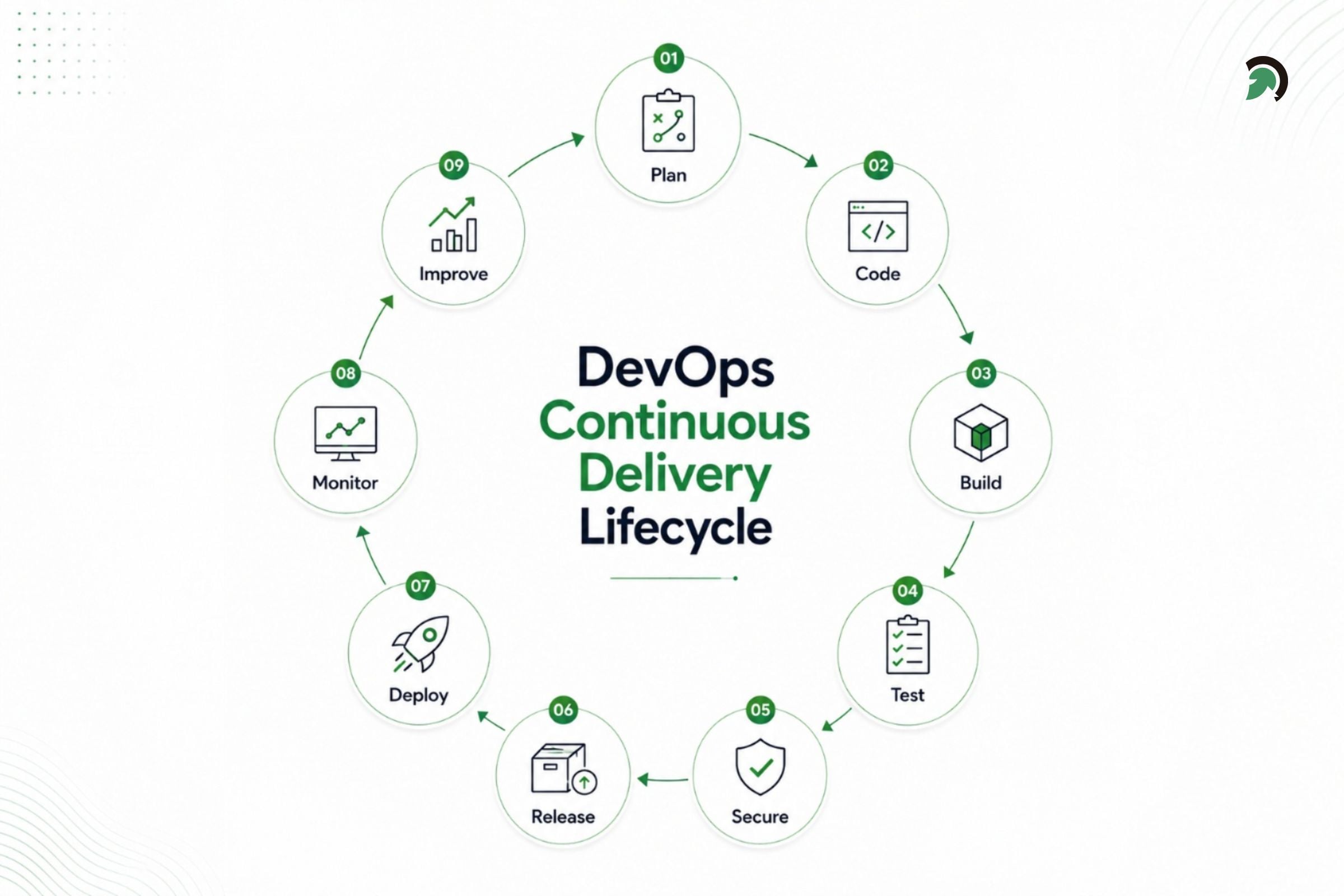
DevOps continuous delivery lifecycle covering planning, coding, building, testing, security, release, deployment, monitoring, and improvement.
Expert Perspective:
DevOps is the outcome of applying the most trusted principles from the domain of physical manufacturing and leadership to the IT value stream.
– Gene Kim, Jez Humble, Patrick Debois, and John Willis, Authors of The DevOps Handbook
Quick Stat:
According to Google Cloud’s DORA research, more than a decade of studies has helped identify the practices and metrics associated with high-performing technology teams and effective software delivery.
Why Secure and Faster Software Delivery Matters
Businesses are under constant pressure to release updates faster, but speed without proper security, testing, and operational control can lead to vulnerabilities, failed deployments, downtime, as well as costly rework. This risk is becoming more important as teams are increasingly using AI-assisted development tools.
Quick Stat:
The 2024 DORA report found that 39% of respondents had little or no trust in AI-generated code, despite widespread adoption and reported productivity gains.
Secure and efficient software delivery helps organizations validate changes thoroughly, identify issues earlier, reduce manual effort, and improve release consistency. It also provides better visibility across development and production, allowing teams to respond quickly when problems occur.
By following the proven DevOps best practices, organizations can accelerate software delivery while maintaining the security, stability, as well as reliability required for the long-term growth.
Also Read: 7 Phases of the Software Development Life Cycle You Must KnowExpert Perspective:
DevOps should be viewed as an end-to-end operating model, not simply a way to automate deployments. Its real value comes from connecting planning, development, testing, security, release, and operations into one continuous system with shared ownership and fast feedback.
– Dharmesh Patt, Department Head – DevOps, EvinceDev
Latest DevOps Best Practices for Secure and Faster Software Delivery
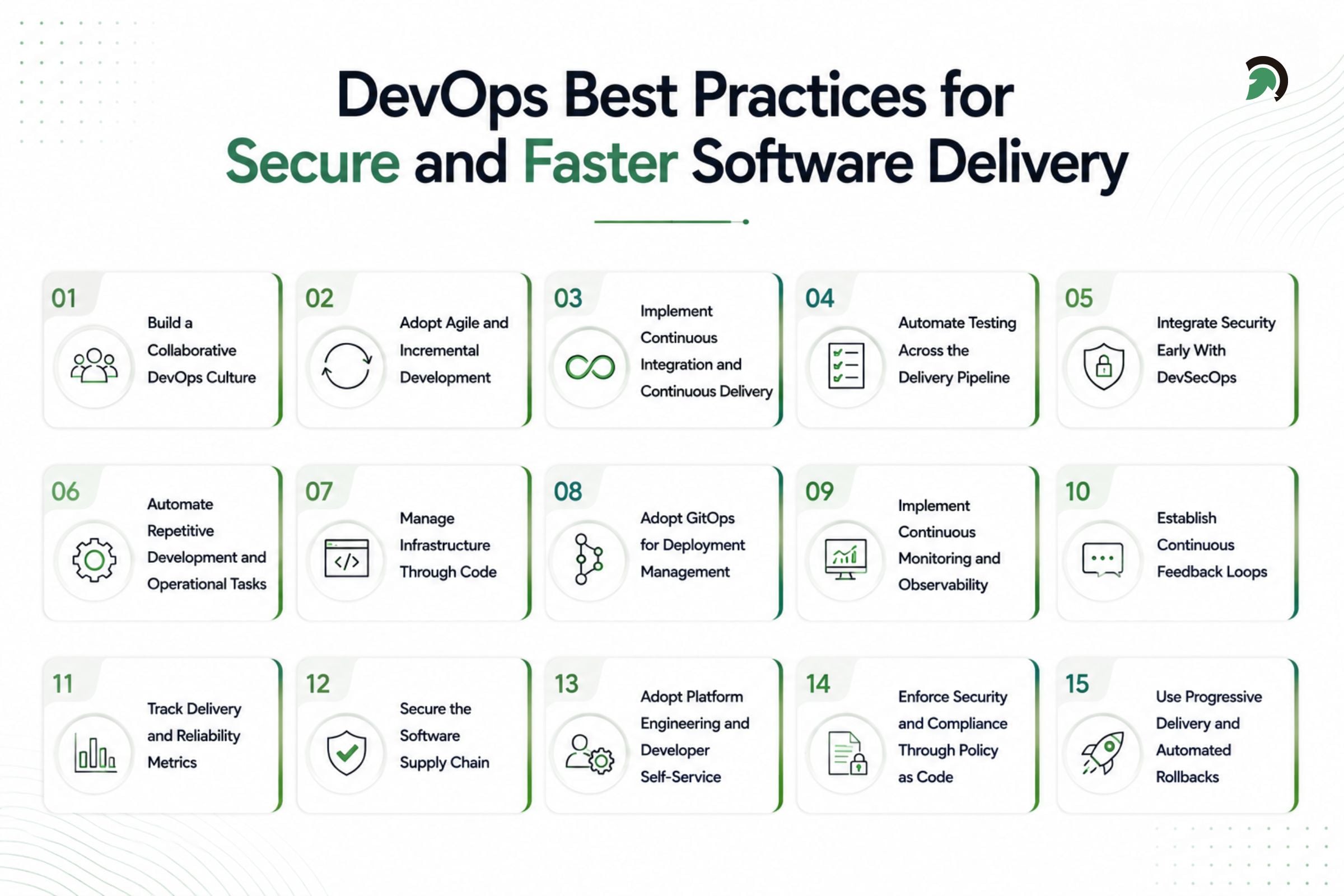
Fifteen DevOps best practices for improving software delivery speed, security, reliability, automation, and collaboration.
The following latest DevOps best practices help organizations improve collaboration, automate software delivery, strengthen security, and maintain reliable production environments.
1. Build a Collaborative DevOps Culture
A successful DevOps approach begins with collaboration between development, operations, security, as well as, quality assurance teams. These teams should work towards shared delivery, security, and reliability goals rather than operating in the isolated departments.
Why It Matters
Poor communication and unclear ownership can delay releases, create operational gaps, and slow down incident resolution. A collaborative culture enables teams to identify issues earlier and take shared responsibility for software performance.
How to Implement It
- Establish shared delivery and reliability objectives.
- Involve operations and security teams during planning.
- Define clear ownership for applications and services.
- Conduct collaborative and blameless incident reviews.
- Maintain accessible technical documentation.
2. Adopt Agile and Incremental Development
Agile and incremental development breaks large projects into smaller changes that can be designed, tested, reviewed, and released more frequently.
Why It Matters
Smaller changes are easier to understand, validate, troubleshoot, and reverse. They also allow teams to gather feedback earlier and reduce the risks associated with large releases.
How to Implement It
- Divide large features into smaller deliverable units.
- Use short development and feedback cycles.
- Keep feature branches short-lived.
- Release improvements in manageable increments.
- Use feature flags to control feature availability.
3. Implement Continuous Integration and Continuous Delivery
CI/CD automates the process of integrating code, running tests, creating deployment artifacts, and releasing approved changes across software environments.
Why It Matters
Manual delivery processes are slow and inconsistent. CI/CD helps teams detect integration issues earlier, reduce deployment errors, and release software more frequently.
How to Implement It
- Trigger automated builds for every relevant code change.
- Add testing and security checks to the pipeline.
- Create versioned and traceable deployment artifacts.
- Standardize deployment workflows across environments.
- Include post-deployment health checks.
- Define approval and rollback processes based on risk.
4. Automate Testing Across the Delivery Pipeline
Automated testing continuously validates application functionality, integrations, performance, security, and user workflows as software changes move through the pipeline.
Why It Matters
Testing problems late in development create expensive rework and release delays. Early automated testing prevents defective or insecure code from reaching production.
How to Implement It
- Run unit tests on every relevant code change.
- Add integration, contract, and regression tests.
- Conduct performance and security testing before release.
- Use end-to-end tests for important user journeys.
- Run smoke tests after deployment.
- Identify and fix unreliable tests.
Quick Stat:
The 2024 DORA research found that more than 75% of respondents used AI for at least one daily professional task, and over one-third reported moderate to extreme productivity gains. However, increased AI adoption was also associated with a 1.5% reduction in delivery throughput and a 7.2% reduction in delivery stability.
5. Integrate Security Early With DevSecOps
DevSecOps embeds security requirements, testing, and controls throughout planning, development, deployment, and operations.
Why It Matters
Security issues become more difficult and expensive to resolve when discovered immediately before release. Early security integration reduces risks without creating last-minute delivery bottlenecks.
How to Implement It
- Define security requirements during planning.
- Conduct threat modeling for sensitive applications.
- Apply secure coding standards.
- Use static and dynamic security testing.
- Scan dependencies, APIs, containers, and infrastructure code.
- Detects exposed credentials and secrets.
- Prioritize vulnerabilities based on risk and exploitability.
Quick Stat:
Sonatype reported a 156% year-over-year increase in identified malicious open-source packages, showing why package verification and continuous dependency scanning are increasingly important.
6. Automate Repetitive Development and Operational Tasks
Automation replaces repetitive manual activities with consistent and repeatable workflows across development, infrastructure, security, and operations.
Why It Matters
Manual processes consume engineering time and increase the likelihood of errors. Automation improves consistency while allowing technical teams to focus on more valuable work.
How to Implement It
- Automate application builds and deployments.
- Automate infrastructure provisioning and configuration.
- Generate release documentation automatically.
- Automate security and compliance checks.
- Use automated alerts and incident workflows.
- Simplify inefficient processes before automating them.
7. Manage Infrastructure Through Code
Infrastructure as Code allows teams to define servers, networks, databases, cloud services, and access configurations through version-controlled files.
Why It Matters
IaC makes infrastructure repeatable, reviewable, testable, and easier to restore. It also reduces inconsistencies between development, testing, and production environments.
How to Implement It
- Define infrastructure resources in code.
- Store configurations in version control.
- Review changes through pull requests.
- Scan infrastructure code for security risks.
- Test changes before production deployment.
- Monitor deployed environments for configuration drift.
8. Adopt GitOps for Deployment Management
GitOps uses a Git repository as the source of truth for application and infrastructure deployments. Teams define the desired state in version-controlled files, while automated tools continuously compare the live environment with that approved state.
Why It Matters
GitOps makes deployments more consistent, traceable, and easier to audit. Every production change is linked to a reviewed commit, reducing manual configuration changes and helping teams detect or correct environment drift.
How to Implement It
- Store application and infrastructure deployment configurations in Git.
- Require pull-request reviews before production changes.
- Use tools such as Argo CD or Flux to reconcile live environments.
- Detect and correct unauthorized configuration drift.
- Maintain a complete deployment history for auditing and rollback.
- Limit direct manual changes to production environments.
9. Implement Continuous Monitoring and Observability
Monitoring and observability provide visibility into applications, infrastructure, APIs, pipelines, deployments, and user experiences.
Why It Matters
Without reliable operational data, teams may struggle to detect incidents, understand system behavior, and identify the root cause of production failures.
How to Implement It
- Collect logs, metrics, traces, and application events.
- Monitor infrastructure, services, APIs, and pipelines.
- Add deployment markers to operational dashboards.
- Define alerts around user and service impact.
- Connect incidents with recent application or infrastructure changes.
- Document ownership and response procedures.
10. Establish Continuous Feedback Loops
Continuous feedback ensures that insights from testing, monitoring, users, support teams, and production incidents reach the people responsible for improving the software.
Why It Matters
Without structured feedback, teams may repeat the same problems or make decisions without understanding how changes affect users and production systems.
How to Implement It
- Share testing and pipeline results with developers.
- Use production telemetry to guide improvements.
- Include customer and support feedback in planning.
- Convert incident findings into corrective actions.
- Review cost and performance data regularly.
- Gather feedback about developer workflows.
Expert Perspective:
Improving developer output is only one part of software delivery. Testing delays, manual approvals, unstable environments, and weak deployment processes can still prevent changes from reaching users quickly and safely.
– Dharmesh Patt, Department Head – DevOps, EvinceDev
11. Track Delivery and Reliability Metrics
Delivery and reliability metrics show how efficiently and safely software changes move from development to production.
Why It Matters
Meaningful metrics help teams identify delays, failures, recovery problems, and unnecessary rework. They also reveal whether DevOps improvements are generating measurable results.
How to Implement It
- Track change lead time.
- Measure deployment frequency.
- Monitor change failure rate.
- Track failed deployment recovery time.
- Measure deployment rework rate.
- Monitor pipeline duration and vulnerability remediation time.
- Use metrics to improve processes rather than evaluate individuals.
Expert Perspective:
Frequent deployments do not indicate strong DevOps performance if releases regularly fail or require urgent fixes. Measure deployment speed alongside failure rate, recovery time, and rework.
– Dharmesh Patt, Department Head – DevOps, EvinceDev
12. Secure the Software Supply Chain
Software supply-chain security protects the code, dependencies, build tools, container images, registries, and artifacts used to develop and distribute software.
Why It Matters
A compromised package, pipeline action, build system, or container image can introduce risks across the entire application delivery process.
How to Implement It
- Maintain an inventory of dependencies.
- Generate and update an SBOM.
- Scan packages and container images.
- Pin dependencies and pipeline actions to trusted versions.
- Use approved package repositories.
- Sign and verify software artifacts.
- Protect repositories, build systems, and registries.
- Separate build and deployment identities.
Quick Stat:
Modern applications depend heavily on third-party software. Sonatype reports that commercial software can contain up to 90% open-source code, while the average application includes around 180 open-source components.
13. Adopt Platform Engineering and Developer Self-Service
Platform engineering provides reusable tools, templates, and workflows that allow developers to complete common infrastructure and deployment tasks independently.
Why It Matters
Managing numerous cloud, infrastructure, security, and deployment tools can slow developers down. A shared platform reduces complexity and improves consistency across teams.
How to Implement It
- Provide reusable CI/CD pipeline templates.
- Create approved infrastructure modules.
- Enable self-service environment provisioning.
- Offer standard application and deployment templates.
- Integrate monitoring, secrets, and security controls.
- Maintain a service catalog with ownership details.
- Improve the platform based on developer feedback.
Quick Stat:
Google Cloud research found that 55% of surveyed organizations had adopted platform engineering, and 90% of those organizations planned to extend it to more developers.
14. Enforce Security and Compliance Through Policy as Code
Policy as Code converts security, compliance, and operational requirements into automated rules that can be evaluated throughout the delivery lifecycle.
Why It Matters
Manual policy reviews are difficult to apply consistently. Automated policies help teams identify risks earlier and maintain governance across applications and environments.
How to Implement It
- Validate infrastructure configurations automatically.
- Detect publicly exposed or unencrypted resources.
- Identify excessive access permissions.
- Prevent the use of prohibited components.
- Require artifact signatures and test results.
- Store policies in version control.
- Provide clear remediation guidance.
- Use controlled, time-limited exceptions.
15. Use Progressive Delivery and Automated Rollbacks
Progressive delivery releases software changes gradually while monitoring their effect on application health and user experience.
Why It Matters
Deploying a change to every user simultaneously can increase the impact of defects. Controlled rollouts limit exposure and make failures easier to contain.
How to Implement It
- Use canary releases for limited traffic.
- Apply blue-green deployment strategies.
- Control feature availability with feature flags.
- Release changes by region or user group.
- Define acceptable error and performance thresholds.
- Pause or reverse unhealthy deployments automatically.
- Test rollback procedures regularly.
Together, these practices provide a structured DevOps best practices checklist for improving software delivery speed, security, reliability, and operational consistency.
Expert Perspective:
Application code may be easy to reverse, but database changes, message formats, and third-party integrations can complicate rollback. Design changes for backward compatibility and consider roll-forward recovery where appropriate.
– Dharmesh Patt, Department Head – DevOps, EvinceDev
DevOps Tools That Support These Best Practices
The following tools support DevOps best practices, but adopting more tools does not automatically create a mature DevOps environment. Organizations should choose them based on integration needs, architecture, security requirements, and operational priorities.
| DevOps function | Common tools | Primary purpose |
| Source control | GitHub, GitLab, Bitbucket | Version control and collaboration |
| CI/CD | Jenkins, GitHub Actions, Azure DevOps | Build, test, and deployment automation |
| Infrastructure | Terraform, OpenTofu, Ansible | Provisioning and configuration |
| Security | Snyk, Trivy, Checkov, Sigstore | Security and supply-chain protection |
| Observability | Prometheus, Grafana, OpenTelemetry | Monitoring, metrics, and tracing |
The technology stack may also differ by industry. A fintech software development company, for example, may need stricter access controls, auditability, encryption, vulnerability management, and release approvals than a low-risk internal application requires.
Common DevOps Mistakes That Slow Down Software Delivery
Even with modern tools, DevOps can underperform when teams overlook process design, ownership, and collaboration.
1. Treating DevOps as a Tooling Project
Tools alone do not improve delivery. Teams also need shared goals, clear ownership, and process changes.
2. Automating Inefficient Processes
Automation can make poor workflows faster. Simplify unnecessary approvals and duplicated steps first.
3. Adding Security Too Late
Security checks introduced only before release create delays and costly rework.
4. Building Overly Complex Pipelines
Too many stages, plugins, and scripts make pipelines harder to maintain and troubleshoot.
5. Releasing Large Changes
Large releases are more difficult to test, diagnose, and reverse than smaller updates.
6. Ignoring Developer Experience
Slow environments, unreliable tests, and unclear documentation reduce productivity.
7. Using Too Many Disconnected Tools
Overlapping tools create fragmented data, duplicate alerts, and unclear ownership.
8. Relying on Long-Lived Credentials
Permanent credentials increase security risk. Short-lived credentials and workload identities are safer.
9. Measuring Activity Instead of Outcomes
Focus on delivery speed, reliability, recovery, security, and customer impact rather than ticket counts or lines of code.
10. Deploying Without Recovery Plans
Every release should include monitoring, health checks, rollback triggers, and tested recovery procedures.
Avoiding these mistakes is as important as following DevOps best practices, because poorly designed automation can increase risk instead of improving delivery.
Conclusion
Modern DevOps is not only about deploying software more frequently. It is about building a delivery system that helps teams release changes faster, validate them continuously, strengthen security, monitor production performance, and recover safely when problems occur.
The most effective DevOps best practices combine collaboration, automation, testing, DevSecOps, Infrastructure as Code, observability, platform engineering, governance, and progressive delivery. Organizations do not need to implement every capability at once. They should begin with the delivery bottlenecks and security risks that have the greatest impact on software quality, reliability, and release speed.
EvinceDev supports this journey through DevOps consulting, CI/CD pipeline implementation, cloud infrastructure automation, Infrastructure as Code, containerization, monitoring as well as the observability, DevSecOps integration, and custom software development services. Our team helps businesses modernize delivery workflows, reduce manual effort, improve release consistency, and build secure, scalable software delivery environments aligned with their operational goals.