Key Takeaways
- Strategy First: Clear goals and requirements reduce scope creep, rework, and uncertain development decisions.
- User-Centered Design: Research, intuitive navigation, onboarding, and accessibility create more usable mobile experiences.
- Scalable Engineering: Modular architecture, state management, and offline support prepare apps for future growth.
- Security and Quality: Built-in security, comprehensive testing, and real-device validation reduce technical and user risks.
- Continuous Improvement: Analytics, crash monitoring, app-store optimization, and maintenance support long-term app success.
A mobile app can lose a user in seconds. Slow loading, confusing navigation, poor security, or an inconsistent experience is often enough to trigger an uninstall before the app delivers any real value.
That is why Mobile App Development in 2026 requires much more than building features and publishing them to an app store. Businesses must make informed decisions across product strategy, UX, architecture, security, testing, deployment, analytics, and ongoing maintenance.
Whether you are launching a new app or modernizing an existing platform, a structured Mobile app development process creates a stronger foundation for long-term success.
This guide covers 20+ practical practices for secure, scalable, accessible, and high-performing Mobile application development in 2026.
What Are Mobile App Best Practices?
Mobile app best practices are the methods and standards teams follow to plan, design, build, test, release, and improve mobile applications. They help development teams make consistent decisions while balancing user needs, technical requirements, business goals, and long-term maintenance.
The Best practices for mobile app development are not limited to coding. They also include defining product objectives, validating user journeys, selecting the right technology, protecting sensitive information, testing on real devices, monitoring app performance, and responding to user feedback.
When applied consistently, these practices make Mobile App Development more predictable and reduce the risk of performance issues, poor usability, security gaps, and unnecessary technical debt.
Why Mobile App Development Best Practices Matter in 2026
The mobile landscape continues to evolve as devices, operating systems, user expectations, and digital business models become more complex. Apps must now perform reliably across different screen sizes, network conditions, accessibility requirements, privacy expectations, and intelligent features. Following the right development practices helps businesses build apps around real user needs while improving speed, stability, responsiveness, security, and long-term scalability. It also supports more reliable releases, stronger feature adoption, better user retention, lower maintenance costs, and consistent performance across multiple devices and operating systems. Businesses that use professional Mobile app development services also benefit from established design, engineering, testing, and deployment processes. This reduces uncertainty across the Mobile app development stages and helps teams make better technical decisions from the beginning.
Quick Stat:
According to Sensor Tower’s State of Mobile 2026 report, global in-app purchase revenue reached $167 billion in 2025, increasing 10.6% year over year.
20+ Best Practices for Mobile App Development in 2026
1. Define Clear App Objectives and Requirements
Every successful app starts with a clear understanding of what it needs to achieve. Before development begins, define the target audience, business problem, core use cases, required features, constraints, and success metrics.
The requirements should answer questions such as:
- Who will use the app?
- What problem will it solve?
- Which user journeys are essential?
- What business outcome should it support?
- Which features are required for the first release?
- What security, compliance, or integration needs apply?
Clear requirements prevent feature creep and help design, development, and testing teams work toward the same outcome. They also make Mobile application development estimates more reliable.
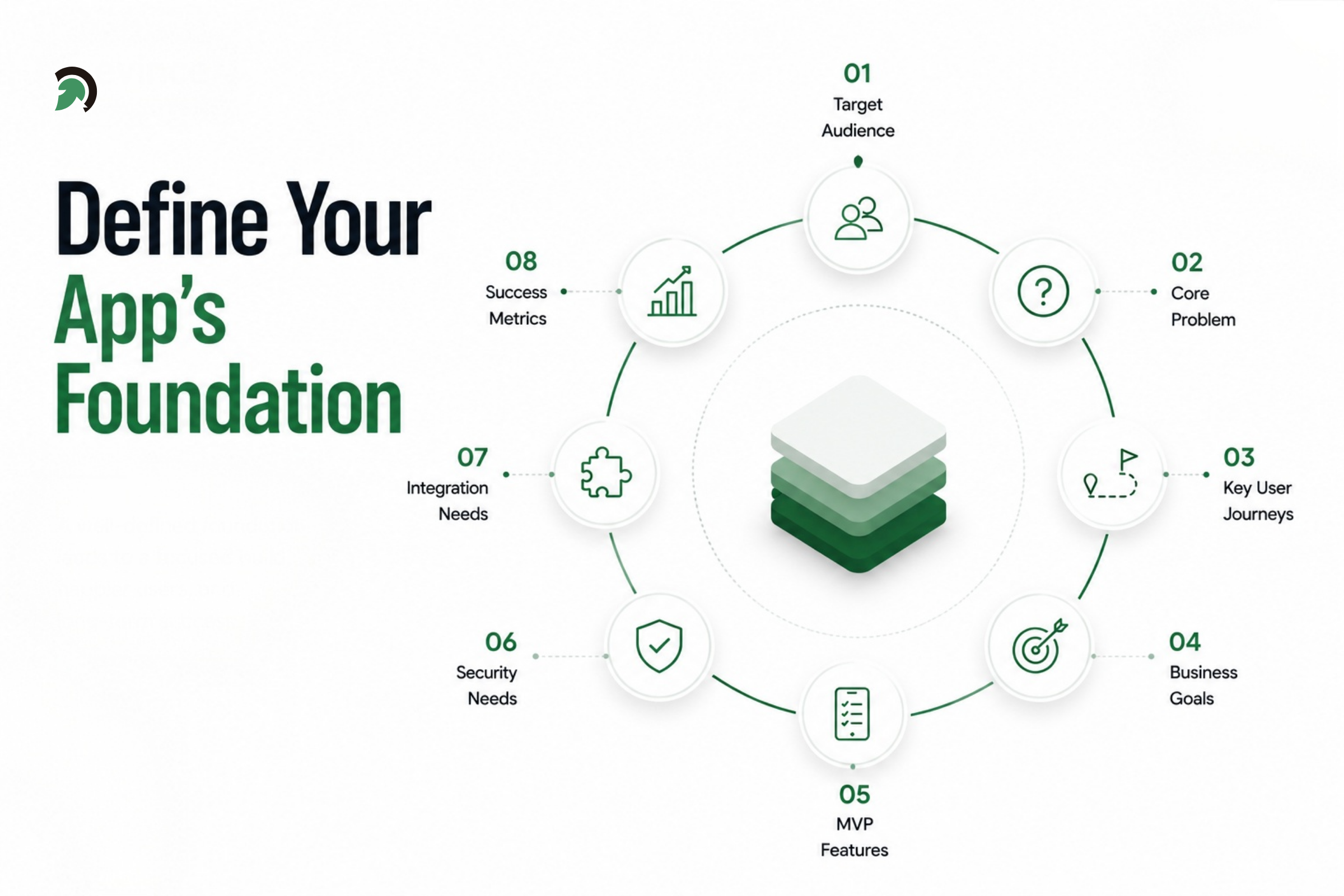
Mobile App Objectives and Requirements Planning
Expert Perspective:
“The strongest mobile apps are not defined by how many features they include, but by how effectively they solve a clear user problem. Teams should identify the most important user journeys first and use them to guide scope, design, and development decisions.”
- Henit Nathwani, Dept. Head – Mobile, EvinceDev
2. Choose the Right Development Approach
The choice between native and cross-platform app development affects performance, timeline, cost, access to device features, and long-term maintenance.
Native development is often suitable when an app requires advanced device capabilities, demanding graphics, highly optimized performance, or platform-specific experiences. Cross-platform development can be a better fit when businesses need to release on iOS and Android faster while sharing a large portion of the codebase.
When evaluating the approach, consider:
- Performance expectations
- Platform-specific functionality
- Product complexity
- Budget and timeline
- Team expertise
- Maintenance requirements
- Future scalability
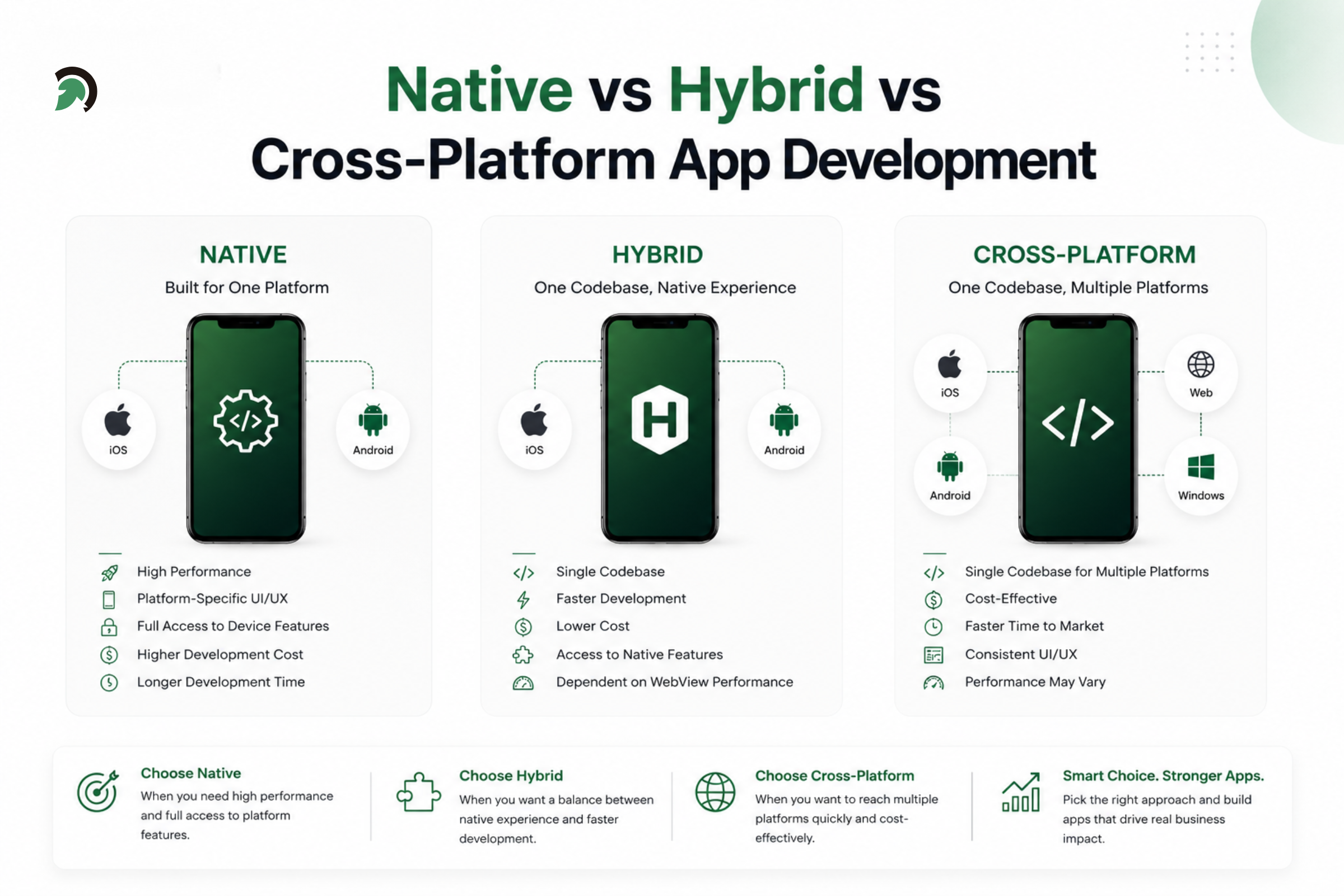
Native, Hybrid, and Cross-Platform Mobile App Comparison
Businesses exploring Cross-platform mobile app development services should evaluate the framework, plugin ecosystem, native integration needs, testing effort, and long-term support rather than choosing solely based on lower initial cost.
3. Follow a Mobile-First Design Approach
A mobile-first approach begins with the smallest screen and the most essential user actions. This forces teams to prioritize content, reduce clutter, and design around the realities of touch interactions, limited space, slower networks, and varying device capabilities.
The interface should make important actions easy to find and complete. Secondary details can be progressively revealed when needed.
Effective mobile-first planning should address:
- Thumb-friendly interactions
- Clear visual hierarchy
- Short task flows
- Readable content
- Minimal form fields
- Fast access to key functions
Applying Mobile UI design best practices early helps prevent desktop-style layouts from being compressed into small screens without considering actual mobile behavior.
4. Adopt User-Centered UI/UX Design
“They need to start with an understanding of people: user needs first, technology last.”
User-centered design places real user needs at the center of product decisions. Instead of relying on internal assumptions, teams should gather insights through interviews, surveys, journey mapping, prototypes, and usability testing.
The goal is to understand what users are trying to accomplish, what causes frustration, and how the app can reduce effort.
Useful methods include:
- User personas
- Journey maps
- Low-fidelity wireframes
- Interactive prototypes
- Usability tests
- Feedback sessions
- Behavior analytics
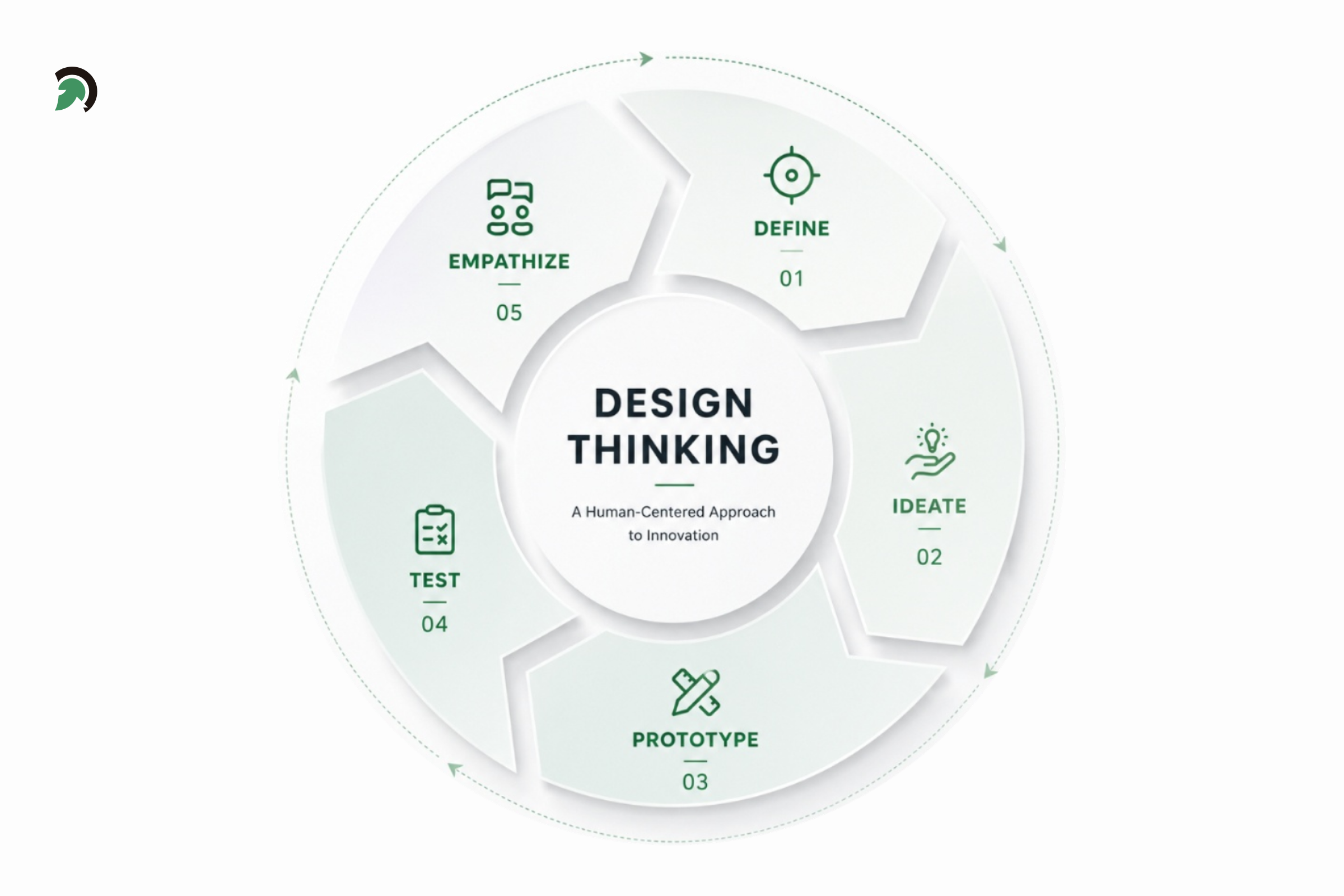
Design Thinking Process for Mobile App Development
Strong Mobile application development combines user research with technical feasibility. The design should feel simple to users even when the underlying workflows are complex.
5. Create Simple and Intuitive Navigation
Users should understand how to move through the app without needing detailed instructions. Navigation should use familiar patterns, clear labels, recognizable icons, and predictable behavior.
Avoid adding too many navigation options at the same level. Important actions should remain easy to access, while less frequently used features can be grouped logically.
Good navigation practices include:
- Using clear menu labels
- Keeping key actions visible
- Maintaining consistent placement
- Supporting back navigation
- Avoiding hidden gestures for critical actions
- Reducing unnecessary steps
A clear navigation system improves usability and lowers the chance that users abandon a task because they cannot find the next step.
6. Build a Frictionless Onboarding Experience
Onboarding should help users understand the app’s value and complete their first meaningful action quickly. Long tutorials, forced account creation, and unnecessary permissions can create friction before users experience any benefit.
A better approach is to:
- Explain the core value in simple language
- Request only essential information
- Use progressive onboarding
- Provide contextual guidance
- Offer sample content where useful
- Let users skip nonessential steps
- Set accurate expectations
Mobile app development services should treat onboarding as a measurable product flow, not just a series of welcome screens. Teams should track where users drop off and improve the experience based on real behavior.
7. Design for Different Screens and Devices
Mobile apps must work across different screen sizes, resolutions, aspect ratios, orientations, operating-system versions, and hardware capabilities.
Layouts should be flexible rather than fixed. Text, controls, images, and interactive elements should adapt without becoming difficult to read or use.
Teams should test:
- Small and large phones
- Tablets where supported
- Portrait and landscape modes
- Different pixel densities
- Older and current OS versions
- Devices with limited memory or processing power
Reliable Mobile App Development requires testing beyond a single flagship device. A design that looks correct on one screen may break or feel crowded on another.
8. Build Accessibility Into the App
Accessibility allows people with different abilities to use the app effectively. It should be considered during design and development rather than added after the product is complete.
Important accessibility practices include:
- Screen-reader support
- Descriptive labels
- Sufficient color contrast
- Scalable text
- Clear focus order
- Captions and transcripts
- Large touch targets
- Alternatives to gesture-only interactions
Accessible Mobile application development improves usability for a wider audience and can also make interfaces clearer for everyone.
Quick Stat:
According to the World Health Organization, approximately 1.3 billion people, or 16% of the global population, experience a significant disability.
9. Optimize App Speed and Performance
Performance has a direct effect on user satisfaction, retention, and app-store ratings. Slow startup times, delayed screens, frozen interfaces, and excessive battery use can quickly drive users away.
Teams should monitor and improve:
- App startup time
- Screen-rendering speed
- Network response time
- Memory usage
- Battery consumption
- Image and asset size
- Background activity
- App package size
Common techniques include caching, lazy loading, asset compression, pagination, background processing, as well as reducing the unnecessary API calls.
Performance optimization should continue even after the launching because real-world usage can reveal bottlenecks that were not visible during the development.
10. Use Modular, Scalable Architecture and State Management
A well-structured architecture makes an app easier to test, maintain, and expand. Code should be organized into clear layers and modules with defined responsibilities.
Teams may use patterns such as MVVM, Clean Architecture, or other suitable approaches depending on the platform and product complexity.
A scalable architecture should support:
- Separation of concerns
- Reusable components
- Independent modules
- Testable business logic
- Clear data flows
- Dependency management
- Easier feature expansion
Professional Mobile app development services should recommend architecture based on the app’s expected growth, integrations, security needs, and team structure rather than applying the same pattern to every project.
11. Implement Effective State Management
State management controls how data changes and how those changes are reflected across the interface. Poorly managed state can create inconsistent screens, duplicate logic, difficult debugging, and unpredictable user experiences.
The right approach should provide:
- A clear source of truth
- Predictable data flow
- Separation between local and shared state
- Controlled updates
- Easy debugging
- Testable logic
State management should match the complexity of the application. A small app may not need a heavy framework, while a large product with real-time data and multiple workflows may require a more structured solution.
12. Prioritize App Security and Data Privacy
Security should be built into every phase of Mobile App Development. It should cover the mobile client, APIs, backend services, third-party integrations, local storage, authentication, and deployment pipeline.
Important practices include:
- Secure authentication and authorization
- Encryption in transit and at rest
- Safe token storage
- Input validation
- API rate limiting
- Secure secrets management
- Session controls
- Dependency scanning
- Minimal data collection
- Permission management
Privacy also requires transparency. Users should understand what data is collected, why it is needed, and how they can control it. A reliable Mobile app development company in USA should include security reviews, threat modeling, code scanning, and penetration testing where appropriate.
13. Provide Offline and Low-Connectivity Support
Not every user will have a fast or stable connection. Apps that fail completely during poor connectivity can create frustration and lost transactions.
Where the use case requires it, support:
- Local caching
- Offline data access
- Retry mechanisms
- Background synchronization
- Clear connection indicators
- Conflict resolution
- Queued actions
- Data compression
Offline capability should be designed carefully because data synchronization can introduce conflicts, duplicate actions, and security concerns. Teams should define which features must work offline and how updates will be reconciled when connectivity returns.
14. Continuous Integration, Testing, and Deployment
Testing should cover more than whether a feature works in an ideal environment. A complete Mobile application development strategy includes different testing types across the development lifecycle.
These may include:
- Unit testing
- Integration testing
- UI testing
- End-to-end testing
- Security testing
- Performance testing
- Usability testing
- Accessibility testing
- Compatibility testing
Mobile application development teams should automate repeatable checks while still using manual testing for exploratory scenarios, complex interactions, and real-world usability.
15. Test Across Real Devices and Network Conditions
Emulators are useful however they cannot fully reproduce hardware limitations, manu-facturer specific behavior, camera performance, battery conditions, sensor behavior or the real network instability.
Testing should include:
- Physical iOS and Android devices
- Older and newer operating systems
- Low-memory devices
- Slow networks
- Intermittent connectivity
- Offline mode
- Background and foreground transitions
- Different permission states
This practice helps uncover issues that may not appear in controlled test environments.
16. Automate Development and Releases With CI/CD
Continuous integration and continuous delivery help teams release software more consistently. Automated pipelines can validate code, run tests, generate builds, and deploy approved versions with fewer manual steps.
A strong CI/CD workflow may include:
- Code-quality checks
- Automated tests
- Security scans
- Build generation
- Environment-specific configuration
- Release approvals
- Deployment automation
- Rollback support
Mobile app development services that use mature CI/CD practices can reduce release risk and support smaller, more frequent updates.
17. Use Product Analytics and Monitor User Journeys
Analytics helps teams understand how users interact with the product after launch. It reveals which features are used, where users drop off, and which flows support business outcomes.
Useful metrics include:
- Activation rate
- Retention
- Conversion rate
- Session frequency
- Feature adoption
- Funnel completion
- User-flow drop-offs
- Engagement by segment
Analytics events should be planned during the Mobile app development process rather than added as an afterthought. Teams should define which decisions each metric will support and avoid tracking data without a clear purpose.
18. Segment Users and Personalize Their Experience
Different users may interact with the same app in very different ways. Segmenting users by factors such as lifecycle stage, behavior, location, preferences, or even feature usage helps teams understand these differences and deliver more relevant as well as personalized experiences to the users.
User segmentation may include:
- New and returning users
- Active and inactive users
- Free and paid users
- Geographic or demographic groups
- High-value or frequent users
- Users with different feature preferences
- Users at different journey stages
Teams can use these segments to personalize onboarding, recommendations, notifications, content, and in-app guidance. This can improve engagement, retention, and feature adoption without forcing every user through the same experience. UXCam specifically recommends comparing journeys across user segments and using personalization, guided experiences, and incentives to help more users become active users.
19. Create Accessible User Feedback Channels
Users should have simple ways to report their problems, share suggestions/feedback, as well as rate their experiences without leaving the app. Feedback channels help teams identify usability issues that the analytics and technical monitoring may not reveal fully.
User feedback channels may include:
- In-app surveys
- Feedback forms
- Rating prompts
- Support options
- App-store reviews
- Social media comments
- Post-interaction questions
Teams should review feedback regularly, identify recurring concerns, and use those insights to guide the product improvements/modifications. UXCam recommends strategically placing surveys, feedback forms, and rating prompts while also monitoring app-store and social-media comments.
20. Monitor Crashes, Errors, and App Performance
Product analytics explains what users do, while technical monitoring explains whether the app is working reliably.
Teams should track:
- Crash-free sessions
- Application-not-responding events
- API errors
- Slow screens
- Network failures
- Memory spikes
- Battery impact
- Device-specific issues
Alerts should help teams identify serious issues quickly. Error reports should include enough context to support diagnosis without exposing sensitive user data.
Ongoing monitoring is essential because device updates, backend changes, third-party SDK updates, and new traffic patterns can affect app stability.
Quick Stat:
According to Google Play, an app can cross its overall bad-behavior threshold when at least 1.09% of daily active users experience a user-perceived crash.
21. Performance Optimization, Security, and Ongoing Maintenance
Launching the app is not the end of the product lifecycle. Teams must continue improving visibility, compatibility, security, as well as, the user experience.
App Store Optimization may include:
- Relevant keywords
- Clear descriptions
- Strong screenshots
- Preview videos
- Accurate categories
- Review management
- Regular listing updates
Ongoing maintenance should include bug fixes, operating-system compatibility updates, security patches, dependency upgrades, performance improvements, and feature enhancements.
Businesses choosing a Mobile app development company in USA should confirm what post-launch support is included, how issues are prioritized, and how future releases will be managed.
22. Validate Improvements Through A/B Testing
A/B testing helps teams compare the two versions of the screen, message, feature, or user flow to identify, which option performs better. Also, it allows product decisions to be based on real user behavior rather than just assumptions.
A/B testing may be used for:
- Onboarding screens
- Navigation layouts
- Calls to action
- Subscription flows
- Checkout steps
- Feature placement
- In-app messages
Teams should define a clear goal and test one meaningful change at a time, and also measure the outcomes, such as conversion, engagement, completion rate, or retention.
23. Maintain a Consistent and Unified Design
A consistent design helps users understand how the app works without re-learning patterns on each and every screen. Typography, colors, icons, buttons, navigation elements, as well as the interface components should follow the same visual and interaction standards throughout the app.
A consistent design system may include:
- Standard typography and color styles
- Reusable UI components
- Familiar iconography
- Consistent button behavior
- Uniform spacing and layouts
- Predictable interaction patterns
Consistency improves usability, strengthens brand-recognition, and makes future design and development updates much easier to manage. UXCam specifically recommends maintaining consistent typography, color schemes, iconography, & UI components across the app.
Common Mistakes to Avoid When Building a Mobile App
Even experienced teams can make costly mistakes when planning and development decisions are rushed. Common issues include:
- Starting without clear requirements
- Adding too many features to the first release
- Choosing technology based only on initial cost
- Treating security as a final-stage task
- Ignoring accessibility requirements
- Testing only on emulators
- Tracking analytics without clear goals
- Skipping performance monitoring
- Failing to plan for updates and maintenance
Avoiding these mistakes requires coordination across product, design, development, QA, security, and operations.
How to Choose the Right Mobile App Partner
The right mobile app partner should have a strong understanding of product strategy, UX, engineering, security, testing, cloud infrastructure, and post-launch growth. When evaluating providers, look at their experience with similar applications, native and cross-platform expertise, UX research and accessibility capabilities, backend and architecture skills, security practices, CI/CD maturity, analytics experience, communication process, and maintenance support. A qualified provider of Mobile app development services should explain why a specific approach fits your business goals rather than recommending technology before understanding your product. It is also important to assess how the team manages requirement changes, quality assurance, documentation, ownership, and long-term support.
Conclusion
Building a successful app in 2026 requires more than attractive screens and functional code. Teams need a balanced approach that connects product strategy, user experience, architecture, security, performance, testing, deployment, analytics, and maintenance.
The right Mobile application development practices reduce technical risk and create a stronger foundation for growth. They also help teams respond faster to user feedback, platform changes, and evolving business needs.
EvinceDev provides Mobile app development services for businesses that need secure, scalable, and user-focused applications for iOS, Android, and cross-platform environments. Our team supports planning, design, engineering, testing, deployment, and post-launch improvement through a structured delivery approach.
Frequently Asked Questions (FAQs)
What are the most important mobile app development best practices?
The most important practices include clear requirements, user-centered design, scalable architecture, strong security, performance optimization, comprehensive testing, analytics, monitoring, and continuous maintenance.
Which is better for mobile apps: native or cross-platform development?
Native development is often preferred for advanced performance and deep platform integration. Cross-platform development can reduce delivery time and code duplication when the app’s requirements are suitable for a shared framework.
How can developers improve mobile app performance?
Developers can improve performance by reducing unnecessary network calls, compressing assets, using caching and lazy loading, optimizing rendering, monitoring memory usage, and testing on lower-powered devices.
Why is mobile app security important?
Mobile apps often handle personal, financial, business, or behavioral data. Weak authentication, insecure APIs, unsafe local storage, and outdated dependencies can expose users and businesses to serious risks.
How should mobile apps be tested before launch?
Apps should be tested through unit, integration, UI, end-to-end, performance, security, accessibility, and compatibility testing. Teams should also test on real devices and under different network conditions.
What role does analytics play in mobile app development?
Analytics helps teams measure activation, retention, conversions, feature usage, and user drop-offs. These insights support product decisions and help prioritize improvements after launch.
How often should a mobile app be updated?
The update frequency depends on user needs, security requirements, operating-system changes, defects, and the product roadmap. Critical security and stability issues should be addressed quickly, while planned improvements can follow a predictable release cycle.
How do I choose a mobile app development company?
Review the company’s experience, design capabilities, technical expertise, security practices, testing process, communication model, portfolio, and post-launch support. The company should also be able to explain its development approach clearly.