
Key Takeaways
- Mobile App Design Shapes User Experience: Strong design makes apps easier to use, navigate, and engage with.
- UX and UI Work Together: UX defines how the app works, while UI defines how it looks and feels.
- A Clear Design Process Reduces Risk: Research, wireframes, prototypes, and testing help avoid costly mistakes later.
- Simplicity Improves Usability: Clean layouts, clear navigation, and minimal friction create better app experiences.
- Testing Strengthens Design Quality: Usability testing helps identify issues before development or launch.
- Good Design Supports Business Growth: Well-designed apps improve retention, conversions, customer satisfaction, and brand value.
The average smartphone user interacts with dozens of mobile applications every month, yet only a small percentage become part of their daily routine. Why? In many cases, the difference is not the features an app offers, but the experience it delivers. Users may tolerate limited functionality, but they rarely tolerate confusing navigation, slow interactions, or frustrating user journeys.
As mobile usage continues to grow across industries, businesses face increasing pressure to deliver applications that are not only functional but also intuitive, engaging, and easy to use. Whether it is an eCommerce platform, banking application, healthcare solution, or on-demand service, users expect seamless experiences from the moment they open an app.
This is why mobile app design has become a critical factor in application success. Effective design helps users complete tasks effortlessly, improves engagement, strengthens brand perception, and contributes to higher retention and conversion rates. Poor design, on the other hand, can quickly drive users toward competing alternatives.
In this comprehensive guide, we explore everything businesses need to know about mobile application design, including its core components, key design principles, the mobile app design process, best practices, common challenges, emerging trends, and practical strategies for creating user-friendly applications that deliver lasting value.
Quick Stat:
Nearly 90% of users have stopped using an app because of poor performance or user experience issues, according to the AppDynamics App Attention Span Study.
What Is Mobile Application Design?
Before discussing methodologies and best practices, it is important to understand what is app design and why it matters.
Mobile application design refers to the process of planning, creating, testing, and refining the user experience and visual interface of a mobile application. It encompasses everything users see, touch, and interact with while using the app.
It should not be just an aesthetically pleasing screen. It must allow users to do their tasks in as short time possible, move around freely, and make them understand the way the application works easily.
It has often been wrongly considered that design consists of nothing else but colors and icons. Design actually covers aspects such as usability, navigation, information structure, interaction, etc.
It is also important to distinguish design from development. While mobile app development focuses on building the application’s technical functionality and infrastructure, design focuses on how users interact with those capabilities.
A successful application combines both disciplines to deliver an experience that is useful, reliable, and enjoyable.
Also Read: Ultimate Guide to Mobile App Backend DevelopmentWhy Mobile Application Design Matters
Quick Stat:
86% of mobile users have deleted or uninstalled at least one app due to poor performance, according to AppDynamics research.
The quality of an application’s design often determines whether users continue using it or uninstall it after a few interactions.
Strong mobile app design delivers benefits that extend far beyond aesthetics.
- Improved User Retention: Users are more likely to return to applications that are easy to navigate and provide frictionless experiences.
- Better Customer Satisfaction: Clear workflows, intuitive interfaces, and responsive interactions help users achieve their goals efficiently.
- Higher Conversion Rates: Well-designed onboarding processes, calls-to-action, and user journeys can significantly improve conversions.
- Stronger Brand Perception: Design directly influences how users perceive a company’s professionalism, credibility, and reliability.
- Reduced Support Costs: Applications that are easy to understand typically generate fewer support requests and user complaints.
As competition continues to grow across industries, investing in thoughtful design can become a meaningful competitive advantage.
Understanding the Core Components of Mobile App Design
Successful mobile applications are built on several interconnected design disciplines. Each component plays a unique role in shaping how users interact with, navigate, and experience an application.
User Experience (UX) Design
User Experience (UX) design focuses on the overall experience users have while interacting with an application. Its primary objective is to ensure that users can complete tasks efficiently, intuitively, and with minimal friction.
Key focus areas include:
- User research
- User journeys
- Information architecture
- Task flows
- Usability testing
- User satisfaction
Effective UX design helps create experiences that are intuitive, efficient, and aligned with user expectations.
User Interface (UI) Design
User Interface (UI) design focuses on the visual elements users interact with throughout the application. It determines how information is presented and how users engage with various screens and features.
Key focus areas include:
- Buttons and controls
- Icons and graphics
- Typography
- Color schemes
- Layouts and spacing
- Forms and input fields
- Navigation components
A well-designed interface improves usability while creating a visually appealing experience.
Interaction Design
Interaction design focuses on the behaviors, animations, and responses that occur when users interact with the application. It helps ensure that actions feel natural, responsive, and engaging.
Key focus areas include:
- Swipe gestures
- Button interactions
- Screen transitions
- Loading indicators
- Feedback messages
- Micro-interactions
Thoughtful interaction design improves engagement and helps users navigate the application with confidence.
Visual Design
Visual design focuses on creating a cohesive and aesthetically appealing appearance that supports usability and reinforces brand identity. It helps guide user attention and improve content readability.
Key focus areas include:
- Visual hierarchy
- Spacing and alignment
- Imagery and illustrations
- Color systems
- Brand consistency
- Accessibility considerations
Strong visual design enhances both the user experience and the overall perception of the application.
Key Principles of Effective Mobile App Design
The process of designing should be governed by certain principles that are focused on making a balanced approach towards fulfilling the needs of users, the goals of businesses, the usability of the software and its performance.
User-Centered Design
User-centered design focuses on understanding user behavior, expectations, goals, and pain points before making design decisions.
Key focus areas include:
- User needs
- User behavior
- Pain points
- User journeys
- Real-world use cases
This principle helps teams create solutions based on actual user expectations rather than assumptions.
Expert Perspective
Many businesses focus on helping users complete actions quickly, but the best apps also reduce the time users spend figuring out how the app works. When navigation, interactions, and workflows feel familiar, users can start using the application confidently from the first session.
Simplicity and Clarity
Simplicity and clarity focus on making the application easy to understand, navigate, and use without unnecessary complexity.
Key focus areas include:
- Clear navigation
- Concise content
- Simple layouts
- Easy-to-understand actions
- Reduced cognitive load
This principle helps users complete tasks faster and with less confusion.
Consistency
Consistency focuses on maintaining familiar design patterns across all screens so users can learn and navigate the application more easily.
Key focus areas include:
- Colors
- Typography
- Navigation
- Icons
- Buttons
- Interactions
This principle creates a smoother and more predictable user experience.
Expert Perspective
Users should not have to relearn how buttons, menus, or interactions work as they move between screens. Consistency reduces cognitive effort and creates a more intuitive experience.
Accessibility
Accessibility focuses on making the application usable for people with different abilities, devices, and interaction needs.
Key focus areas include:
- Color contrast
- Readable text sizes
- Screen reader compatibility
- Touch-friendly controls
- Clear error messages
This principle helps create inclusive applications that can serve a wider audience.
Mobile-First Thinking
Mobile-first thinking focuses on designing specifically for smaller screens, touch-based interactions, and mobile usage patterns.
Key focus areas include:
- Responsive layouts
- Thumb-friendly interactions
- Prioritized content
- Simple screen structures
- Device-specific behavior
This principle ensures the application feels natural and efficient on mobile devices.
Performance-Oriented Design
Performance-oriented design focuses on creating visually appealing experiences without slowing down the application or frustrating users.
Key focus areas include:
- Lightweight visuals
- Optimized animations
- Fast loading screens
- Minimal clutter
- Smooth interactions
This principle helps maintain a balance between aesthetics, usability, and app performance.
Quick Stat:
As mobile load times increase from 1 second to 3 seconds, the probability of users leaving increases by 32%, according to Google mobile performance research.
The Mobile App Design Process
Designing mobile applications via structured processes facilitates the movement of organizations from having ideas to creating applications that are easy to use, beautiful, and ready for implementation. The next step builds on the previous one, avoiding misunderstandings and enabling better design choices.
Step 1: Discovery and Requirement Gathering
The process begins with understanding the business goals, target users, project scope, competitors, and required features. This stage helps teams define what the app should achieve and what users expect from it.
Step 2: User Research and Analysis
Once the goals are clear, designers study the target audience through user interviews, surveys, analytics, feedback, and behavior patterns. This helps identify user pain points, motivations, preferences, and expectations.
Step 3: Creating User Personas
Based on research insights, teams create user personas that represent different audience segments. These personas help designers make decisions based on real user needs instead of assumptions.
Step 4: Information Architecture
Information architecture organizes app content, features, menus, and navigation paths in a logical structure. This makes it easier for users to find what they need and move through the app smoothly.
Step 5: User Flow Design
User flows map the steps users take to complete important actions, such as signing up, booking a service, placing an order, or completing a payment. This stage helps reduce unnecessary steps and improve the overall journey.
Step 6: Wireframing
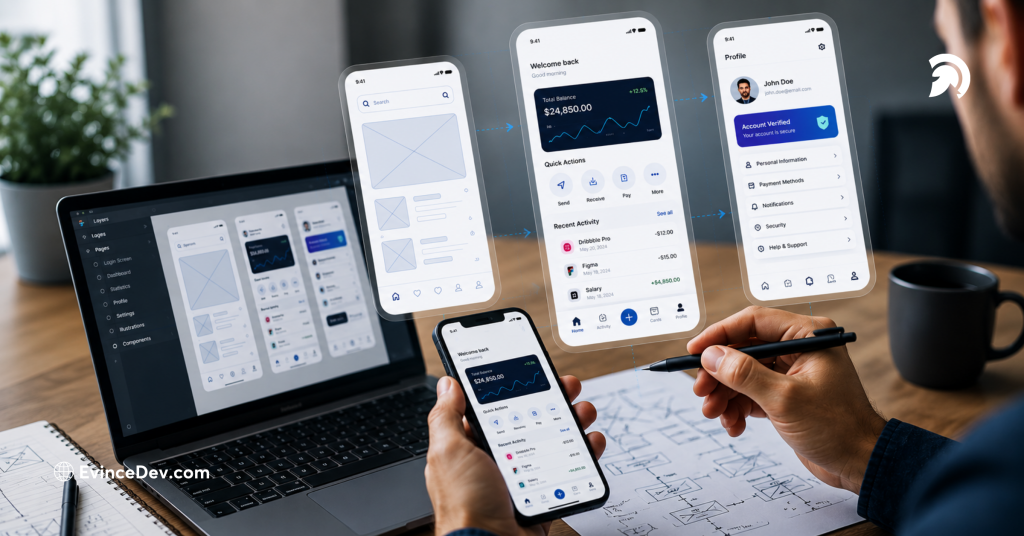
Wireframes are basic screen layouts that show structure, content placement, and functionality without detailed visuals. They help teams review the app’s foundation before moving into high-fidelity design.
Step 7: Prototyping
Prototypes turn wireframes into clickable or interactive experiences. They allow stakeholders and users to test navigation, interactions, and usability before the app moves into development.
Step 8: UI Design
After the structure and flows are approved, designers create polished visual screens using typography, colors, icons, imagery, components, and brand guidelines. This stage gives the app its final look and feel.
Step 9: Usability Testing
Usability testing helps evaluate whether users can complete tasks easily and without confusion. Feedback from this stage is used to refine screens, improve flows, and fix design gaps early.
Step 10: Developer Handoff
The last step entails handing over all necessary design elements like the design file, asset library, design specification, style guide, etc., to the developer team.
Also Read: Mobile App Development Process: Step-by-Step GuideWireframes vs Mockups vs Prototypes
These terms are often used interchangeably, but they serve different purposes within the design lifecycle.
| Design Stage | Purpose |
| Wireframe | Defines layout and structure |
| Mockup | Displays visual appearance |
| Prototype | Simulates user interactions |
Wireframes focus on functionality, mockups focus on presentation, and prototypes focus on user experience validation. Together, these deliverables help teams reduce risk and improve design quality before implementation.
Essential Elements of Mobile App Design
There are a number of aspects that affect usability, engagement, navigation, and user satisfaction in general. Proper planning of these aspects results in improving the convenience of using the app.
- Navigation Design: Helps users understand where they are, move between screens easily, and reach their desired actions without confusion.
- Onboarding Experience: Introduces users to the app’s value, key features, and basic functionality without overwhelming them at the start.
- Buttons and Calls-to-Action: Guide users toward important actions such as signing up, making a purchase, booking a service, or submitting information.
- Forms and User Input: Make it easier for users to enter information through simple fields, clear instructions, helpful validation, and minimal required steps.
- Typography: Improves readability, accessibility, and visual hierarchy by using appropriate font sizes, spacing, and text styles.
- Color Scheme: Supports brand identity, improves visual appeal, and helps highlight important actions or information within the app.
- Icons and Visual Assets: Make the interface more understandable by using recognizable symbols, illustrations, and visuals that support user actions.
- Search Functionality: Helps users quickly find products, services, content, or features, especially in apps with large amounts of information.
- Notifications: Keep users informed and engaged when used thoughtfully, without becoming excessive or disruptive.
- Error Handling and Feedback: Helps users understand what went wrong, how to fix it, and whether their actions were completed successfully.
Mobile App Design Guidelines for Different Platforms
Different platforms have unique user expectations and design standards.
iOS Design Guidelines
Apple’s Human Interface Guidelines emphasize clarity, consistency, and intuitive interactions.
Key considerations include:
- Native navigation patterns
- Gesture support
- Platform-specific controls
Android Design Guidelines
Google’s Material Design guidelines are also renowned for being sources of information regarding visual design, components, and even accessibility. Generally, it is recommended that apps developed using the Android platform should retain consistency with the platform guidelines despite their device versatility.
Cross-Platform Considerations
Businesses frequently design applications for both iOS and Android audiences.
Balancing consistency while respecting platform-specific expectations helps create seamless experiences across devices.
Mobile App Design Best Practices
Implementing proven app design best practices can significantly improve usability, engagement, and user satisfaction. A well-designed app should be easy to navigate, visually clear, responsive, and aligned with user expectations.
1. Design for Thumb-Friendly Use
Most users interact with mobile apps using one hand. Important buttons, menus, and actions should be placed where users can easily reach and tap them.
2. Minimize User Input
Avoid lengthy forms and unnecessary steps. Use autofill, smart defaults, dropdowns, saved preferences, and simple input fields to make tasks faster and easier.
3. Prioritize Intuitive Navigation
Users should always know where they are and what to do next. Clear menus, logical screen flows, visible back options, and familiar navigation patterns create a smoother experience.
4. Reduce Visual Clutter
Clean layouts help users focus on important actions and information. Use proper spacing, readable typography, limited content blocks, and clear visual hierarchy.
Expert Perspective
Many successful applications offer extensive functionality while maintaining clean interfaces. The difference lies in how information and actions are organized, prioritized, and presented to users.
5. Maintain Consistency Across Screens
Buttons, icons, colors, fonts, forms, and interaction patterns should remain consistent throughout the app. This helps users learn the interface quickly and navigate with confidence.
6. Provide Immediate Feedback
Feedback for users is essential to ensure clarity in the process. Users should get feedback for each action that they perform within the application.
7. Optimize Loading Experiences
Fast and smooth performance is essential for user satisfaction. Use lightweight visuals, skeleton screens, progress indicators, and optimized animations to make the experience feel responsive.
8. Test With Real Users
Usability testing assists in uncovering problematic flows, gaps in design, and other problems with the app even before its release to users.
These practices allow creating an application that will be easy and convenient for users to use.
Common Mobile App Design Mistakes to Avoid
Even experienced teams can encounter design challenges. Common mistakes include:
Overcomplicated Navigation
Users should never need multiple steps to complete simple tasks.
- Excessive Features: Trying to include too many features often creates clutter and confusion.
- Ignoring Accessibility: Failing to accommodate diverse user needs can negatively impact usability and adoption.
- Poor Onboarding: Lengthy or confusing onboarding experiences frequently result in early abandonment.
- Inconsistent Design Patterns: Changing layouts, icons, or navigation styles between screens can create unnecessary friction.
Avoiding these mistakes improves both user experience and long-term engagement.
Mobile App Design Trends
Design trends continue evolving as user expectations and technologies change.
Several notable trends are influencing application experiences today.
- AI-Powered Personalization: Applications increasingly use artificial intelligence to deliver personalized recommendations and experiences.
- Conversational Interfaces: Chatbots and virtual assistants are becoming more integrated into user experiences.
- Voice User Interfaces: Voice-enabled interactions continue gaining popularity across industries.
- Dark Mode Optimization: Many users prefer dark mode for improved comfort and battery efficiency.
- Micro-Interactions: Small animations and feedback mechanisms enhance usability while making applications feel more responsive.
- Inclusive Design: Organizations are placing greater emphasis on designing experiences that accommodate broader user audiences.
A modern trending app often incorporates several of these innovations while maintaining simplicity and usability.
Also Read: AI Driven Mobile Apps Redefining the Future of DevelopmentChallenges in Mobile App Design
Designing successful applications involves balancing numerous constraints and priorities.
Common challenges include:
- Supporting multiple screen sizes
- Maintaining consistency across platforms
- Meeting accessibility requirements
- Managing performance limitations
- Addressing security and privacy concerns
- Balancing functionality and simplicity
Design teams must continually evaluate trade-offs to create experiences that satisfy both users and business stakeholders.
Mobile App Design Tools
Modern design teams use specialized tools to plan, design, prototype, collaborate, and hand off mobile app designs efficiently.
- Figma: Used for UI/UX design, real-time collaboration, prototyping, and design systems.
- Sketch: Helps designers create app layouts, reusable components, and high-fidelity interface screens.
- Adobe XD: Supports wireframing, interactive prototyping, and design sharing for feedback.
- Framer: Useful for creating advanced prototypes, animations, transitions, and realistic app interactions.
- InVision: Helps teams review designs, collect feedback, and test clickable prototypes.
- Miro: Used for brainstorming, user journey mapping, workshops, and early-stage planning.
- Zeplin: Helps developers access design specifications, assets, style guides, and implementation details.
These tools make the mobile app design process more organized, collaborative, and development-ready.
The Future of Mobile Application Design
The future of mobile app design will be shaped by evolving technologies and changing user expectations.
Artificial intelligence is expected to play a growing role in personalization, content recommendations, and workflow automation. Designers are also exploring adaptive interfaces that dynamically adjust based on user behavior and context.
Advancements in technology, including wearable technology, augmented reality, spatial computing, and predictive experiences, are opening up innovative possibilities. On the other hand, companies would remain committed to incorporating accessibility, privacy, and performance as basic elements in the design process.
With digital experiences becoming more advanced by the day, companies that focus on effective design can gain an edge in customer relationships and competition.
Conclusion
Effective mobile app design is much more than creating attractive screens. It involves understanding users, solving real problems, simplifying complex interactions, and delivering experiences that align with business objectives.
From user research and wireframing to usability testing and implementation, every stage of the design journey contributes to an application’s overall success. The adoption of successful strategies, such as using UX design for mobile apps, adhering to useful app design tips, and continually enhancing the experience by learning from user feedback, will enable companies to develop effective applications.
EvinceDev helps businesses design and build user-friendly, scalable, and performance-driven mobile applications through its UI/UX design, mobile app development, and custom software development services. With the right design strategy and development partner, organizations can deliver mobile experiences that meet evolving user expectations and support long-term digital growth.