
Key Takeaways
- Plan Before Development: Clear goals, structure, user flows, and architecture help reduce rework and support future scalability.
- Speed Impacts Results: Fast-loading pages and strong Core Web Vitals improve user experience, SEO, and conversions.
- Security Builds Trust: Secure coding, updated dependencies, HTTPS, and regular checks protect users and business data.
- SEO Starts With Code: Clean URLs, schema, crawlable pages, mobile usability, and structured content strengthen search visibility.
- Launch Is Not the End: Ongoing monitoring, maintenance, analytics, and optimization keep the website secure, relevant, and competitive.
A modern website is no longer just an online presence. It is often the first place where users discover a business, compare its services, check its credibility, and decide whether to take action.
That is why following the right web development best practices has become important for every business website. A good website should load fast, work smoothly across devices, protect user data, support search visibility, and guide visitors toward meaningful actions.
Whether a business is building a corporate website, SaaS platform, eCommerce store, web portal, or content-heavy website, the development approach directly affects performance, user experience, SEO, security, scalability, and conversions.
This blog covers what website development means, why best practices matter, and the 15 web development best practices every modern website should follow.
What Is Website Development?
Website development is the process of planning, designing, building, testing, launching, and maintaining a website. It includes both the visible parts users interact with and the technical systems that work behind the scenes.
The front end includes layouts, menus, buttons, forms, images, content sections, and user interactions. The back end manages databases, servers, business logic, user accounts, integrations, security, and content management.
For businesses, website development is not only about creating a good-looking website. It is about building a reliable digital platform that supports brand visibility, lead generation, customer engagement, automation, content updates, and long-term growth.
Why Are Website Development Best Practices Important?
Website development best practices help teams build websites that are fast, secure, accessible, scalable, SEO-friendly, and easier to manage. Without a proper development approach, websites may look fine at launch but create problems later, such as slow speed, broken layouts, weak security, poor rankings, and difficult updates.
These practices help businesses reduce technical debt and avoid costly fixes. They also improve the experience for users because the website becomes easier to browse, faster to load, and more reliable across devices.
Strong web development strategies also connect design, development, SEO, content, security, and business goals. Instead of treating each area separately, a structured process ensures that every part of the website supports the same purpose.
Following the right approach helps businesses improve speed, mobile usability, search visibility, accessibility, security, user trust, conversions, scalability, integrations, and long-term maintenance.
Quick Stat:
Google research shows that 53% of mobile visits are abandoned if a page takes more than 3 seconds to load.
15 Web Development Best Practices Every Modern Website Should Follow
1. Start With Clear Website Planning and Architecture
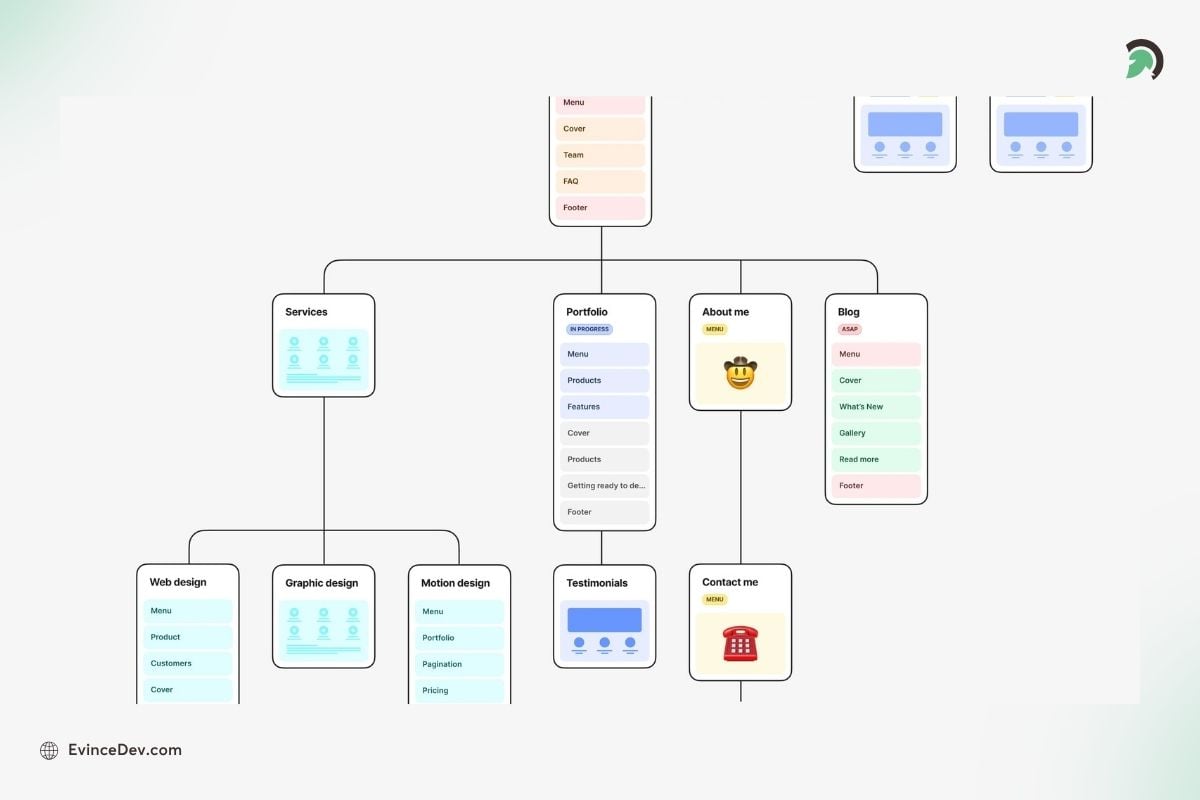
Website planning that gives the website a strong foundation before design and coding
Clear planning gives the website a strong foundation before design or coding begins. It helps teams define the website’s purpose, target audience, user journeys, content structure, technical needs, and business goals.
It also prevents confusion during development. When the architecture is planned well, the website becomes easier to scale, update, optimize, and connect with future tools or platforms.
How to do it:
- Define the main website goal before development starts
- Identify key users and their expected actions
- Plan navigation, page hierarchy, and URL structure
- List required features, forms, integrations, and workflows
- Choose the right development approach based on business needs
- Consider SEO, security, scalability, and compliance early
- Create wireframes or user flows before final design
- Align content, design, and development teams from the start
Real World Project:
In the Urban Air website development project, EvinceDev helped build a scalable WordPress Multisite architecture that supported centralized website management across a growing franchise network. This shows why planning the right CMS structure and backend architecture early can make a website easier to scale and manage over time.
Read the full Case Study here: Urban Air Project
Pro tip: Do not begin development with only a visual design. A website also needs a clear structure, content plan, technical roadmap, and conversion goal.
Expert Perspective
A website should be developed with future updates in mind, not only the initial launch. Reusable sections, editable content blocks, and flexible page templates make it easier for teams to add landing pages, update services, and run campaigns without frequent redevelopment.
2. Follow a Mobile-First Responsive Approach
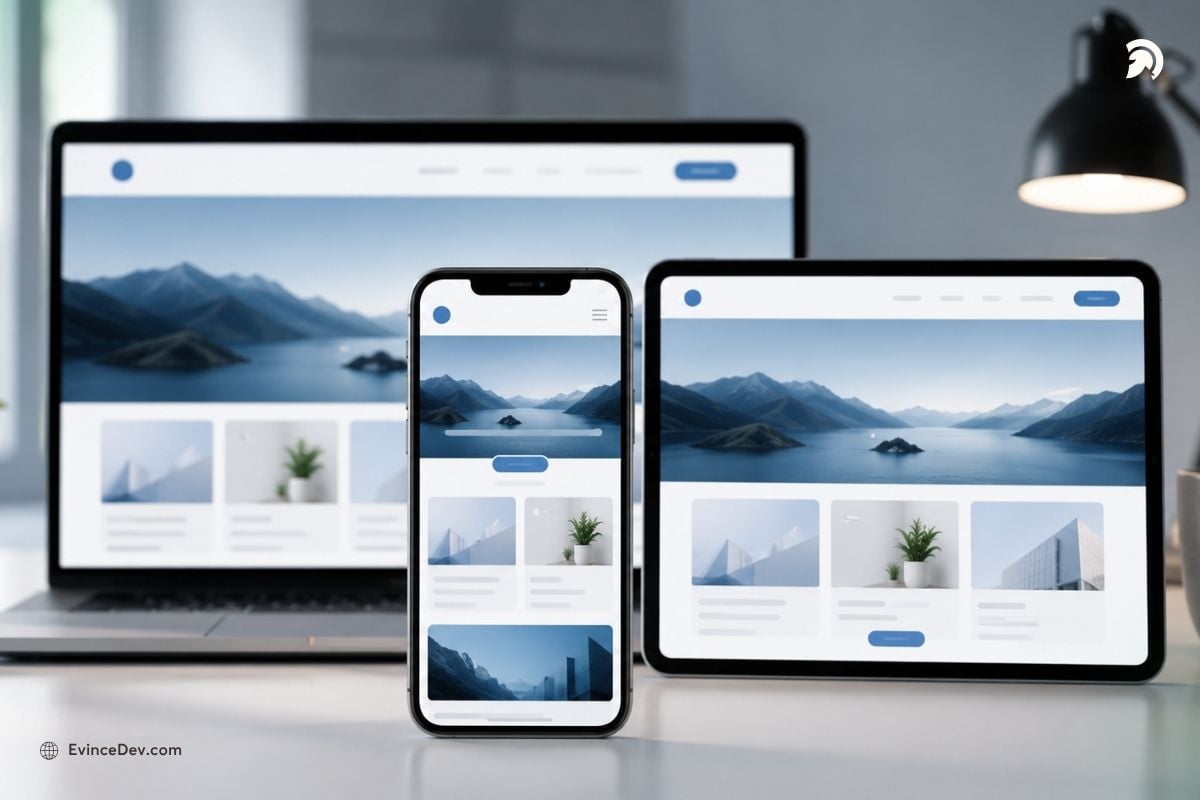
A mobile-first approach prioritizes designing websites for smartphones first, creating faster, cleaner, and more user-friendly experiences before scaling to larger screens.
A mobile-first approach means designing and developing for smaller screens first, then adapting the experience for tablets and desktops. This keeps the website simple, focused, and easier to use on mobile devices.
It matters because many users browse websites from smartphones. If the mobile experience is slow, cluttered, or hard to navigate, users may leave before reading content or submitting a form.
How to do it:
- Design the mobile layout before the desktop version
- Use responsive grids and flexible sections
- Keep menus simple and easy to access
- Make buttons and form fields touch-friendly
- Use readable font sizes on smaller screens
- Avoid heavy animations or large elements on mobile
- Test important pages on real mobile devices
- Keep mobile CTAs visible and easy to use
Pro tip: Do not just shrink the desktop design for mobile. Build the mobile experience around what users need most when browsing on smaller screens.
Quick Stat:
Google’s mobile speed research found that 3 out of 4 mobile sites took longer than 10 seconds to load, while the average mobile page load time was 19 seconds.
3. Optimize Website Performance and Core Web Vitals
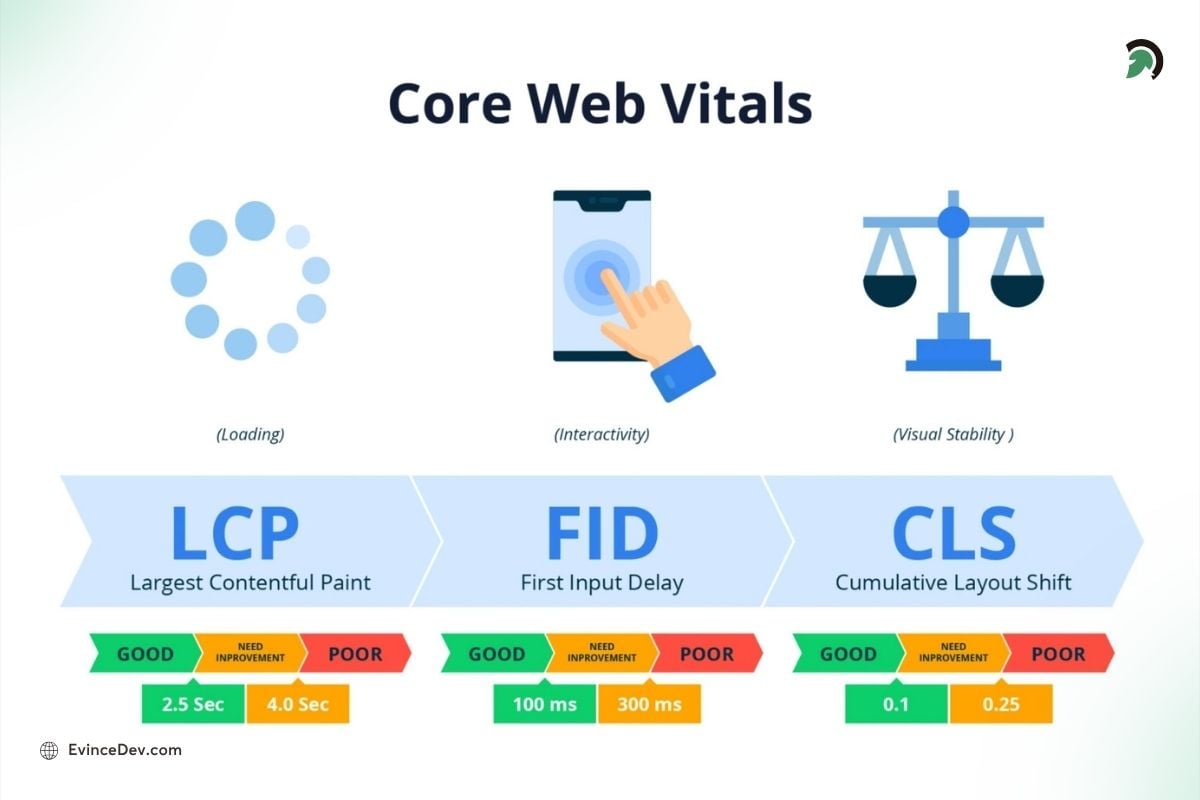
Website performance improves speed, usability, and engagement by helping pages load quickly, respond faster, and stay visually stable.
A fast website helps users browse without delays, especially on mobile devices, slower networks, or content-heavy pages. Performance is not only about page speed. It also includes how quickly users can interact with the page and whether the layout stays stable while loading.
It supports SEO, engagement, and conversions because users are more likely to leave when pages load slowly, buttons respond late, or content shifts unexpectedly. For business websites, this can directly affect form submissions, product views, demo requests, and sales inquiries.
How to do it:
- Compress images and use WebP or AVIF formats
- Resize images before upload instead of relying only on browser scaling
- Enable caching and use a CDN for faster content delivery
- Reduce unused CSS, JavaScript, plugins, and third-party scripts
- Lazy load images, videos, and below-the-fold sections
- Improve server response time with better hosting and optimized backend logic
- Use code splitting so users do not load unnecessary scripts upfront
- Monitor LCP, INP, and CLS through tools like PageSpeed Insights or Search Console
Pro tip: Inspect third-party scripts before deployment. Too many chat apps, analytics trackers, heat maps, popups, and plug-ins could negatively affect page performance. Keep only those that contribute to your business/marketing goal.
Quick Stat:
According to Google, 53% of mobile visits are likely to be abandoned if a page takes longer than 3 seconds to load, making speed one of the most important web development best practices for user experience and conversions.
4. Build Security Into Every Stage of Development
Website security refer to protecting the website, user data, business information, and connected systems from unauthorized access or misuse. It should be part of planning, coding, testing, deployment, and maintenance.
This matters because even a well-designed website can lose trust and credibility if it exposes customer data, gets infected with malware, or becomes vulnerable through outdated plugins, weak forms or insecure login systems.
How to do it:
- Use HTTPS across the entire website
- Validate all form inputs and user-submitted data
- Protect against SQL injection, XSS, and CSRF attacks
- Use secure authentication and session management
- Add role-based access for admin users
- Keep frameworks, plugins, themes, and dependencies updated
- Use security headers and safe cookie settings
- Run vulnerability scans before major releases
- Follow OWASP guidelines for common security risks
Pro tip: Security should not be checked only after launch. Add security reviews during development so issues can be fixed before they reach users.
Quick Stat:
Verizon’s 2025 Data Breach Investigations Report analyzed 22,052 real-world security incidents and 12,195 confirmed data breaches, showing why security-first development is essential for modern websites.
5. Make Accessibility a Core Requirement
“The power of the Web is in its universality. Access by everyone regardless of disability is an essential aspect.”
– Tim Berners-Lee, inventor of the World Wide Web
Accessibility means making a website usable for everyone, including people with visual, hearing, motor, or cognitive disabilities. It improves inclusivity and also makes the website easier to use for all visitors.
It matters because accessible websites are clearer, easier to navigate, and more user-friendly. Good accessibility can also support SEO because it encourages cleaner structure, readable content, and meaningful HTML.
Quick Stat:
WebAIM’s 2026 analysis of 1 million home pages found more than 56 million accessibility errors, with an average of 56.1 errors per page, showing why accessibility should be built into development from the start.
How to do it:
- Use semantic HTML for headings, lists, buttons, and sections
- Add descriptive alt text for important images
- Keep proper heading hierarchy across pages
- Make the website usable with keyboard navigation
- Use enough color contrast between text and background
- Add labels and helpful error messages to forms
- Use readable font sizes and spacing
- Avoid relying only on color to explain actions or errors
- Test pages with accessibility tools and screen readers where possible
Pro tip: Accessibility is easier to build from the start than to fix later. Include it during design, development, content, and QA.
Also Read: Top 10 Web Development Trends6. Develop With SEO From the Start
SEO should be included during development, not added only after the website goes live. A website needs a clean technical foundation so search engines can crawl, understand, and rank important pages.
This is where web dev seo becomes important. It connects development decisions with search visibility through clean code, crawlable pages, fast loading, proper metadata, structured content, and technical SEO setup.
How to do it:
- Use clean, readable, and keyword-friendly URLs
- Add proper title tags and meta descriptions
- Maintain a clear heading structure on every page
- Create XML sitemap and robots.txt files
- Use canonical tags to avoid duplicate page issues
- Add schema markup where relevant
- Keep internal linking structured and useful
- Avoid broken links, redirect chains, and orphan pages
- Make sure important content is crawlable and indexable
- Optimize page speed and mobile usability
Pro tip: SEO and development teams should work together before launch. Many ranking issues come from technical decisions made during website development.
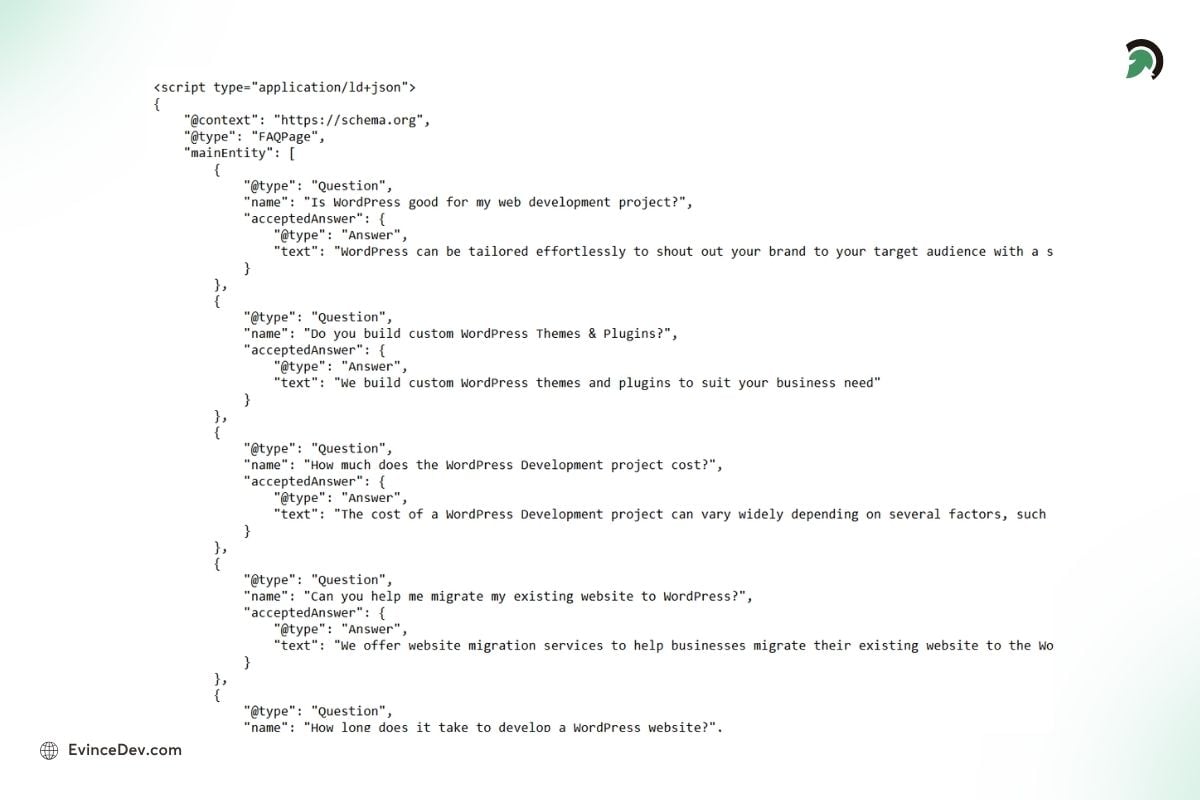
FAQ Schema helps search engines better understand frequently asked questions, improving content visibility and making answers easier for users to find.
7. Prepare the Website for AI Search Visibility
AI search visibility means structuring website content so search engines, AI Overviews, answer engines, and conversational search tools can understand it clearly. This goes beyond traditional SEO and focuses on direct answers, topic clarity, and entity-rich content.
It matters because users are now more inclined to discovering information through AI-generated summaries and question-based search experiences. Websites that explain topics clearly and in a better way have a better chance of being understood, cited, or surfaced in these new search journeys.
How to do it:
- Add clear answers to common user questions
- Use FAQ sections on relevant pages
- Build topic clusters around services, industries, and use cases
- Use entity-rich content with clear context
- Add schema markup where suitable
- Include examples, comparisons, and practical explanations
- Keep content updated and factually accurate
- Link related blogs, service pages, case studies, and resources
- Make content easy to scan with clear headings and short sections
Pro tip: Do not write only for keywords. Write in a way that clearly explains what the topic is, who it helps, how it works, and why it matters.
8. Use Clean, Modular, and Maintainable Code
Clean code makes a website easier to update, debug, scale, and maintain. Users may not see what code is being used in the backend, however, they can feel its impact through faster updates, fewer bugs, smoother performance.
It matters because poorly written code creates technical debt. Over time, even smallest changes can become slow, risky, and expensive if the codebase is messy, unreliable, or hard to understand.
How to do it:
- Use reusable components for repeated sections
- Follow consistent naming conventions
- Keep files, folders, and modules organized
- Remove unused code, old scripts, and unnecessary dependencies
- Use linting and formatting tools
- Add comments where logic needs explanation
- Use TypeScript where it adds value
- Review code before merging changes
- Keep business logic separate from presentation where possible
Pro tip: Maintainability should be treated as one of the core web development best practices, especially for websites that will keep growing with new pages, features, and integrations.
9. Choose the Right CMS, Framework, and Tech Stack
There is no one-size-fits-all solution since the CMS, framework, and the tech stack must be chosen based on the website objectives, content requirements, technical demands, budget considerations, and future maintenance plan. The choice is significant because the inappropriate technology can lead to limited scalability, slower website updates, higher expenses, or difficult content management.
How to do it:
- Choose the CMS based on content editing needs
- Select a framework that fits the website type and expected growth
- Consider a headless CMS for multi-channel content delivery
- Check scalability, performance, and security requirements
- Review developer availability and long-term support
- Evaluate integration needs before choosing the stack
- Avoid using a technology only because it is trending
- Match the tech stack with business goals and team capabilities
Pro tip: Businesses that need advanced publishing workflows, custom content structures, or scalable content management can explore CMS Development Services to create a more flexible setup.
Expert Note:
A CMS should be structured around the needs of the marketing and content teams using it. FAQs, CTAs, service blocks, case studies, SEO fields, and banners should be easy to update without affecting design consistency or requiring small development changes.
10. Build With API-First and Integration-Ready Architecture
Modern websites are often required to connect with CRMs, ERPs, payment gateways, analytics platforms, marketing automation tools, booking systems, chatbots, and also the customer portals. An API-first approach is what prepares the website for these connections.
It matters because integrations help automate business workflows. Without proper planning, data can become scattered across systems, forms may not sync correctly, and teams may need more manual work.
How to do it:
- Identify required integrations before development starts
- Use secure and well-documented APIs
- Add authentication, authorization, and rate limiting
- Plan API versioning for future updates
- Test data flow between connected systems
- Avoid hard-coded or fragile integrations
- Add error handling for failed API requests
- Keep integration documentation updated
- Make sure third-party tools follow privacy and security requirements
Pro tip: Think beyond the website frontend. Plan how data will move between forms, CRM tools, email systems, analytics platforms, and internal teams.
Expert View
Connecting a website with a CRM, payment system, or marketing tool is only one part of the work. Teams should also have visibility into failed syncs, API errors, duplicate records, and missing lead data so issues can be resolved before they affect business operations.
11. Implement Automated Testing and Quality Checks
Testing is what helps find bugs, faulty designs, slow loading, and unsuccessful user journeys before users go through them. This makes developers feel more confident before the release and any major change.
This is important since the smallest thing may impact leads, sales, trust, and the UX. A failing form, an issue at the checkout, or something similar will make conversions drop immediately.
How to do it:
- Run unit tests for key functions and components
- Use integration testing for connected systems
- Test important user journeys from start to finish
- Check forms, search, login, checkout, and CTA flows
- Use visual testing for layout changes where needed
- Run performance tests before launch
- Check broken links, redirects, and missing pages
- Review tracking codes, schema, and analytics setup
- Test content accuracy and design consistency
Pro tip: Focus testing on business-critical actions first. Contact forms, checkout pages, booking flows, demo requests, and lead forms should never be treated as secondary items.
Also Read: The Rise of API in Web Development12. Use CI/CD for Faster and Safer Deployments
CI/CD makes sure that the development team releases software updates in a more secure and efficient manner. This involves automating certain aspects of the build process, testing, staging, and deployment.
It is important since there may be mistakes when manually deploying code. There may also be files that might get left out, leading to downtime.
How to do it:
- Use version control for all code changes
- Set up separate development, staging, and production environments
- Automate builds and basic quality checks
- Run tests before deployment
- Use staging reviews before pushing changes live
- Keep rollback options ready
- Track deployment history and release notes
- Use feature flags for controlled rollouts
- Add security scans where possible
Pro tip: A staging environment is important. It allows teams to test real website changes before users see them on the live site.
13. Test Across Browsers, Devices, and Real User Conditions
A website can behave differently across browsers, devices, operating systems, screen sizes, and internet speeds. Cross-browser and cross-device testing helps ensure the experience stays consistent.
It matters because users may access the website from Chrome, Safari, Firefox, Edge, Android, iOS, tablets, desktops, or older devices. If the website breaks for a segment of users, the business may lose potential leads or customers.
How to do it:
- Test pages on major browsers such as Chrome, Safari, Firefox, and Edge
- Check layouts on Android and iOS devices
- Review tablet, laptop, and desktop screen sizes
- Test navigation, buttons, forms, and popups on touch screens
- Check performance on slower networks
- Review browser-specific layout differences
- Test keyboard navigation and focus states
- Confirm that images, videos, and animations work properly
- Check forms and CTAs across devices
Pro tip: Do not rely only on browser resizing tools. Real-device testing often reveals issues that simulated previews miss.
14. Design for Conversions With Clear CTAs and Trust Signals
A website should not only look good, in fact, it should also help users understand what to do next, whether that is booking a call, requesting a quote, signing up, downloading a resource, or making a purchase.
It matters because traffic alone can not create business value. The website needs clear messaging, strong page flow, simple forms, visible CTAs, as well as trust building elements to convert visitors into leads or customers.
How to do it:
- Use clear and action-focused CTA buttons
- Keep forms short and easy to complete
- Place CTAs where users naturally need them
- Add testimonials, client logos, case studies, and reviews
- Use strong visual hierarchy for headings, content, and buttons
- Keep layouts clean and free from unnecessary clutter
- Use real content instead of placeholder text
- Make contact details easy to find
- Align every important page with one main conversion goal
Pro tip: A page with too many competing CTAs can confuse users. Choose one primary action and support it with clear content and trust signals.
Quick Stat:
Baymard Institute reports that the average cart abandonment rate is 70.19%, which shows how much conversion-focused design, clear forms, and smooth checkout flows matter for eCommerce websites.
15. Monitor, Maintain, and Improve After Launch
A website needs continuous care even after the launch. Regular monitoring and maintenance is helpful in keeping the web-site secure, fast, updated, and aligned with new evolving business goals.
It matters because websites can become slow, outdated or less effective over time. New browser updates, plugin changes, content gaps, broken links, and security risks can affect performance if they are not taken into account.
How to do it:
- Monitor uptime and page performance
- Track Core Web Vitals regularly
- Fix broken links, errors, and failed redirects
- Update plugins, themes, frameworks, and dependencies
- Run regular backups and security checks
- Review analytics and conversion data
- Improve underperforming pages based on user behavior
- Update outdated content and visuals
- Check forms, CTAs, and tracking setup after updates
- Plan regular performance and SEO audits
Pro tip: Launch is not the finish line. Ongoing improvement is one of the best web development practices that keeps the website useful, secure, and competitive over time.
Quick Recap: Web Development Best Practices and Their Business Impact
Here is a quick recap of the 15 web development best practices and how each one supports website performance, usability, security, and business growth.
| Best Practice | Main Focus | Business Impact |
| Website planning and architecture | Structure, goals, user flow | Reduces rework and supports scalability |
| Mobile-first responsive design | Mobile usability | Improves user experience across devices |
| Performance and Core Web Vitals | Speed and stability | Improves SEO, engagement, and conversions |
| Security-first development | Data and system protection | Builds trust and reduces risk |
| Accessibility | Inclusive usability | Makes the website easier for all users |
| SEO-first development | Crawlability and rankings | Improves organic visibility |
| AI search visibility | Answer-ready content | Supports visibility in AI-driven search |
| Clean and maintainable code | Code quality | Reduces long-term development issues |
| Right CMS and tech stack | Platform selection | Supports growth and content management |
| API-first architecture | Integrations | Connects the website with business tools |
| Automated testing | Quality assurance | Reduces bugs before launch |
| CI/CD | Deployment workflow | Enables safer and faster releases |
| Cross-browser testing | Consistency | Improves experience for all users |
| Conversion-focused design | CTAs and trust signals | Improves leads, sales, and inquiries |
| Post-launch maintenance | Monitoring and updates | Keeps the website secure and competitive |
Additional Practices Worth Considering
Progressive Web Apps
Progressive Web Apps can give websites app-like features such as offline access, push notifications, faster loading, and smoother mobile usability. They are useful for platforms where users return often, such as eCommerce stores, learning portals, dashboards, booking systems, or customer portals.
PWAs may not be needed for every business website, but they can improve engagement when the website needs to behave more like an app.
Sustainable Web Development
Sustainable web development focuses on reducing unnecessary page weight and improving efficiency. It includes optimized images, cleaner code, fewer unused scripts, better hosting choices, and lower resource usage.
This also supports performance. A lighter website usually loads faster, works better on mobile, and creates a smoother experience for users.
Privacy and Compliance by Design
Websites that collect user data are advised to follow privacy and compliance practices from the beginning. This may include cookie consent, clear privacy policies, data minimization, secure data storage, consent tracking, as well as safe use of third-party tools.
Depending on the target audience, location and other such factors, businesses may also need to consider GDPR, CCPA, or other privacy regulations. Privacy-first development helps reduce risk and build user trust.
Content-First Development
Content should not be added at the last stage. A website should be designed around real content so the layout, messaging, SEO structure, and user journey feel natural.
This is especially useful for service pages, industry pages, blogs, case studies, landing pages, and product pages. Real content helps teams avoid design gaps that appear when placeholder text is replaced later.
How These Best Practices Help Businesses Build Better Websites
With proper development procedures in place, companies will not only benefit from a good-looking website but also acquire a tool for marketing, selling, operations, customer experience, and overall growth.
Proper planning provides a strategy. Mobile-first design increases outreach. Optimization ensures engagement. Security preserves trust. Accessibility increases usability. Search engine optimization and web development seo help to get more visibility. Good coding and CI/CD makes it easy to maintain the website in the future.
Together, these web development strategies help businesses build websites that perform well today and remain easier to improve tomorrow.
Choosing the Right Web Development Partner
Applying all these practices requires the right strategy, technical skill, and execution process. A reliable development partner can help plan the website, choose the right technology, build secure architecture, optimize performance, support integrations, and maintain the website after launch.
When choosing a partner, businesses should look for experience across UI/UX, front-end development, back-end development, CMS development, QA, SEO, security, and post-launch support.
Professional web development services can help businesses turn these practices into a scalable, secure, and performance-focused website that supports long-term goals.
Choosing the Right Web Development Partner
Applying all these practices requires the right strategy, technical skill, and execution process. A reliable development partner can help plan the website, choose the right technology, build secure architecture, optimize performance, support integrations, and maintain the website after launch.
When choosing a partner, businesses should look for experience across UI/UX, front-end development, back-end development, CMS development, QA, SEO, security, and post-launch support.
This is where working with an experienced web development company like EvinceDev can make the process more structured and reliable. With expertise across custom web development, web application development, CMS development, eCommerce development, UI/UX design, cloud solutions, and ongoing support, EvinceDev helps businesses build scalable, secure, and performance-focused websites aligned with long-term digital goals.
Professional web development services can help businesses turn these practices into a future-ready website that supports usability, visibility, security, and business growth.
Conclusion
Website development today is not only about design and technology but involves various other factors such as SEO, security, performance, accessibility, and business strategy. Apart from designing a professional-looking website, it is important for it to be fast-loading, multi-device friendly, secure, visible in search engines, integrated with business tools, and drive users to take the required actions.
Adhering to the correct website development best practices enables businesses to create more efficient and easy to maintain websites. Moreover, adhering to the correct practices reduces future risks by laying a better foundation at the start.
It is possible to build high-quality websites through proper planning, using the mobile-first philosophy, performance, security, accessibility, SEO, AI search readiness, high-quality code, integration, testing, deploying, conversion rate optimization, and maintenance.
Through the use of these web development best practices, it is possible to build websites that can satisfy users, search engines, internal stakeholders, and future needs.
FAQs
1. What are web development best practices?
Web development best practices are proven methods used to build websites that are fast, secure, user-friendly, accessible, scalable, SEO-ready, and easy to maintain.
2. Why are web development best practices important?
They help improve website performance, user experience, search visibility, security, mobile usability, conversion rates, and long-term maintainability.
3. What is the most important best practice in web development?
There is no single best practice that works alone. Planning, performance optimization, security, mobile-first design, accessibility, and SEO are all important for building a strong website.
4. How does the web development strategy impact the growth of a business?
A web development strategy impacts the speed at which the website loads, navigability of the website, search engine rankings, security of the website, and conversion rates.
5. How often should a website be maintained?
A website should be monitored regularly and maintained through updates, backups, security checks, performance reviews, broken link fixes, analytics reviews, and content improvements.
6. What should a business verify prior to the website launch?
The following is what a business should check prior to the website launch; Mobile responsiveness, Browser compatibility, Page speed, Core Web Vitals, SEO configuration, Security, Forms, Links, Redirects, Analytics, Accessibility, Backups, and Content accuracy.