Key Takeaways
- More Than a Transaction: Payment processing connects customers, merchants, gateways, processors, card networks, and banks to complete digital payments securely.
- Multiple Steps Work Together: Each payment moves through authorization, capture, clearing, and settlement before the merchant receives the funds.
- Provider Choice Matters: Businesses should compare payment methods, total fees, security, integrations, settlement terms, reporting, and scalability.
- Failures Can Be Recovered: Clear decline messages, alternative methods, controlled retries, and payment reminders can help recover lost revenue.
- Reliability Supports Growth: Secure, flexible, and well-integrated payment systems can improve checkout experiences, financial visibility, and operational efficiency.
A customer taps a card, clicks “Pay Now,” or scans a QR code, and the transaction appears to finish almost instantly. Behind that brief moment, however, a complex network of gateways, processors, banks, payment networks, and security systems works together to verify the payment and move the funds.
For businesses, this process directly affects far more than revenue collection. It shapes checkout completion, customer trust, transaction approval rates, fraud exposure, operating costs, cash flow, and financial visibility. Even a small delay, confusing error, or unnecessary decline can interrupt a sale and damage the overall customer experience.
Understanding what is payment processing helps businesses make better decisions about the technologies and providers that support their transactions. This guide explains how payment processing works, who is involved, how fees and settlement are handled, what security measures protect payments, and how businesses can choose a provider that fits their operational and growth needs.
Quick Stat:
According to Worldpay’s Global Payments Report 2025, spending through digital payment methods increased from $1.7 trillion in 2014 to $18.7 trillion in 2024 and is projected to exceed $33.5 trillion by 2030.
What Is Payment Processing?
Payment processing is the series of steps used to securely accept, verify, authorize, and complete an electronic transaction between a customer and a business.
It connects the systems used by the merchant with payment gateways, processors, card networks, acquiring banks, and issuing banks. Together, these participants determine whether a transaction is legitimate, whether sufficient funds are available, and whether the money can be transferred to the merchant.
In simple terms, the process answers three questions:
- Is the customer’s payment information valid?
- Does the customer have enough money or available credit?
- Can the transaction be completed securely?
Modern payment processing systems can support debit and credit cards, digital wallets, bank transfers, UPI, recurring billing, contactless payments, account-to-account transfers, and buy now, pay later services.
Quick Stat:
McKinsey reports that the global payments industry supported approximately 3.6 trillion transactions and $2 quadrillion in value flows, generating about $2.5 trillion in revenue.
Why Is Payment Processing Important for Businesses?
Customers expect to pay quickly, securely, and through a method they already trust, however, when a business cannot support a preferred payment option, or when its checkout repeatedly fails, customers may leave without completing the purchase.
Expert Perspective:
“Fraud risk now extends beyond individual transactions to identity theft, fraudulent account creation, and application fraud. Businesses therefore need to evaluate risk across the entire customer lifecycle, not only at the moment of payment.”
– Michael Jabbara, Senior Vice President, Global Head of Fraud Services, Visa
A reliable payment setup helps businesses:
- Accept payments through websites, apps, stores, and payment links
- Improve checkout completion rates
- Support subscription and recurring revenue models
- Reduce unsuccessful transactions
- Manage refunds and disputes
- Track transaction fees and payouts
- Accept international currencies and regional methods
- Protect sensitive financial information
- Improve accounting and cash-flow visibility
The payment experience is also part of the overall customer experience. Clear instructions, quick authorization, mobile-friendly forms, and meaningful error messages can make customers feel more confident about completing a purchase.
Also Read: How Long Do Wire Transfers Take? A Complete GuideQuick Stat:
Baymard Institute estimates that the average ecommerce cart abandonment rate is approximately 70%, showing how checkout friction, payment issues, and unexpected costs can affect completed sales.
Who Is Involved in a Payment Transaction?
Several participants may be involved in moving money from a customer to a merchant.
Customer or Cardholder
The customer is the person or organization making the purchase. They may use a card, bank account, digital wallet, or another available method.
Merchant
The merchant is the company accepting the payment. It could be an ecommerce retailer, SaaS business, marketplace, restaurant, healthcare provider, or physical store.
Point-of-Sale System or Checkout Interface
The point-of-sale system or checkout interface is where the customer initiates the transaction. It may be a physical card terminal, an ecommerce checkout page, a mobile application, a QR code, a payment link, or an in-app purchase screen.
Payment Gateway
A payment gateway securely collects the customer’s details and transfers them from the checkout interface to the processor. It may also encrypt or tokenize sensitive information.
Payment Processor
The processor routes the transaction between the merchant, payment network, and relevant financial institutions. It supports authorization, clearing, and settlement.
Acquiring Bank
The acquiring bank works with the merchant and receives funds on its behalf. It may provide or support the merchant account used to accept card transactions.
Issuing Bank
The issuing bank provides the customer’s card or account. It decides whether the transaction should be approved or declined.
Card Network
Networks such as Visa, Mastercard, American Express, and RuPay transfer card transaction information between the issuing and acquiring institutions. They also establish many of the rules under which card transactions operate.
How Payment Processing Works Step by Step
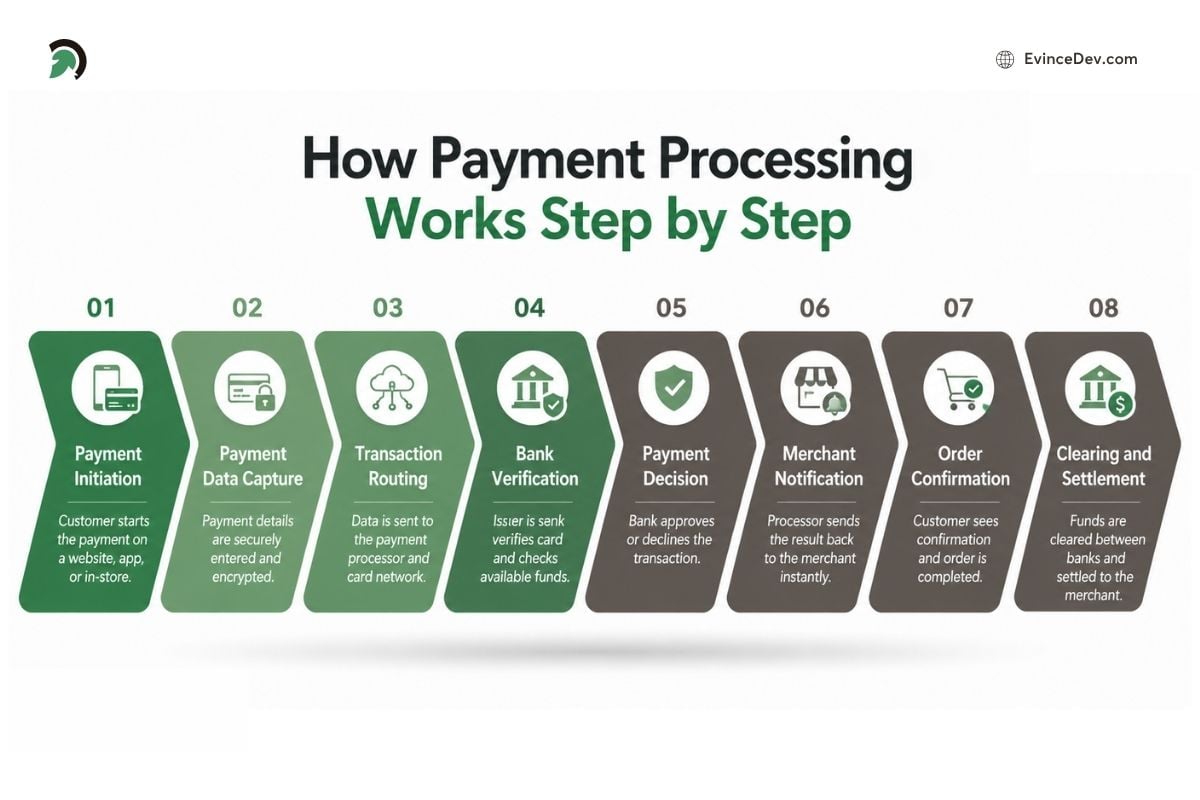
How payment processing works from payment initiation and data capture to bank verification, approval, and settlement.
A payment may appear instant to the customer, but it passes through several connected systems before the merchant receives the funds.
Step 1: Payment Initiation
The customer selects a product or service and chooses a payment method. This may involve entering card details, using a digital wallet, scanning a QR code, or tapping a card at a terminal.
Step 2: Payment Data Capture
The payment gateway collects the transaction details and protects sensitive information through encryption or tokenization. The secured request is then sent to the payment processor.
Step 3: Transaction Routing
The processor forwards the request through the relevant card network or banking channel. The request includes the payment amount, merchant details, account information, and security data.
Step 4: Bank Verification
The issuing bank reviews the transaction by checking the available balance or credit, account status, transaction limits, security credentials, device information, and possible fraud signals.
Step 5: Payment Decision
The issuing bank either approves the payment or declines it with a response code explaining the issue.
Step 6: Merchant Notification
The approval or decline response travels back through the payment network, processor, and gateway. The merchant’s website, app, or terminal then displays the result to the customer.
Step 7: Order Confirmation
If the payment is approved, the merchant confirms the purchase and begins processing the order or delivering the service.
Step 8: Clearing and Settlement
The approved transaction is submitted for clearing, and the funds move from the customer’s bank to the merchant’s acquiring institution. After applicable fees and adjustments are deducted, the remaining amount is deposited into the merchant’s account.
Authorization usually takes only a few seconds, while settlement may take longer depending on the payment method, provider, country, banking schedule, and merchant risk profile.
Expert Perspective
“Payment performance should not be treated only as a finance metric. Every decline, delay, and unnecessary verification step affects the customer journey, which means payment success must be considered during product and checkout design.”
– Dharmesh Patt, CTO – Operations & Management, EvinceDev
What Are Authorization, Capture, Clearing, and Settlement?
These four terms describe different stages of the transaction lifecycle.
Authorization
Authorization is the issuing bank’s confirmation that the transaction may proceed well. The bank checks the account, available balance, payment credentials, and risk signals.
An approval does not always mean that the merchant has already received the money. It generally means the amount has been approved and may be reserved.
Capture
Capture is the merchant’s request to collect the authorized amount.
Some businesses authorize and capture a transaction immediately, while the others may delay the same until the order has shipped, a hotel stay has finished, or the service has been delivered.
Clearing
During clearing, the transaction details are exchanged between processors, payment networks, and banks. The participating institutions calculate the final amounts and applicable fees.
Settlement
Settlement occurs when the funds are transferred to the merchant. The amount deposited may be lower than the original sale value because transaction fees, refunds, reserves, or other adjustments may be deducted.
Payment Gateway vs. Payment Processor
A gateway and a processor perform related but distinct functions.
| Factor | Payment Gateway | Payment Processor |
| Main role | Captures and transmits payment details | Routes and manages transaction messages |
| Customer interaction | Often connected to checkout | Usually operates behind the scenes |
| Primary focus | Secure data transfer | Authorization, clearing, and settlement |
| Common use | Especially important online | Used online and in physical stores |
| Security role | Encrypts or tokenizes information | Applies transaction and risk rules |
Some providers combine gateway and processor capabilities into one platform. This can simplify integration, reporting, support, and vendor management.
Merchant Account vs. Payment Service Provider Account
A merchant account is a specialized account that is used to receive card transaction funds before they are transferred to the business bank account. It is commonly established through an acquiring bank or payment provider.
Traditional merchant accounts may involve detailed underwriting and providers can evaluate the company’s business model, financial history, expected volume, average transaction value, and also the chargeback risk before the approval.
A payment service provider uses an aggregated structure in which multiple businesses operate under the provider’s larger merchant arrangement. This model generally allows faster onboarding.
A dedicated merchant account may offer more control and flexible pricing for larger businesses. An aggregated account may be more convenient for startups and smaller merchants, although it can involve stricter limits, reserves, or account-review policies.
What Types of Payments Can Businesses Accept?
Businesses can support different methods based on their market, customers, and operating model.
Credit and Debit Cards
Cards remain widely used for online and in-store purchases. They offer familiarity, convenience, and broad acceptance.
Digital Wallets
Digital wallets allow customers to pay using stored card or account details. They can reduce form filling and make mobile checkout faster.
Quick Stat:
Digital wallets represented 56% of global ecommerce spending and 33% of in-person spending in 2025, making them an increasingly important option for both online and physical businesses.
Bank Transfers
Bank-based methods move funds directly between accounts. They may be suitable for B2B transactions, high-value payments, invoices, and markets where cards are less common.
UPI and Real-Time Payments
Real-time networks enable customers to transfer money using mobile apps, account identifiers, or QR codes. They can provide quick confirmation and lower friction.
Recurring Payments
Subscription businesses use recurring billing to automatically charge customers at scheduled intervals. This requires secure storage of reusable payment credentials, typically through tokenization.
Buy Now, Pay Later
Buy now, pay later services allow customers to divide a purchase into installments. The merchant receives funds according to the provider’s terms.
Cross-Border Payments
International transactions may involve foreign currencies, regional methods, additional fraud checks, conversion charges, and cross-border fees.
|
How Do Online and In-Store Payments Differ?
Online transactions are generally classified as card-not-present payments because the merchant cannot physically inspect the card. These transactions may require stronger fraud screening, device checks, address verification, and customer authentication.
In-store transactions are usually card-present. Customers insert, swipe, or tap a card or mobile wallet at a terminal. The physical presence of the payment instrument can reduce certain fraud risks.
Businesses operating across several channels should consider payment processing systems that can combine transaction records, customer information, refunds, inventory updates, and financial reports.
What Security Measures Protect Payments?
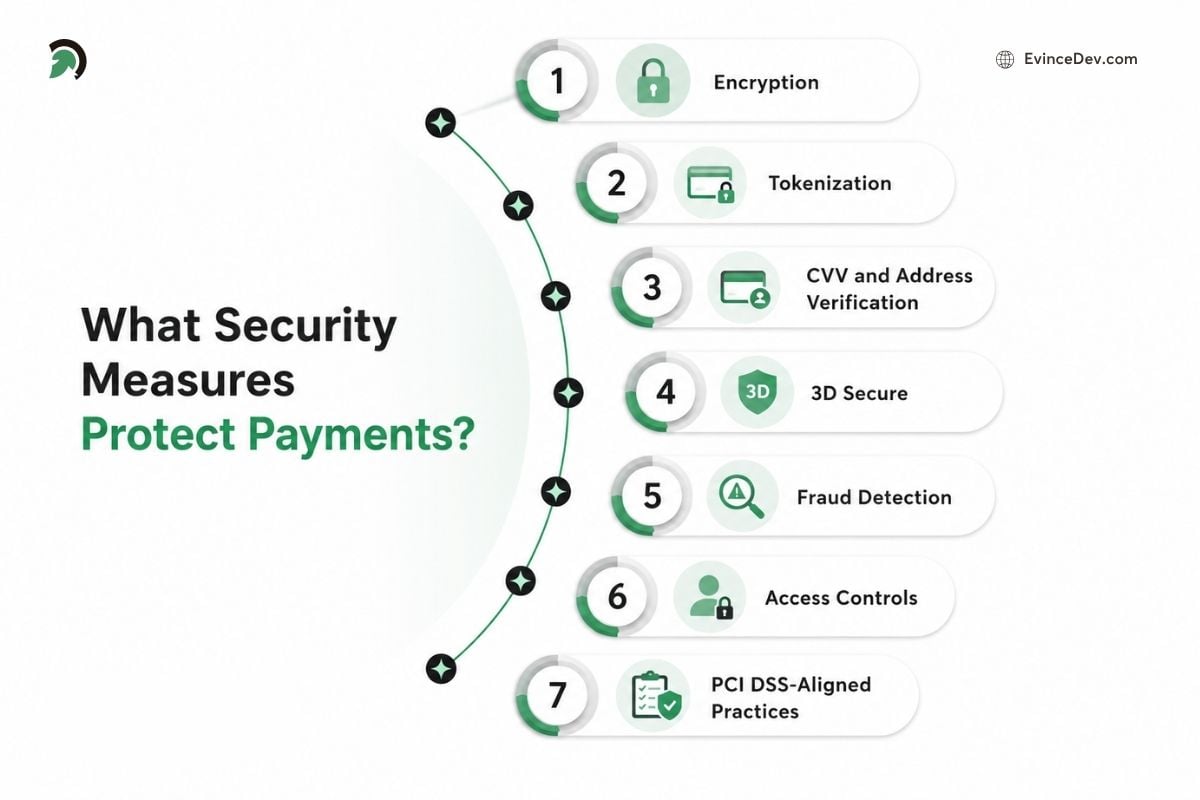
Key security measures that protect digital payments and sensitive cardholder data throughout the transaction process.
Payment security involves both technical controls and operational practices.
Encryption
Encryption converts readable information into protected data while it travels between systems. Unauthorized parties cannot easily interpret the information without the appropriate key.
Tokenization
Tokenization replaces sensitive card details with a non-sensitive token. The token can be used for future transactions without repeatedly exposing the actual card number.
CVV and Address Verification
CVV and billing-address checks help determine whether the customer possesses the card and knows the associated information.
3D Secure
3D Secure may require the customer to verify a transaction through their bank. Depending on the bank, the customer may use an app, one-time password, or biometric confirmation.
Fraud Detection
Fraud tools examine factors such as transaction history, location, device information, order value, purchasing behavior, and unusual patterns.
Access Controls
Only authorized employees and systems should be able to view transaction data or modify payment settings. Businesses should use role-based access and multi-factor authentication where appropriate.
PCI DSS-Aligned Practices
Businesses accepting cards should design their technology and procedures to align with applicable PCI DSS requirements. Reducing the amount of card data stored or handled directly can lower security exposure.
Security should be treated as an ongoing process. Payment software must be updated, access should be reviewed, employees should receive training, and unusual activity should be monitored.
Also Read: PCI DSS Compliance in Software Development: A Complete GuideWhat Fees Do Businesses Pay?
The cost of accepting digital payments can include several types of charges:
- Transaction fees: A fixed amount or percentage charged on each payment
- Interchange fees: Fees paid to the customer’s issuing bank
- Processor markups: Additional charges applied by the payment provider
- Gateway or platform fees: Charges for using checkout, reporting, billing, or payment software
- Cross-border and currency fees: Extra costs for international cards, foreign currencies, or conversion
- Chargeback fees: Charges applied when a customer disputes a transaction
- Hardware fees: Costs for terminals, card readers, printers, or other in-store equipment
The exact amount depends on the provider, payment method, transaction type, region, as well as, the pricing model. Businesses should compare the total cost rather than focusing only on the advertised transaction rate.
What Are the Common Pricing Models?
Flat-Rate Pricing
The merchant pays a standard percentage and fixed fee for every transaction. It is easy to understand and forecast.
Interchange-Plus Pricing
The merchant pays the underlying interchange amount plus a clearly identified provider markup. This model offers greater transparency and can suit businesses with higher volume.
Tiered Pricing
Transactions are grouped into pricing levels such as qualified, mid-qualified, and non-qualified. The final cost depends on the category assigned to each payment.
Subscription-Based Pricing
The merchant pays a recurring platform or membership fee, sometimes in exchange for a lower transaction markup.
How Can Businesses Reduce Payment Costs?
Businesses should compare the complete cost rather than choosing a provider solely because it advertises a low percentage rate.
Useful strategies include:
- Review monthly, gateway, hardware, international, and dispute fees
- Compare providers using actual transaction volume and order values
- Negotiate pricing as the company grows
- Offer lower-cost bank-based methods where appropriate
- Use clear billing descriptors to reduce unrecognized transactions
- Maintain transparent refund and cancellation policies
- Prevent fraud without creating excessive false declines
- Track costs by country, card type, channel, and method
- Reassess the provider and pricing model periodically
Square payment processing may be considered by businesses seeking an integrated point-of-sale, hardware, and transaction platform. Stripe payment processing is often evaluated by online businesses that need APIs, recurring billing, international methods, and customizable checkout experiences.
The better choice depends on the business model, location, expected volume, required integrations, and overall cost.
What Happens When a Payment Fails?
A payment may fail because of insufficient funds, incorrect details, failed authentication, bank restrictions, fraud checks, transaction limits, network issues, unsupported methods, or the gateway related errors.
Common Causes of Payment Failure
- Customer-related issues: Insufficient funds, incorrect details, expired cards, or failed authentication
- Bank-related issues: Account restrictions, transaction limits, or declined authorization
- Security-related issues: Fraud rules, unusual activity, or repeated payment attempts
- Technical issues: Network timeouts, unsupported methods, or gateway and processor errors
How Businesses Can Respond
Some failures are temporary and may succeed after a controlled retry. Others require the customer to update their details, choose some another method, or contact their respective banks.
Businesses can improve recovery by showing clear error messages, offering alternative payment options, sending update reminders, using scheduled retries for subscriptions, tracking decline codes, as well as, avoiding excessive attempts that may trigger fraud controls. A structured recovery process can reduce lost sales, improve the customer experience, and recover more recurring revenue.
What Are Refunds and Chargebacks?
A refund is issued directly by the merchant when a business returns all or part of a customer’s payment. A chargeback, on the other hand, begins when a customer disputes a transaction through their bank. The bank reviews the claim and may temporarily reverse the payment while the dispute is investigated.
Chargebacks may happen because of the stolen payment details, unrecognized billing names, duplicate charges, delivery issues, product-quality concerns, subscription cancellation problems, or even poor communication from the merchant. To handle disputes effectively, businesses should always maintain clear order records, delivery proof, refund details, customer communications, as well as service terms. A high number of chargebacks can lead to additional fees, payment reserves, closer account monitoring, and also restrictions from the payment provider.
How Long Does Settlement Take?
Settlement is not always immediate, and the time required may vary depending on the payment method, provider payout schedule, merchant risk level, country, currency, weekends, bank holidays, transaction reviews, refund activity, rolling reserves, and even cross-border requirements. Some providers also offer accelerated payouts for an additional fee. Businesses should understand when funds will become available, because settlement timelines can directly affect working capital, cash-flow planning, as well as, day-to-day financial operations.
What Are Payment Reconciliation and Reporting?
Payment reconciliation is the process of matching the transaction data across different systems to confirm that each payment has been recorded, settled, as well as, deposited correctly. It typically involves comparing customer orders, approved transactions, processor records, settlement statements, bank deposits, fees, refunds, and chargebacks.
Accurate reconciliation helps businesses verify that successful sales were paid, identify any duplicate transactions, separate processing fees from the revenue, and detect delayed or even incorrect payouts. Reporting adds further visibility by showing the approval rates, failed payments, refund activity, dispute trends, settlement status, as well as, transaction costs.
As the payment volume increases, managing this process manually can become time consuming and even error prone. Automated reports and integrations with ERP systems can simplify reconciliation, improve financial accuracy, and give businesses a holistic view of cash flow as well as payment performance.
Expert Perspective:
“Payment reconciliation becomes difficult when order, transaction, settlement, refund, and bank data are stored as disconnected records. Designing a consistent transaction reference across systems can prevent hours of manual investigation later.”
– Dharmesh Patt, CTO – Operations & Management, EvinceDev
How Should a Business Choose a Payment Processing Provider?
The right provider should fit the business model, customer expectations, transaction volume, technical setup, and expansion plans. Businesses should look beyond basic transaction rates and evaluate the complete payment experience.
Supported Payment Methods
The provider should support the methods customers actually use, including credit and debit cards, digital wallets, bank transfers, UPI, buy now, pay later, and local payment options. A broader range of relevant methods can reduce checkout friction and improve conversion rates.
Total Processing Cost
Businesses should compare the full cost of accepting payments, not just the advertised percentage per transaction. This includes fixed fees, interchange costs, gateway charges, monthly fees, currency conversion charges, cross-border fees, chargeback fees, and hardware costs.
Security and Fraud Prevention
A reliable provider should offer encryption, tokenization, multi-factor authentication, fraud screening, secure credential storage, and role-based access controls. Businesses should also assess how the provider handles suspicious transactions, false declines, and customer authentication.
Integration Flexibility
The provider should fit the existing technology environment. Depending on the business, this may require hosted checkout pages, ecommerce plugins, APIs, mobile SDKs, payment links, subscription billing tools, marketplace capabilities, or POS hardware.
Transaction Success Rates
Low fees are less valuable if legitimate payments are frequently declined. Businesses should review authorization performance, retry capabilities, payment routing, and support for local acquiring in key markets.
Settlement and Payout Terms
The provider should clearly explain payout schedules, settlement timelines, rolling reserves, account holds, and review procedures. Faster and more predictable payouts can improve cash-flow planning.
International Payment Support
Businesses serving multiple regions should examine supported countries, currencies, local payment methods, tax requirements, conversion fees, and cross-border transaction costs.
Recurring Billing Capabilities
Subscription businesses may need automated invoicing, plan management, usage-based billing, payment retries, card-update services, prorated charges, and self-service customer billing portals.
Reporting and Reconciliation
The platform should provide clear reports for approved and failed payments, fees, refunds, chargebacks, settlements, and payouts. Strong reporting and accounting integrations can reduce manual reconciliation and make financial tracking more accurate.
Scalability and Reliability
The provider should be able to support higher transaction volumes, seasonal demand, new markets, additional products, and multiple sales channels. Businesses should also review uptime, system performance, backup options, and incident-handling processes.
Customer and Technical Support
Responsive support is especially important when transactions fail, payouts are delayed, accounts are reviewed, or an integration breaks. Businesses should check support hours, available channels, response times, and access to technical assistance.
Platform-Specific Requirements
Some businesses need more than standard checkout functionality. A company developing a specialized financial product may work with a fintech software development company to build secure payment flows, provider integrations, reporting dashboards, fraud controls, and reconciliation features.
Broader custom software development services can connect payment functionality with ecommerce platforms, mobile applications, ERPs, CRMs, accounting tools, subscription systems, and internal business workflows.
Popular Payment Processing Systems Businesses Can Consider
Payment providers differ in their ideal use cases, integration options, supported markets, and pricing structures. Some commonly considered platforms include:
| Provider | Commonly Considered For |
| Stripe | API-based online payments, SaaS, subscriptions, and marketplaces |
| Square | In-person payments, POS systems, and small businesses |
| PayPal | Familiar online checkout and international customer reach |
| Adyen | Enterprise and omnichannel payment operations |
| GoCardless | Bank debit, account-to-account, and recurring payments |
The right choice depends on transaction volume, customer location, preferred payment methods, technical requirements, settlement terms, and total processing costs.
Best Practices for Reliable Payment Operations
Businesses can improve payment reliability by focusing on customer convenience, security, and consistent system performance. Key practices include:
- Offering payment methods that match customer preferences
- Keeping checkout forms short, clear, and mobile-friendly
- Using tokenization and secure integrations to protect payment data
- Providing helpful messages and alternative options when payments fail
- Monitoring approval rates, declines, refunds, chargebacks, and settlement delays
- Keeping payment plugins, APIs, terminals, and security tools updated
- Testing successful payments, failed transactions, refunds, retries, and authentication flows
- Using recognizable billing descriptors to reduce unnecessary disputes
- Reconciling payouts, fees, refunds, and bank deposits regularly
- Maintaining backup procedures for processor, gateway, or network outages
The aim is to complete legitimate transactions smoothly while reducing fraud, payment failures, unnecessary costs, disputes, and operational disruption.
Expert Perspective
“A business should avoid designing its entire payment experience around one provider’s limitations. A flexible integration layer makes it easier to add regional methods, change providers, or introduce intelligent routing as the business grows.”
– Dharmesh Patt, CTO – Operations & Management, EvinceDev
Future Trends in Digital Payments
Digital payments are becoming faster, more integrated, and more intelligent. Real-time payment networks are making it possible to move money instantly between the accounts, while embedded payments are bringing transaction capabilities directly into the marketplaces, SaaS platforms, healthcare applications, mobility solutions, and other business workflows.
Payment orchestration is also gaining importance by helping businesses connect multiple gateways and providers within a single setup. This allows transactions to be routed based on factors such as location, cost, system availability, and expected approval rates. At the same time, AI-powered fraud detection is improving how suspicious behavior is identified by analyzing large volumes of transaction and customer activity data.
Biometric authentication, including fingerprints, facial recognition, as well as, behavioral signals, is making customer verification faster and more secure. Businesses are also adopting intelligent transaction routing and personalized checkout experiences to improve payment success and display the most relevant options based on a customer’s country, device, history, and preferences.
Conclusion
A well-built payment system needs to juggle several things at once. It has to feel effortless for the customer, keep financial data locked down, cut down on failed or declined transactions, and keep processing costs in check. On top of that, businesses need real visibility into where their money is going, payouts, fees, refunds, chargebacks without having to dig for answers.
Getting this right is not just about picking a payment processor and moving on. It means understanding how the entire transaction lifecycle fits together, then choosing the right technology that matches how the business actually operates. By doing that well, checkout stops being a friction point, in fact, it becomes something that scales effortlessly with the business.
This is where EvinceDev comes in, helping companies build that foundation through fintech software development, secure payment integrations, custom software builds, and connected web and mobile solutions.