Key Takeaways
- AI-Driven Development: Generative AI helps teams plan, code, test, document, and maintain software more efficiently.
- Faster Delivery: AI reduces repetitive development tasks and supports quicker release cycles.
- Better Productivity: Developers can focus more on architecture, logic, integrations, and user experience.
- Stronger QA Support: AI can generate test cases, edge scenarios, and documentation to improve software quality.
- Human Review Matters: AI-generated code must be reviewed for accuracy, security, compliance, and business fit.
- Responsible Adoption: Businesses need clear governance, secure tools, and expert oversight to use AI effectively.
Imagine a developer generating hundreds of lines of code in seconds, a QA engineer creating comprehensive test cases with a simple prompt, or a product manager turning business requirements into detailed user stories almost instantly.
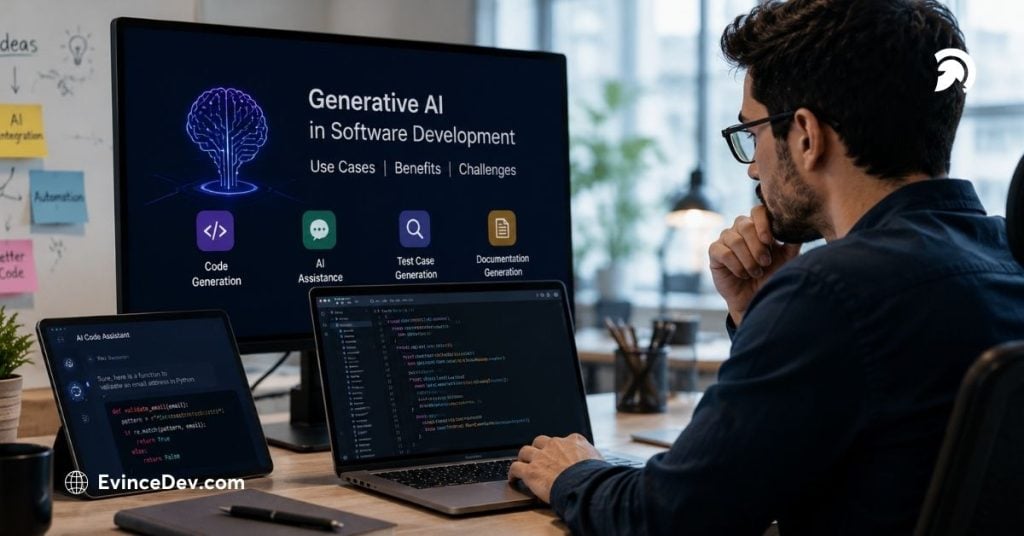
This is no longer a future concept. Generative AI is already changing how software teams design, build, test, deploy, and maintain applications. From accelerating development workflows to improving collaboration across teams, AI is becoming an integral part of modern software engineering.
But while the opportunities are significant, successful adoption requires understanding where AI delivers value, where human expertise remains critical, and how to manage risks such as security, accuracy, and compliance.
In this blog, we’ll explore the role of generative AI software development, its key use cases, benefits, challenges, popular tools, industry applications, and practical considerations for businesses looking to integrate AI into their development processes.
Quick Stat:
According to Microsoft Research and GitHub, developers using GitHub Copilot completed coding tasks 55.8% faster than those working without AI assistance.
What Is Generative AI Software Development?
Generative AI software development is the practice of using AI models to generate, analyze, and improve software-related work from writing code and test cases to drafting documentation, architecture suggestions, and DevOps scripts.
What sets it apart from traditional automation is context-awareness. Older tools follow fixed rules; generative AI responds to prompts, existing codebases, project requirements, and natural language instructions to produce new, relevant outputs. A developer can describe what they need, and the model generates a working starting point.
That said, it functions as an assistant, not a replacement. The engineering judgment deciding what to build, how to architect it, whether the logic is correct, and whether the output meets business needs still belongs to the humans on the team. What changes is where developers spend their time: less on repetitive groundwork, more on design, problem-solving, and the decisions that actually require expertise.
Why Generative AI Is Becoming Important in Software Development
Modern software projects are becoming more complex. Businesses need applications that are scalable, secure, integrated, user-friendly, and continuously updated. Development teams are expected to deliver faster while maintaining quality and managing technical debt.
This is where generative AI software development brings practical value. It helps teams handle repetitive tasks, generate first drafts of technical assets, speed up debugging, and support decision-making during development.
Several factors are driving adoption:
- Businesses want faster time-to-market.
- Development teams need to reduce repetitive coding tasks.
- QA teams need better test coverage.
- Product teams need clearer documentation and user stories.
- Enterprises want to modernize legacy systems efficiently.
- Engineering leaders want to improve developer productivity.
Generative AI for business is becoming especially valuable because it connects technology outcomes with operational goals. Instead of using AI only as a coding assistant, companies can use it to improve delivery speed, software quality, process efficiency, and team collaboration.
Also Read: How Generative AI Can Improve Your Shopify Store: Practical Growth StrategiesHow Generative AI Fits Into the Software Development Lifecycle
The real value of generative AI software development is visible when it is applied across the full software development lifecycle, not only during coding.
Here is how it can support different stages:
| SDLC Phase | How Generative AI Helps |
| Requirement Gathering | Converts business inputs into user stories, acceptance criteria, and feature summaries |
| Planning | Helps estimate tasks, identify dependencies, and structure project scope |
| Architecture | Suggests system design patterns, API structures, and integration flows |
| Development | Generates code, components, functions, APIs, and reusable logic |
| Testing | Creates unit tests, integration tests, and edge-case scenarios |
| Documentation | Generates technical documentation, API references, release notes, and user guides |
| DevOps | Assists with CI/CD scripts, Dockerfiles, cloud configurations, and deployment workflows |
| Maintenance | Helps debug issues, explain legacy code, and recommend improvements |
If used wisely, generative AI software development tools can enhance teamwork between tech-savvy and non-tech-savvy professionals. The product manager will be able to articulate his/her needs in a clear manner; the developers will work quickly, while the testing team will have a wider range of scenarios tested.
Examples of Generative AI Tools for Software Development
The tooling landscape has matured quickly. A couple of years ago, AI-assisted development meant experimenting with early prototypes. Today, there are purpose-built tools for almost every stage of the development workflow, and most development teams are already using at least one of them.
GitHub Copilot: The most adopted starting points can be found in GitHub Copilot. Copilot is embedded into your IDE and provides you with code suggestions as you write them, finishing off functions, generating templates, and suggesting code based on what you’re currently writing. It doesn’t always work perfectly, but for minimizing the friction of doing repetitive coding tasks, it’s hard to beat.
ChatGPT is the generalist. Developers use it for everything from explaining an unfamiliar library to drafting documentation to talking through a tricky architecture decision. It doesn’t integrate directly into your coding environment, but its flexibility makes it useful at almost any stage of a project.
Claude handles large codebases well. If you need to drop in an entire file, a lengthy specification, or a complex codebase and ask thoughtful questions about it, Claude’s extended context window makes it better suited for that kind of deep analysis, architecture discussion, or detailed code review.
Google Gemini fits naturally into teams already working within the Google ecosystem, particularly those using Google Cloud, Workspace, or Firebase. Code generation and cloud workflow assistance are its strongest suits in a development context.
Amazon Q Developer is built specifically for AWS. If your infrastructure lives on AWS, it can assist with building, testing, deploying, and securing cloud applications with context that generic AI tools simply don’t have.
Cursor takes a different approach entirely. Rather than being an add-on to your editor, it is the editor, rebuilt around AI assistance so that writing, reviewing, and refactoring code feels like a continuous conversation rather than a series of copy-paste interactions.
TabNine is all about code completions, with a special focus on reliability and privacy. This tool is often used by enterprise teams who want to utilize the power of AI without sharing their proprietary code with third-party servers.
What needs to be mentioned here is that no tool can do everything perfectly. In many cases, teams choose two tools depending on what they have to do. More importantly, they make an informed decision instead of just following a trend.
Key Use Cases of Generative AI in Software Development
1. AI-Powered Code Generation
What it does: Generates functions, APIs, boilerplate code, database queries, and frontend components.
Example: Creating CRUD operations or form validation logic for a customer management module.
Human review needed for: Logic accuracy, security, performance, and architecture alignment.
2. Code Review and Refactoring
What it does: Identifies bugs, improves readability, and suggests cleaner code structures.
Example: Breaking a long legacy function into smaller, reusable components.
Human review needed for: Business logic, dependencies, and domain-specific rules.
3. Test Case Generation and QA Support
What it does: Creates unit tests, integration tests, regression scenarios, and edge cases.
Example: Generating payment test cases for failed transactions, refunds, and duplicate payments.
Human review needed for: Test coverage, real-world scenarios, and compliance requirements.
4. Documentation Generation
What it does: Creates API documentation, onboarding guides, system summaries, and release notes.
Example: Summarizing a code file, inputs, outputs, and module dependencies.
Human review needed for: Accuracy, completeness, and project-specific details.
5. Requirement Analysis and User Story Creation
What it does: Converts business ideas into user stories, acceptance criteria, and feature breakdowns.
Example: Turning a dashboard requirement into user roles, features, data fields, and acceptance criteria.
Human review needed for: Business priorities, user needs, and stakeholder expectations.
6. DevOps and Infrastructure Automation
What it does: Generates CI/CD scripts, Dockerfiles, Kubernetes configurations, and cloud templates.
Example: Drafting a GitHub Actions workflow for automated testing and deployment.
Human review needed for: Security, environment setup, access control, and deployment risks.
7. Legacy Application Modernization
What it does: Explains old code, identifies dependencies, and suggests modernization paths.
Example: Understanding a legacy module before migration to a modern framework.
Human review needed for: Migration strategy, business continuity, testing, and architecture decisions.
Benefits of Generative AI Software Development
What Generative AI Actually Does for Development Teams
The benefits of generative AI in software development aren’t abstract; they show up in concrete, day-to-day ways that teams feel almost immediately after adoption.
Development is happening faster. These mundane activities, such as spending hours writing up the boilerplate, creating tests, hunting for bugs, debugging, and documenting, are the very kinds of work an AI system does best. If mundane activities become shorter, there is time to concentrate on other things.
Quick Stat:
McKinsey found that software developers can complete coding tasks up to twice as fast when using generative AI effectively.
Developers get their attention back. There’s a particular kind of exhaustion that comes from context-switching between meaningful engineering work and routine coding chores. AI absorbs a good portion of that routine work, which means developers can stay focused on architecture decisions, integration logic, and building things that actually require creative thinking.
The quality is enhanced with the right process. Artificial intelligence can identify problems during the code review phase, identify edge cases through testing, and find inconsistencies in the documentation. However, the artificial intelligence doesn’t replace QA, but only lifts the bar higher. Teams that embrace AI as a quality enhancement end up having fewer surprises.
There are no more painful onboarding processes. In any software development team, there are always codebases understood by only one or two people. This is where AI comes into play, because new hires can ask questions about unfamiliar code and receive clear answers that help them understand everything.
The nontechnical teams finally know what’s going on. Another quiet advantage of using AI is its ability to facilitate interdepartmental communication. If an AI allows a product manager or a QA lead to understand what a technical spec means, how it impacts other departments, and helps them define testing scenarios based on that, cooperation becomes much more effective.
Quick Stat:
According to Stack Overflow’s 2024 Developer Survey, 81% of developers identify increased productivity as the primary benefit of AI tools in development workflows.
Challenges of Generative AI in Software Development
- Code accuracy issues: AI-generated code may look correct, but can still include logic errors, missing validations, or inefficient patterns.
- Security risks: AI may generate insecure code, such as weak authentication, poor input validation, or unsafe data handling.
- Data privacy concerns: Using proprietary code, customer data, credentials, or confidential project details in public AI tools can create privacy and security risks.
- IP and licensing issues: AI-generated outputs may raise questions around code ownership, reuse rights, and licensing compliance.
- Limited business context: AI may not fully understand business rules, customer expectations, regulatory needs, or system dependencies.
- Over-reliance on AI: Depending too much on AI can reduce critical thinking, weaken review practices, and affect long-term code quality.
- Need for human validation: Every AI-generated output should be reviewed, tested, and validated before being used in production.
Best Practices for Adopting Generative AI Software Development
To get the most value from AI, businesses need a structured adoption approach.
-
Keep Human Review at the Center
Every AI-generated output should be reviewed by experienced developers, QA engineers, architects, or security specialists. Human validation is essential for accuracy, security, and business alignment.
-
Define AI Usage Policies
Organizations should clearly define what teams can and cannot use AI for. Policies should cover source code sharing, data privacy, approval workflows, documentation standards, and security requirements.
-
Start With Low-Risk Use Cases
Businesses can begin with use cases such as documentation, test case generation, code explanation, and internal productivity support before applying AI to critical production workflows.
-
Use Secure AI Tools
Teams should use AI platforms that support enterprise security, data protection, access control, and compliance needs. This is especially important for businesses in regulated industries.
-
Integrate AI Into Existing Workflows
AI works best when it fits naturally into existing development workflows. It should support IDEs, code repositories, QA processes, documentation systems, and DevOps pipelines.
-
Measure Impact
Businesses should track metrics such as development speed, defect rates, test coverage, documentation quality, developer productivity, and release efficiency. This helps determine whether AI adoption is creating measurable value.
The Future of Generative AI Software Development
The future of generative AI software development will move beyond simple code suggestions. AI systems are becoming more context-aware, integrated, and capable of supporting multi-step workflows. Future development environments may include AI agents that can analyze requirements, create tasks, generate code, run tests, detect failures, suggest fixes, and prepare documentation. These systems will likely work alongside developers rather than independently.
A RAG-based approach could assist AI-powered software in utilizing industry documentation, coding guidelines, product information, and architecture rules. It could increase the relevancy and reliability of the AI-generated output. As AI further integrates into the engineering workflow, enterprises must navigate a trade-off between rapid implementation and governance. The ones that will thrive in this environment are the ones that marry technological capabilities with proper governance.
Also Read: How Generative AI Is Transforming Product Content Creation for eCommerceGenerative AI Use Cases by Industry
The adoption of generative AI software development is expanding across industries as organizations seek to improve development efficiency, accelerate innovation, and deliver better digital experiences.
SaaS Platforms
Software-as-a-Service providers use generative AI to accelerate feature development, automate testing, improve documentation, enhance customer support experiences, and streamline product updates. AI can also support personalization features and intelligent workflow automation within SaaS products.
FinTech
FinTech firms make use of AI technology to improve the software development process, facilitate document automation, assist in fraud detection efforts, provide customers with better experiences, and speed up their efforts to modernize applications. Business-oriented generative AI can assist FinTech firms in developing their digital products quickly and securely.
Healthcare
AI-assisted software development in healthcare is used to develop patient portals, telemedicine platforms, healthcare application systems, healthcare analytics systems, and operations management systems. AI is capable of helping development teams boost their efficiency while speeding up the deployment of healthcare technology solutions.
eCommerce and Retail
These organizations use artificial intelligence to create personalized customer shopping experiences, recommend products, manage inventories, offer customer service, and engage in omnichannel commerce. Using AI in software development could help them adapt to changing customer demands much faster.
Logistics and Supply Chain
Using AI-based software development techniques, logistics firms develop software programs for route optimization, warehouse management, fleet tracking, predictive analytics, and operational automation, which increase the efficiency of their operations.
Enterprise Software
Large enterprises use generative AI development practices to modernize legacy systems, improve internal business applications, automate workflows, enhance reporting platforms, and accelerate digital transformation initiatives. AI helps organizations reduce development effort while improving software delivery speed and operational efficiency.
As AI adoption continues to grow, industry-specific use cases will expand beyond productivity improvements and increasingly support innovation, automation, personalization, and data-driven decision-making across software ecosystems.
When Should Businesses Consider Generative AI in Software Projects?
Businesses should consider AI adoption when they want to:
- Speed up development cycles
- Improve developer productivity
- Reduce repetitive coding tasks
- Strengthen QA and test coverage
- Improve technical documentation
- Modernize legacy applications
- Support faster product iteration
- Improve collaboration between business and engineering teams
However, AI adoption should be aligned with business goals. It should not be implemented only because it is trending. The right approach is to identify clear use cases, assess risks, define governance, and start with practical implementation areas.
For example, a SaaS company may use AI to improve developer productivity and documentation. An eCommerce business may use AI to accelerate feature development and testing. A financial technology business may work with a fintech software development company to explore secure, AI-supported development workflows for payment, compliance, or customer-facing platforms.
Role of AI in Custom Software Development
AI is changing how businesses approach custom software development. Instead of building every component manually from the ground up, teams can use AI to accelerate planning, development, testing, and maintenance. For businesses investing in custom software development services, AI can support faster delivery and better software outcomes when combined with skilled engineering teams. It can help create smarter applications, improve development workflows, and support more efficient product evolution.
Similarly, companies building mobile-first platforms can benefit from AI-supported mobile application development services, especially when teams need faster prototyping, automated testing, improved personalization, or intelligent app features.
The key is not to use AI as a shortcut. The key is to use it as a productivity layer that strengthens engineering quality, improves delivery speed, and supports better business outcomes.
Conclusion
Generative AI software development is reshaping how modern software is planned, built, tested, documented, and maintained. It gives development teams new ways to reduce repetitive effort, accelerate delivery, improve documentation, and strengthen collaboration across the software lifecycle.
However, the success of AI in development depends on responsible implementation. Businesses must validate AI-generated code, protect sensitive data, follow secure engineering practices, and keep human expertise at the center of decision-making.
The real value of generative AI software development is not in replacing developers. It is in helping skilled teams work smarter, move faster, and focus on higher-value business and technical challenges.
For organizations planning to adopt AI in their development workflows, EvinceDev can support the journey through AI consulting, custom software development, application modernization, AI integration, and secure software engineering services. With the right strategy, governance, and development expertise, businesses can use generative AI to build smarter, faster, and more scalable digital solutions.