Key Takeaways
- Supports User Tasks: Application software helps users create, communicate, analyze, manage, and complete everyday digital tasks.
- Available in Many Types: It includes productivity tools, business apps, web apps, mobile apps, enterprise software, and industry-specific solutions.
- Powers Business Operations: Businesses use it for CRM, finance, HR, sales, marketing, inventory, support, and analytics.
- Key Features Matter: Scalability, security, usability, performance, integrations, automation, and reporting define software value.
- Custom vs Ready-Made: Off-the-shelf software is faster to deploy, while custom software offers greater flexibility and workflow fit.
- Future Is AI-Driven: AI, cloud, automation, and APIs are making application software more intelligent, scalable, and connected.
Every business task today depends on software, even when we barely notice it. A sales team updates leads in a CRM, an HR team processes payroll, a retailer tracks inventory, and a customer support agent resolves tickets through a helpdesk platform. Behind each of these actions is application software making everyday work faster, more organized, and easier to manage.
Quick Stat:
According to Gartner, worldwide IT spending is expected to reach $5.61 trillion in 2025, reflecting organizations’ growing dependence on software, cloud platforms, and digital technologies to support business operations and growth.
But what is application software, and why does it matter so much for modern businesses? In this guide, we’ll explore the main types of application software, common examples, key features, business uses, and how organizations can choose between ready-made tools and custom solutions based on their goals.
What Is Application Software?
Application software refers to programs designed to help users perform specific tasks or functions. Unlike system software that manages hardware and operating systems in the background, application software is what users directly interact with to get work done.
If you open a program to accomplish a task, that program is almost certainly application software. It supports a wide range of activities, including creating documents and presentations, managing customer relationships, processing payments, conducting video conferences, tracking inventory, analyzing business data, and managing projects and workflows.
Today, application software powers digital interactions across businesses, educational institutions, healthcare organizations, financial institutions, and government agencies alike.
The Evolution of Application Software
Application software has changed dramatically over the decades, from programs installed on a single desktop machine to cloud-based services accessible from any device, anywhere in the world.
- Desktop Applications: Early software ran locally on individual computers, with no internet connection required. Tools like Microsoft Word, Adobe Photoshop, and Microsoft Excel defined this era and remain widely used today.
- Client-Server Applications: As organizations grew, they adopted network-based systems where software ran across servers and connected devices. Enterprise resource planning (ERP) systems and internal company databases fall into this category.
- Web Applications: The internet brought browser-based software that users could access from any connected device, no installation needed. Gmail, Salesforce, and Shopify are well-known examples.
- Cloud and SaaS Applications: Cloud computing enabled software to be delivered as a subscription service (SaaS), reducing infrastructure costs and improving scalability. HubSpot, Zoom, and QuickBooks Online are popular examples of this model.
- AI-Powered Applications: Today’s applications increasingly incorporate artificial intelligence to automate tasks, surface insights, and personalize user experiences, a shift that is redefining what software can do across every industry.
Also Read: Digital Transformation with Custom Software: Enterprise RoadmapQuick Stat:
According to Gartner, worldwide end-user spending on public cloud services is expected to reach $723.4 billion in 2025, highlighting the growing reliance on cloud-based software and SaaS applications across industries.
How Application Software Works
Understanding how application software is built helps clarify the value it delivers. Most applications consist of five core components:
User Interface — The visual layer of dashboards, forms, menus, and buttons that allows users to interact with the software.
Business Logic — The rules and processes that define how the application processes data and performs specific functions.
Database Layer — Most applications store data in databases that manage customer records, transactions, inventory, and operational information.
APIs and Integrations — Modern software connects with other systems through APIs, enabling seamless data exchange across platforms.
Security Layer — Security features protect sensitive information through authentication, encryption, access controls, and monitoring.
Application Software vs System Software
These two categories are often confused, but they serve very different purposes: while system software provides the foundation, application software enables users to accomplish meaningful work.
|
Feature |
Application Software | System Software |
|
Purpose |
Performs specific user tasks | Manages hardware and operating systems |
|
User Interaction |
Direct |
Indirect |
|
Examples |
CRM, ERP, browsers, and accounting software |
Windows, Linux, device drivers |
| Dependency | Runs on system software |
Supports software operation |
Quick Stat:
According to the Grand View Research report, the global application development software market was valued at $257.94 billion in 2024 and is projected to reach $862.67 billion by 2030, reflecting the accelerating demand for software applications and digital transformation initiatives.
eds.
Productivity Software: Productivity tools help individuals create, organize, and manage information. Microsoft Word, Google Docs, Excel, and PowerPoint are the most widely recognized examples. Businesses use them for documentation, reporting, data analysis, and presentations.
Business Application Software: This broad category covers the tools that drive day-to-day business operations.
- Customer Relationship Management (CRM) — CRM systems help businesses manage customer interactions, sales pipelines, and support activities. Salesforce and HubSpot are leading examples used by businesses of all sizes.
- Accounting Software — Platforms like QuickBooks and Xero simplify financial management, invoicing, payroll, and compliance reporting.
- Human Resource Management Software — HR platforms like BambooHR and Workday manage employee information, recruitment, attendance tracking, and performance management.
Communication and Collaboration Software: Remote and hybrid work has made communication tools more critical than ever. Microsoft Teams, Slack, Zoom, and Google Meet enable teams to collaborate in real time regardless of location, improving coordination and reducing delays.
Web Applications: Web applications run through internet browsers, requiring no local installation. Gmail, Trello, Notion, and Shopify are examples. Their key advantages are easy accessibility, cross-device compatibility, and centralized updates.
Mobile Applications: Mobile apps give users convenient access to services through smartphones and tablets. Banking apps, healthcare platforms, food delivery services, and ride-sharing applications have all become part of daily life. Businesses are increasingly leveraging mobile app development services to improve customer engagement and accessibility.
Enterprise Application Software: Designed for large organizations with complex needs, enterprise software integrates multiple business functions into unified platforms.
- Enterprise Resource Planning (ERP) — Systems like SAP and Oracle ERP unify finance, operations, HR, and supply chain management into a single platform, giving leadership real-time visibility across the business.
- Supply Chain Management Systems — These applications help organizations manage procurement, logistics, and inventory, reducing costs and improving fulfillment reliability.
- Business Intelligence Platforms — Tools like Power BI and Tableau transform raw data into actionable insights, helping organizations make faster and better-informed decisions.
Industry-Specific Applications: Many sectors require specialized software tailored to their regulatory and operational demands. In healthcare, electronic health records (EHR) and telemedicine platforms are essential. Financial services rely on digital banking, payment processing, and wealth management tools. Retailers use point-of-sale and inventory systems, while manufacturers depend on production management and asset monitoring software.
Application Software Examples
Popular consumer applications:
- Google Chrome
- Microsoft Word
- Spotify
- Netflix
Popular business applications:
- Salesforce — CRM and sales management
- QuickBooks — accounting and financial management
- HubSpot — marketing automation and CRM
- Slack — team communication and collaboration
- Zoom — video conferencing and webinars
Beyond these well-known platforms, custom-built applications are increasingly common as organizations need software tailored to their specific workflows and competitive requirements.
Key Features of Application Software
Not all software is created equal. When evaluating any application, look for these essential characteristics:
User-Friendly Interface – Intuitive design reduces training time and improves adoption rates. If users struggle to navigate the software, they will find workarounds or abandon it entirely.
Scalability – Good software grows with your business without requiring costly overhauls. Evaluate how a platform handles increased users, data volumes, and feature requirements over time.
Security – Strong access controls, encryption, and monitoring are non-negotiable, especially for software handling customer or financial data.
Performance – Fast response times and reliable uptime directly affect productivity and customer experience.
Integration Capabilities – Modern businesses rely on multiple software tools. Applications must integrate seamlessly with other platforms to avoid data silos and manual workarounds.
Automation – Workflow automation reduces manual effort, minimizes errors, and frees employees to focus on higher-value work.
Reporting and Analytics – Built-in reporting capabilities allow organizations to keep a tab on performance and make data-driven decisions without exporting data to separate tools.
Customization – Flexible software adapts to evolving business requirements rather than forcing processes to fit the tool.
Business Uses of Application Software
Across industries and departments, application software has become the infrastructure of modern business operations.
Customer Relationship Management – CRM software helps businesses manage leads, track customer interactions, monitor sales pipelines, and resolve support issues, keeping customer relationships organized and responsive.
Sales and Marketing Automation – Marketing platforms automate campaign management, lead nurturing, customer segmentation, and performance tracking, enabling teams to scale outreach without proportionally scaling headcount.
Financial Management – Accounting software simplifies budgeting, payroll, expense tracking, and compliance reporting, reducing the risk of errors that come with manual financial management.
Human Resources – HR applications streamline recruitment, onboarding, attendance tracking, and performance management, reducing administrative burden and improving the employee experience.
Inventory and Supply Chain Management – Supply chain software gives organizations real-time visibility into stock levels, procurement processes, and logistics operations, reducing costly stockouts and overstocking.
Customer Support – Helpdesk platforms centralize support requests, track resolution times, and surface patterns in customer issues, helping teams improve service quality systematically.
Data Analytics – Business intelligence tools help organizations identify trends, measure performance against benchmarks, and inform strategic planning with reliable data.
Also Read: How AI Helps B2B Businesses Improve Customer ExperienceCustom Software vs Off-the-Shelf Software
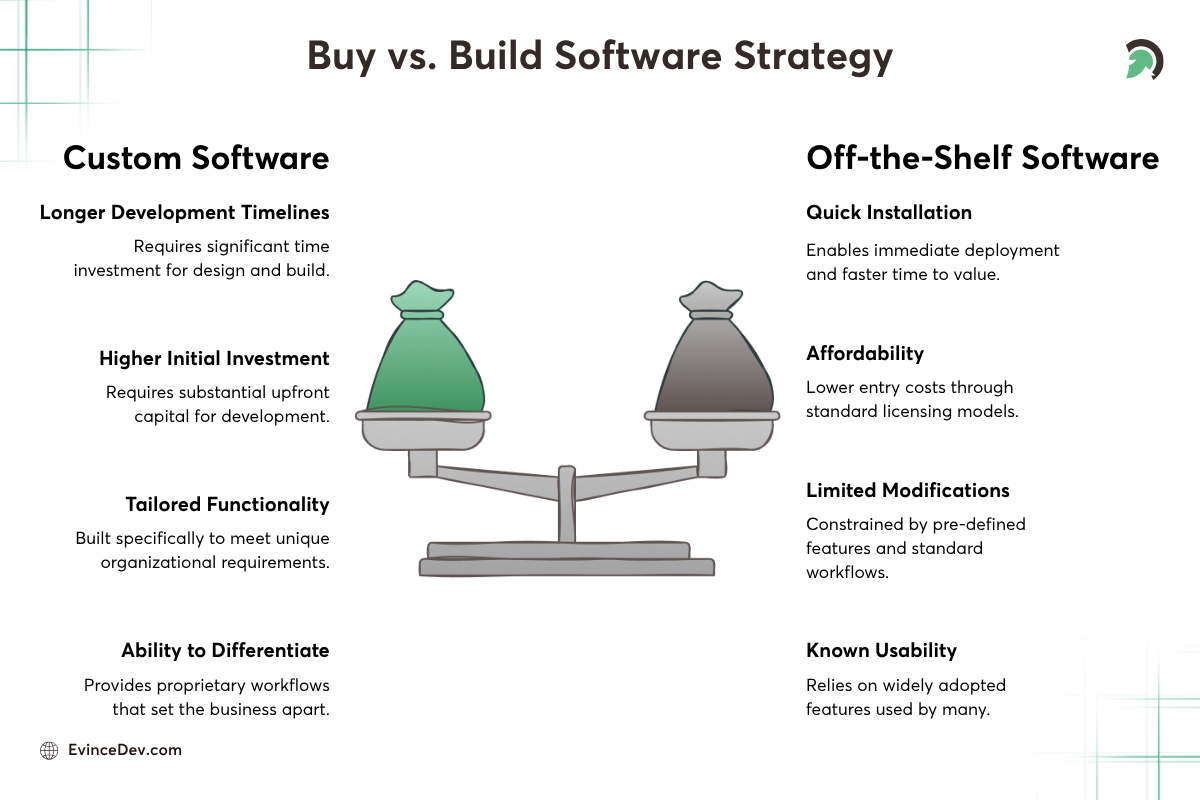
Custom Software vs Off-the-Shelf Software: Choosing the Right Solution for Business Growth
One of the most consequential software decisions a business makes is whether to buy a ready-made solution or invest in custom development. Both approaches have merit depending on the situation.
Off-the-Shelf Software: Pre-built software is intended for a wider user base and can be licensed by many businesses. The benefits of pre-built software include quick installation, affordability, and known usability. However, its drawbacks include limited modifications, monthly subscriptions, and functions that do not necessarily meet your needs.
Custom Software: Custom software is designed as per the unique needs of the organization. It offers tailored functionality, greater flexibility, better long-term scalability, along with the ability to differentiate from competitors who use the same off-the-shelf tools. The trade-offs are higher initial investment and longer development timelines.
Many organizations partner with a trusted custom software development company when their operational requirements have outgrown available commercial solutions, or when a proprietary workflow represents a genuine competitive advantage.
Benefits of Application Software for Businesses
Investing in the right application software delivers measurable returns:
- Increased productivity: Employees spend less time on repetitive tasks and more on strategic work
- Improved collaboration: Shared platforms keep teams aligned regardless of location
- Better decision-making: Real-time data and analytics support faster, more informed choices
- Enhanced customer experience: Organizations deliver faster, more personalized service
- Greater operational efficiency: Automation reduces errors and improves process consistency
- Scalability: Software supports growing customer bases and operational complexity without proportional cost increases
Emerging Trends in Application Software
Artificial Intelligence Integration: AI is progressing from being an innovation to becoming a regular part of business software. There has been an increase in the use of AI-driven apps for automating tasks, detecting abnormalities, providing personalized services, and creating predictions. In the FinTech industry, some examples of how AI technology is applied include fraud detection, risk assessment, customer support automation, and personalization of financial advice.
Cloud-Native Applications: Cloud-first architectures improve scalability, flexibility, and global accessibility. As more organizations shift away from on-premise infrastructure, cloud-native applications are becoming the default rather than the exception.
Low-Code and No-Code Development: These platforms allow non-technical users to build and modify applications more quickly, reducing dependence on developer resources for routine application needs.
Hyperautomation: Businesses are combining AI, machine learning, workflow automation, and analytics to automate increasingly complex end-to-end processes, not just individual tasks.
API-Driven Ecosystems: Modern applications are built to connect. API-first architectures allow organizations to assemble best-of-breed solutions rather than being locked into a single vendor’s ecosystem.
Quick Stat:
According to Salesforce, 40% of new applications are already AI-powered, showing how AI is becoming a core part of modern application software development.
Choosing the Right Application Software
Selecting the right software is a strategic decision, not just a technical one. Organizations should evaluate:
- Current operational requirements and pain points
- Scalability needs over a three-to-five-year horizon
- Security and compliance expectations
- Integration capabilities with existing systems
- User experience requirements and adoption likelihood
- Total cost of ownership, including licensing, implementation, and maintenance
- Long-term business objectives and competitive strategy
Whether selecting commercial software or pursuing custom software application development, technology investments should be evaluated against both present needs and long-term growth plans.
How EvinceDev Helps Businesses Build Application Software
Modern businesses require software solutions that are secure, scalable, and built around their operational goals, not forced into a generic mold.
At EvinceDev, we help organizations design, develop, modernize, and optimize software applications tailored to their unique requirements. Our capabilities include:
- Custom web application development
- Mobile application development
- SaaS product development
- Enterprise software solutions
- Legacy system modernization
- Cloud-native application development
- AI-powered software solutions
- System integration and workflow automation
From startups building their first digital product to enterprises modernizing complex legacy systems, we help businesses create high-performance applications that support growth and long-term success.
Conclusion
Modern organizations run on application software as their operational foundation. Productivity software, communication software, and various enterprise solutions, depending on the nature of the business, could enhance operations and make the work more efficient. The knowledge of the different types of application software is an important factor for consideration when choosing the right one, and the difference between commercial software and customized software will help an organization make sound choices in terms of software investment and selection. With emerging technologies such as AI and cloud computing continuing to transform the software world, it is wise to be strategic in making technological investments.