Key Takeaways
- Copilots Assist: AI copilots help users work faster with summaries, suggestions, drafts, insights, and decision support.
- Agents Execute: AI agents can take action across defined workflows, using tools and systems to complete tasks with more autonomy.
- Control Matters: The main difference lies in how much responsibility, decision-making, and execution the AI system is allowed to handle.
- Readiness Comes First: AI agents need clean data, clear workflows, permissions, integrations, audit trails, and human escalation paths.
- Both Can Work Together: Businesses can start with copilots for productivity and later use agents for structured workflow
A few years ago, most business AI conversations started with chatbots. Could they answer customer questions? Could they reduce support tickets? Could they automate simple responses?
Today, the conversation has moved much further. Businesses are now looking at AI systems that can support employees, analyze information, recommend next steps, connect with business tools, and even complete tasks with minimal human involvement. This is where two terms often come up: AI copilot and AI agent.
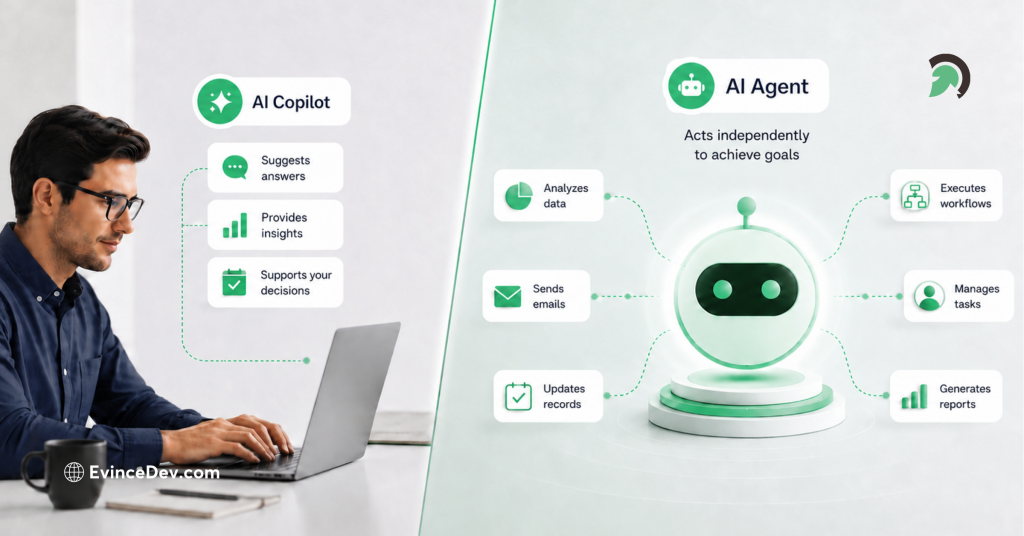
At first, they may sound similar because both are designed to improve productivity and reduce manual effort. But they are not the same. An AI copilot works with a human user by offering suggestions, summaries, drafts, insights, and recommendations. An AI agent goes a step further by taking action toward a defined goal, using tools, following workflows, interacting with systems, and completing tasks within set rules.
Understanding the AI copilot vs AI agent difference is important for businesses that want to adopt AI in the right way. A copilot is useful when human judgment, review, or creativity is still needed. An agent is more suitable when a workflow is structured, repeatable, and ready for safe automation.
For business leaders, the real question is not only what is an AI copilot or what is an AI agent. The bigger question is when to use AI agent vs copilot based on workflow complexity, data maturity, risk level, and business goals. This blog explains the AI copilot vs AI agent difference in detail, with practical examples, comparison tables, use cases, risks, readiness factors, and an adoption roadmap.
Quick Stat:
According to McKinsey’s State of AI 2025 report, 88% of organizations now report regular AI use in at least one business function, compared with 78% a year earlier. This growing adoption makes it more important for businesses to understand which AI model fits their needs, whether it is a copilot that assists teams or an agent that can execute defined workflows.
What Is an AI Copilot?
An AI copilot is an intelligent assistant that works alongside a human user. It does not usually take full ownership of a task. Instead, it helps the user complete the task faster, with better context and fewer manual steps.
A copilot can read information, summarize content, draft responses, suggest next actions, generate ideas, analyze data, and help users navigate complex information. The human remains responsible for reviewing, approving, editing, or making the final decision.
For example, a sales copilot can summarize customer history from a CRM, suggest a follow-up email, highlight risks in the deal, and recommend the next best action. However, the salesperson still decides whether to send the email, change the offer, or schedule a call.
The AI copilot vs AI agent difference becomes clear here. A copilot improves human productivity, but it does not fully replace human judgment. It is useful when work requires creativity, review, expertise, or decision-making.
AI Copilot Example
Imagine a customer support representative handling a complaint about a delayed order. An AI copilot can instantly pull order details, summarize previous conversations, suggest a polite response, and recommend whether the case should be escalated.
The support agent reviews the suggestion and sends the final response. The copilot helps reduce response time and improves consistency, but the human still controls the interaction.
Common AI Copilot Use Cases
AI copilots can be used across several business functions:
| Business Function | AI Copilot Use Case |
| Sales | CRM summaries, follow-up drafts, lead insights, proposal support |
| Marketing | Campaign ideas, content drafts, customer segmentation, performance summaries |
| Customer Support | Suggested replies, knowledge base search, ticket summaries |
| HR | Policy lookup, employee query assistance, job description drafts |
| Finance | Report summaries, variance explanations, invoice review support |
| Software Development | Code suggestions, documentation, debugging assistance |
| Operations | Process summaries, checklist support, exception insights |
Businesses often start with copilots because they are easier to control. They support teams without giving AI full authority to act independently.
What Is an AI Agent?
An AI agent is a goal-oriented AI system that can perform tasks with a higher level of autonomy. It can understand a goal, break the work into steps, use tools or APIs, make decisions within defined boundaries, and complete actions.
An AI agent is not just responding to a prompt. It is designed to move through a workflow. It may check information from one system, update another system, send a message, trigger a process, or escalate an exception when needed.
For example, a customer support AI agent can read a ticket, identify the issue, check order status, verify refund eligibility, update the ticket, send a response, and notify a human manager only if the case is complex.
This is where the AI copilot vs AI agent difference becomes more practical. A copilot assists the employee handling the ticket. An agent can handle the ticket itself, as long as the workflow is structured and permissions are clearly defined.
Quick Stat:
According to McKinsey’s State of AI 2025 report, 23% of organizations are already scaling an agentic AI system somewhere in the enterprise, while another 39% are still experimenting with AI agents. This shows that AI agents are moving beyond early discussion, but most businesses are still in the testing and maturity-building stage.
AI Agent Example
Consider an IT helpdesk workflow. An employee says, “I cannot access my project management tool.” An AI agent can verify the employee’s identity, check access permissions, identify whether the account is locked, trigger a password reset, create a support ticket, and update the employee once the issue is resolved.
The human IT team may only get involved if the request is unusual, sensitive, or outside the agent’s allowed actions.
Common AI Agent Use Cases
AI agents are useful for workflows that are repeatable, structured, and connected to business systems.
| Business Function | AI Agent Use Case |
| Customer Support | Ticket resolution, refund checks, order updates |
| IT | Password reset, access requests, incident routing |
| Sales | Lead qualification, meeting scheduling, CRM updates |
| Finance | Invoice validation, payment reminders, approval routing |
| HR | Candidate screening, onboarding task creation |
| Logistics | Shipment updates, ETA notifications, exception alerts |
| Operations | Workflow routing, status updates, task assignment |
AI agents are powerful, but they also need strong controls. Since they can act across systems, businesses must define what they can do, what they cannot do, when they should ask for approval, and when they should escalate to a human.
AI Copilot vs AI Agent: Key Differences
The AI copilot vs AI agent difference is mainly about autonomy, control, and execution. Both use AI, but they play different roles in a workflow.
| Comparison Point | AI Copilot | AI Agent |
| Main Role | Assists the user | Completes tasks toward a goal |
| Autonomy | Low to moderate | Moderate to high |
| Human Involvement | Continuous | Needed at checkpoints or exceptions |
| Decision-Making | Suggests decisions | Makes decisions within defined rules |
| Task Type | Knowledge work and assistance | Repetitive, structured, multi-step workflows |
| System Access | Usually limited | Often connected to tools, APIs, databases, and workflows |
| Risk Level | Lower | Higher, because it can take action |
| Best Fit | Productivity and decision support | Automation and workflow execution |
A copilot is best when the business wants to improve how people work. An agent is best when the business wants AI to execute a defined process.
This is also where an AI assistant types comparison becomes useful. Not every AI tool should be treated the same. A chatbot may answer questions. A copilot may assist a user. An agent may complete work. Traditional automation may follow fixed rules. Each type has a different level of intelligence, flexibility, and responsibility.
The Simplest Difference: Assist vs Act
The easiest way to understand the AI copilot vs AI agent difference is this:
An AI copilot helps a human complete work. An AI agent completes work on behalf of a human, within defined rules.
Here are a few simple AI copilot vs AI agent examples:
| Scenario | AI Copilot | AI Agent |
| Customer Support | Drafts a reply for the support team | Resolves the ticket and updates the customer |
| Sales | Suggests the best follow-up message | Sends follow-up, updates CRM, and schedules a meeting |
| Finance | Summarizes invoice details | Validates invoice and routes it for approval |
| HR | Answers policy questions | Creates onboarding tasks for a new employee |
| IT Support | Suggests troubleshooting steps | Resets access or creates a support ticket |
These AI copilot vs AI agent examples show that the difference is not only technical. It affects ownership, accountability, process design, and business risk.
When Should You Use an AI Copilot?
Businesses should use an AI copilot when the task still requires human judgment, creativity, sensitivity, or approval. Copilots are especially useful when users need help understanding information, making decisions, or producing better work in less time.
This is why many organizations begin their AI journey with copilots. They offer value without requiring the business to fully automate a process. They also help teams understand where AI can support everyday work.
Use an AI copilot when:
- Human judgment is needed
- The task is creative, strategic, or sensitive
- The workflow is not fully standardized
- The user needs faster insights
- The business is early in AI adoption
- Data is useful but not reliable enough for full automation
- Every output needs review or approval
For example, a legal team may use a copilot to summarize contract clauses, but a lawyer still reviews the final document. A marketing team may use a copilot to draft campaign ideas, but a strategist still decides what to publish. A finance team may use a copilot to explain cost variations, but the finance manager still approves the final report.
This is an important point in the agentic AI vs copilot discussion. Agentic systems can take action, but not every workflow should be autonomous. Some tasks need expert judgment and human accountability.
Best Business Functions for AI Copilots
| Function | Copilot Use Case |
| Sales | Call summaries, proposal drafts, CRM insights |
| Marketing | Content drafts, campaign ideas, audience research |
| HR | Policy assistance, employee communication, job description drafts |
| Finance | Report summaries, budget variance explanations |
| Software Development | Code suggestions, test case generation, documentation |
| Customer Support | Suggested replies, case summaries, knowledge base help |
Businesses exploring AI copilot development services should first identify where employees spend too much time searching, summarizing, drafting, or switching between systems. These are usually the best starting points for copilot adoption.
When Should You Use an AI Agent?
Businesses should use an AI agent when the workflow is structured enough for AI to take action safely. The process should have clear rules, reliable data, system access, and defined escalation points.
This makes the question of when to use AI agent vs copilot very practical. If the task is unpredictable, sensitive, or highly dependent on expert judgment, a copilot is safer. If the task is repeatable and rules-based, an agent may create stronger automation value.
Use an AI agent when:
- The process is repeatable
- Rules are clearly defined
- Data is reliable and accessible
- The task requires multiple steps
- The agent can connect with business systems
- Permissions and approval rules are defined
- Exceptions can be escalated to humans
- Speed, consistency, and scale matter
For example, a retail business may use an AI agent to answer order status questions, process simple return requests, update tickets, and send notifications. A logistics company may use an AI agent to monitor shipment delays, notify customers, and escalate critical exceptions to operations teams.
This is where AI agent development services become valuable. Building an effective agent is not just about connecting a language model to tools. It requires workflow mapping, data access planning, permission control, integration design, testing, monitoring, and governance.
Best Business Functions for AI Agents
| Function | Agent Use Case |
| Customer Support | Ticket resolution, refund checks, order updates |
| Operations | Workflow routing, task assignment, status updates |
| Finance | Invoice validation, approval routing, payment reminders |
| HR | Candidate screening, onboarding workflows |
| IT | Password reset, access requests, incident routing |
| Logistics | Shipment tracking, exception alerts, ETA communication |
AI Copilot vs AI Agent vs Chatbot vs Automation
Many businesses confuse copilots, agents, chatbots, and automation. This AI assistant types comparison helps separate them clearly.
| Type | What It Does | Example |
| Chatbot | Answers questions through conversation | FAQ bot on a website |
| Automation | Follows fixed rules | Auto-sending invoice reminders |
| AI Copilot | Assists users with context-aware suggestions | Sales email drafting assistant |
| AI Agent | Plans and executes multi-step tasks | AI agent that qualifies leads and updates CRM |
A chatbot may answer, “Where is my order?” An automation may send a fixed email after an order is shipped. A copilot may help a support representative write a better response. An AI agent may check the order, identify the delay, notify the customer, update the ticket, and escalate the case if needed.
This broader AI assistant types comparison is useful because businesses often buy tools without understanding the level of autonomy they actually need.
How AI Copilots and AI Agents Work Together
Businesses do not always need to choose one or the other. In many workflows, copilots and agents work best together.
A copilot can support the human user while an agent handles defined execution in the background. For example, in a sales process, a copilot can help the sales representative understand a lead, review previous interactions, and prepare a proposal. An agent can schedule the follow-up, update CRM fields, send reminders, and trigger approval workflows.
In customer support, a copilot can help human agents handle complex cases. At the same time, an AI agent can resolve simple, repetitive requests such as order tracking, password resets, or appointment confirmations.
This balanced approach is important in the agentic AI vs copilot conversation. The future is not only about replacing one with the other. It is about designing the right level of AI support for each workflow.
Business Readiness: Are You Ready for an AI Agent?
Not every business is ready for AI agents immediately. Since agents can take action, they need stronger preparation than copilots.
Before adopting agents, businesses should evaluate their process maturity, data quality, integrations, risk level, and governance model.
| Readiness Factor | Why It Matters |
| Clean Data | Agents need reliable information to act correctly |
| Clear Workflows | Undefined processes lead to poor automation outcomes |
| System Integrations | Agents need access to CRM, ERP, helpdesk, or internal tools |
| Permission Rules | Agents should only act within approved boundaries |
| Human Escalation | Complex or risky cases need human review |
| Audit Trails | Every action should be traceable |
| Security Controls | Agents must follow access and compliance rules |
For example, an invoice approval agent will not work well if vendor data is inconsistent, approval rules are unclear, or finance systems are not integrated. Similarly, a customer support agent may create risk if it can issue refunds without proper limits or approval conditions.
Businesses should not automate broken workflows. They should first simplify the process, clean the data, define rules, and then introduce AI.
Expert Perspective:
AI agent projects usually fail when companies automate before they standardize. If the workflow is unclear, the data is inconsistent, or approvals are not defined, an AI agent will only speed up the confusion. Process clarity should come before agent autonomy.
Risks and Limitations of AI Copilots
AI copilots are lower risk than agents, but they still have limitations.
Common risks include:
- Inaccurate summaries
- Generic suggestions
- Over-reliance on AI outputs
- Data privacy concerns
- Poor user adoption
- Lack of workflow execution
- Limited context from disconnected systems
For example, a marketing copilot may generate content quickly, but the content may still need brand review, fact-checking, and audience alignment. A finance copilot may summarize reports, but numbers should still be verified before decision-making.
Copilots work best when employees understand that AI output is a draft, suggestion, or support layer, not a final authority.
Risks and Limitations of AI Agents
AI agents require more careful planning because they can take action. If poorly designed, they may create wrong actions at scale.
Common risks include:
- Incorrect actions due to poor data
- Unauthorized access to sensitive systems
- Weak approval workflows
- Lack of auditability
- Integration failures
- Prompt injection risks
- Compliance gaps
- Over-automation of sensitive processes
For example, an AI agent that updates CRM records without validation may damage sales data quality. A support agent that processes refunds without limits may create financial risk. A procurement agent that places orders without approval may violate internal policies.
This is why guardrails matter. Agents should have clear limits, role-based permissions, approval checkpoints, exception handling, monitoring, and audit logs.
Quick Stat:
Deloitte notes that regulation and risk became the top barrier to generative AI development and deployment, increasing by 10 percentage points from Q1 to Q4.
How to Choose Between an AI Copilot and an AI Agent
The best choice depends on the task, not the trend. Businesses should evaluate how much autonomy the workflow can safely support.
| Question | Choose AI Copilot If… | Choose AI Agent If… |
| Does the task need human judgment? | Yes | No, or only for exceptions |
| Is the workflow repeatable? | Not fully | Yes |
| Is the data clean and accessible? | Partially | Yes |
| Can AI take action safely? | Not yet | Yes, with permissions |
| Is approval required at every step? | Yes | No |
| Is speed or scale the main goal? | Somewhat | Strongly |
This decision table directly answers when to use AI agent vs copilot. A copilot is better when the task needs human review. An agent is better when the task is repeatable, controlled, and ready for execution.
The AI copilot vs AI agent difference is not about which technology is more advanced. It is about which one fits the business process.
Expert Perspective:
Businesses should not treat copilots and agents as a maturity race. A copilot is not a weaker version of an agent. It is often the right choice for work that needs context, judgment, creativity, or accountability. Agents are best reserved for workflows where the business is ready to let AI act within controlled boundaries.
Practical Adoption Roadmap for Businesses
Businesses should avoid jumping directly into autonomous AI without understanding their workflows. A phased roadmap helps reduce risk and increase value.
Step 1: Start With Workflow Discovery
Identify repetitive, time-consuming, and high-impact workflows. Look for tasks where employees spend too much time searching for information, copying data, writing repetitive messages, or moving between systems.
Step 2: Build an AI Copilot First
Start with AI support that helps employees work faster. A copilot can summarize information, suggest responses, prepare drafts, and provide insights. This helps teams build trust in AI before giving it more autonomy.
Businesses evaluating AI copilot development services can begin with internal knowledge assistants, sales copilots, support copilots, finance copilots, or development copilots.
Step 3: Define Rules and Guardrails
Before moving to agents, define what AI can and cannot do. Set approval rules, access permissions, escalation paths, compliance requirements, and audit needs.
Step 4: Move Selected Workflows to AI Agents
Once the workflow is structured and measurable, selected tasks can move from assistance to execution. This is where AI agent development services can help businesses design agents that connect with systems, follow rules, and act safely.
Step 5: Monitor, Improve, and Scale
AI implementation should not stop after deployment. Track accuracy, time saved, escalation rate, user adoption, cost reduction, and customer satisfaction. Use these insights to improve the system and expand it to more workflows.
Industry Examples of AI Copilots and AI Agents
Different industries can use copilots and agents in different ways.
| Industry | AI Copilot Example | AI Agent Example |
| Healthcare | Summarizes patient notes | Schedules follow-ups and sends care reminders |
| Retail | Suggests product recommendations | Handles order status and return workflows |
| Logistics | Summarizes shipment delays | Sends ETA updates and escalates exceptions |
| Finance | Explains transaction patterns | Routes invoice approvals |
| Insurance | Assists claim reviewers | Processes low-risk claim requests |
| Real Estate | Drafts property descriptions | Qualifies leads and books property visits |
| Manufacturing | Summarizes maintenance logs | Triggers maintenance work orders |
These examples show that the right AI model depends on the workflow. A healthcare organization may prefer copilots for clinical documentation because human review is critical. A retail company may use agents for order tracking because the process is repetitive and low risk.
Real-World Examples of AI Copilots and AI Agents
AI copilots and AI agents are already being used across business workflows, from employee productivity and customer support to IT, sales, and operations. These examples show how the difference between assistance and execution appears in real business settings.
- Microsoft has shared several customer stories around Copilot and AI adoption, showing how organizations use AI to summarize information, draft content, analyze data, and improve productivity across daily work.
- Salesforce’s Agentforce examples highlight how AI agents can support customer-facing workflows by handling defined service tasks, improving response efficiency, and assisting teams with more scalable support operations.
- ServiceNow positions AI agents for enterprise workflows such as IT, customer service, HR, and operations, showing how agents can support work completion across internal processes when connected with the right systems and governance controls.
Common Mistakes Businesses Make
Many AI projects fail because companies prioritize technology over process understanding.
Common mistakes include:
- Calling every chatbot an AI agent
- Automating broken workflows
- Ignoring data quality
- Giving agents too much access too early
- Skipping human approval flows
- Not defining success metrics
- Choosing tools before understanding business needs
- Treating copilots and agents as full replacements for people
A better approach is to start with business goals. What problem needs to be solved? Which workflow is slowing teams down? What data is required? What actions are safe for AI to take? What should still require human approval?
Answering these questions helps businesses avoid overbuilding and focus on measurable value.
Future of AI Copilots and AI Agents
Quick Stat:
Gartner predicts 40% of enterprise applications will include task-specific AI agents by the end of 2026, up from less than 5% in 2025.
AI copilots and agents will continue to evolve. Copilots will become more contextual, personalized, and deeply connected to workplace tools. Agents will become more capable of handling multi-step workflows across business systems.
In the future, many businesses could operate through a blend of copilots, agents, chatbots, automation, and human supervision. Workers can cooperate with copilots in order to assist in decision-making, and meanwhile, the agents will do the back-end execution of tasks.
However, human oversight will remain important. As AI systems become more capable, businesses will need stronger governance, monitoring, security, and accountability.
This makes the AI copilot vs AI agent difference even more important. Companies that understand the difference can adopt AI more strategically instead of chasing every new trend.
Quick Stat:
Microsoft’s 2025 Work Trend Index surveyed 31,000 knowledge workers across 31 markets to study how AI is reshaping work.
How EvinceDev Can Help Businesses Build AI Copilots and AI Agents
EvinceDev helps businesses identify the right AI approach based on workflow maturity, data readiness, integration needs, and automation goals. Some businesses need an AI copilot to improve employee productivity. Others need an AI agent to automate structured workflows. Many need both, introduced in phases.
Through generative AI consulting, EvinceDev helps businesses evaluate where AI can create practical value, what data foundation is required, which workflows are ready for automation, and what guardrails should be in place.
By having the right strategy, it will enable companies to transition from experimenting with AI to implementing it. Generative AI consulting is also vital in avoiding certain errors like adopting AI technology prematurely, automating workflow without proper understanding, or implementing AI without the proper infrastructure.
Conclusion
AI copilots and AI agents are not the same, and they should not be used interchangeably. The AI copilot vs AI agent difference comes down to responsibility. A copilot assists people. An agent acts toward a goal within defined rules.
Copilots are well-suited for jobs requiring human judgment, innovation, evaluation, and decision making. They allow employees to work more efficiently and more intelligently. Agents are better used in repetitive workflows, where AI can safely act, interface, and execute tasks at scale.
The optimal strategy for most businesses involves beginning with copilots, learning from actual user behavior, improving data quality, defining workflows, and adding agents when automation adds value.
An understanding of the distinction between AI copilot and AI agent will assist businesses in making smart investments in AI technologies. Rather than wondering which is superior, the question to ask is which is appropriate for the workflow and the business goal.