
Key Takeaways
- Redesign Before You Automate: Fix inefficient steps first so AI does not simply make a poor process run faster.
- Automate Stable Workflows First: AI workflow automation works best when the process is already clear, standardized, and repetitive.
- Focus on Business Outcomes: Measure success through cycle time, cost, quality, and customer impact, not just the number of automated tasks.
- Keep Humans in the Right Decisions: Design human oversight around risk, uncertainty, and exceptions instead of adding approvals everywhere.
- Simplify for Better AI ROI: Cleaner workflows, better data flow, and fewer handoffs make AI easier to scale, govern, and maintain.
AI can automate a bad process just as easily as a good one.
That is where many businesses get AI adoption wrong. They see a slow workflow, add automation, and expect the problem to disappear. But if that workflow is filled with unnecessary approvals, duplicate tasks, disconnected systems, or outdated steps, AI workflow automation may simply make the inefficiency move faster.
The bigger opportunity is to question the process before automating it.
Should every step still exist? Can some decisions be removed or combined? Is the real problem manual work, or is the process itself poorly designed?
That is the difference between automating what you already have and redesigning how the work should happen.
In this blog, we will compare AI workflow automation with process redesign, explain when each approach makes sense, and show how businesses can decide what should come first.
Quick Stat:
According to McKinsey, only 21% of organizations using generative AI have fundamentally redesigned at least some workflows. It also found that workflow redesign had the strongest effect among 25 organizational attributes tested on whether companies saw EBIT impact from generative AI.
What Is AI Workflow Automation?
AI workflow automation is the use of artificial intelligence inside a business workflow to perform or support tasks that would otherwise require manual effort. These tasks can include extracting information from documents, classifying requests, summarizing content, generating responses, identifying patterns, routing work, or recommending the next action.
Expert View:
A useful AI workflow does more than automate a task. It connects information, decisions, and actions in a way that reduces manual effort without losing control over exceptions.
– Hiren Daraji, Dept. Head – Microsoft, EvinceDev
A basic AI workflow usually follows a sequence such as:
Input → AI processing → decision → action → human review or exception handling
For example, a customer service system may receive an email, identify its intent, retrieve relevant account information, draft a response, and send straightforward cases to an automated path. Uncertain or sensitive cases can be passed to a human employee.
This is different from traditional rule-based automation. Conventional systems work best when inputs and decisions are predictable. A rule might say, “If an invoice is above $10,000, send it to a manager.” AI can add capabilities for less structured work, such as reading the invoice, identifying the supplier, extracting terms, comparing details with other records, and flagging unusual information.
Microsoft describes traditional business process automation as rule-based workflows for standardized tasks such as approvals, notifications, and document routing. AI-enabled automation can extend this approach by working with unstructured or semi-structured information and supporting more adaptive processing.
This is why business process automation with AI can be useful when a process combines predictable steps with information that requires interpretation.
Quick Stat:
According to Deloitte, 34% of organizations are beginning to use AI for deeper transformation by creating new products, services, processes, or business models.
What Is Process Redesign?
Process redesign means rethinking how work should happen before deciding which parts should be automated.
A process may have evolved over years. Approvals may have been added after isolated incidents, employees may copy data between systems that were never integrated, and reviews may continue even when the same information is checked elsewhere.
Process redesign asks whether those steps are still necessary. The goal is to create a simpler flow of work by removing steps, combining approvals, changing decision points, integrating systems, or improving access to information.
AI process optimization fits naturally here. AI can help improve how work is performed, but the design of the process still determines where AI should sit and what responsibility it should have.
For example, imagine an employee onboarding process with eight steps across HR, IT, finance, and a hiring manager. Automating each email and form might reduce some effort. But redesign may show that several approvals are duplicates, one form can be eliminated, and employee data can flow directly from the HR system to downstream tools.
The resulting process is not just faster. It is structurally better.
Also Read: Custom AI Workflows: When to Build vs. BuyAI Workflow Automation vs Process Redesign: What Is the Difference?
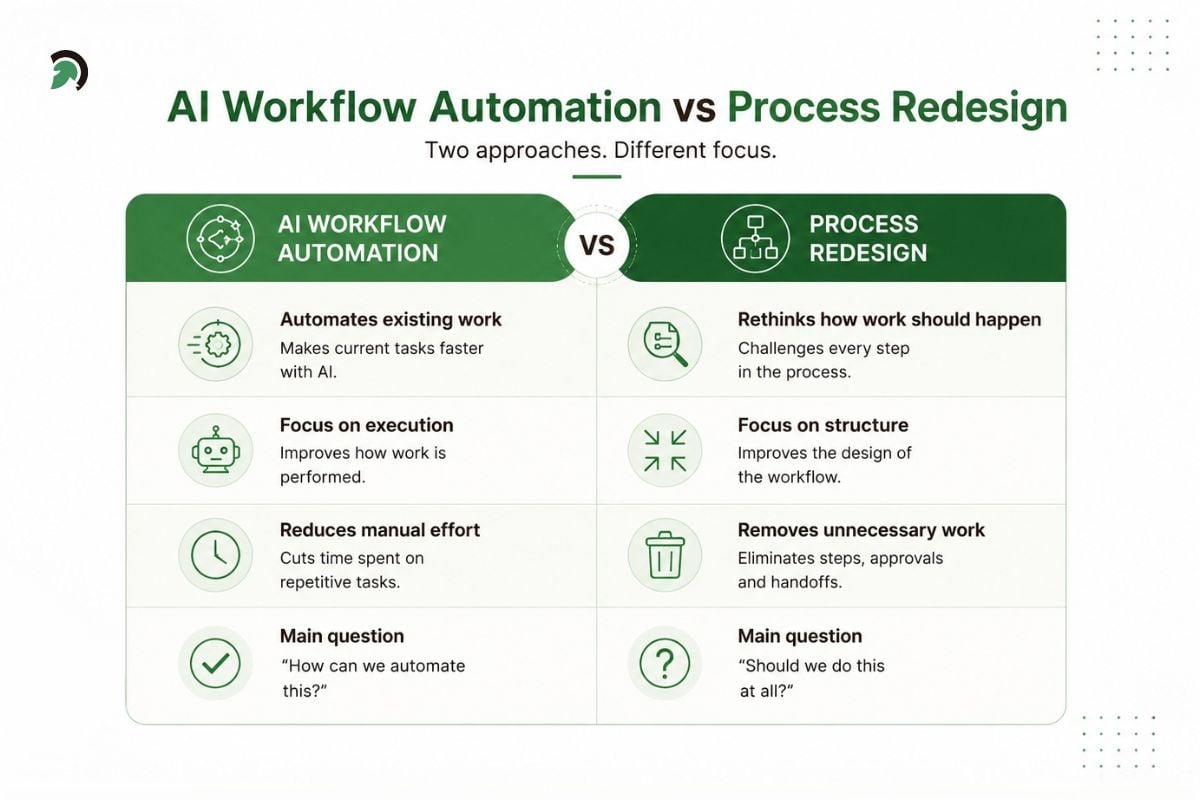
AI workflow automation vs process redesign: two different approaches to improving business processes.
Expert View:
AI does more than reduce the cost of existing work. It changes which workflows are practical in the first place. Processes designed around expensive human review can often be restructured so people focus only on high-risk decisions and exceptions.
– Hiren Daraji, Dept. Head – Microsoft, EvinceDev
The difference is easiest to understand through the question each approach asks.
AI workflow automation asks:
How can we make this work happen with less manual effort?
Process redesign asks:
Is this the right way for the work to happen in the first place?
Automation focuses primarily on execution. Redesign focuses on structure.
If five employees manually transfer information between systems, AI-powered automation might reduce the copying. Process redesign may instead connect those systems so that the transfer is no longer a separate task.
If managers approve hundreds of low-risk transactions, automation might prefill the approval or recommend a decision. Redesign might establish risk thresholds so managers only review exceptions.
Neither approach replaces the other. Good redesign often creates better automation opportunities, while automation makes redesigned processes easier to scale.
This is one reason enterprise AI solutions should not begin with a shopping list of tools. They create more value when connected to clearly defined business problems instead of being layered over inefficient workflows.
Quick Stat:
According to Deloitte, 30% of organizations are redesigning key processes around AI, while 37% are still using AI at a surface level with little or no change to existing processes.
The Risk of Automating an Inefficient Process
Automation can hide process problems rather than solve them.
Consider a purchase approval process. An employee fills out a request, a manager approves it, finance validates the same information, procurement checks it again, and someone manually creates a purchase order.
A business could introduce AI at every stage. It could extract the request, draft approval notes, compare financial data, and generate the purchase order. The process would become faster.
But if finance and procurement are checking the same information, or if low-value purchases do not need two approvals, those unnecessary steps still exist.
This is the central risk: efficiency at the task level can coexist with inefficiency at the process level.
Warning signs include repeated data entry, multiple handoffs, duplicate validation, unclear ownership, disconnected applications, manual workarounds, and approvals that exist because “that is how we have always done it.”
Before investing in AI workflow automation, businesses should understand why each step exists. If no one can explain the business value of a step, automation should not be the first response.
Expert View:
Every unnecessary approval, handoff, and exception becomes another rule the automated system has to manage. Simplifying the process first does more than improve efficiency. It reduces the automation debt the business will carry later.
– Hiren Daraji, Dept. Head – Microsoft, EvinceDev
Why Process Redesign Often Needs to Come First
Remove Work Before Automating It
The cheapest automated task is often the task that no longer needs to exist.
If a report is never used, generating it automatically does not create meaningful value. If two departments independently verify the same information, automating both checks may simply preserve duplication.
Redesign creates an opportunity to remove unnecessary work before technology is added.
Find the Real Bottleneck
The most visible manual task is not always the main problem.
A team might believe that document review is causing delays, when the real bottleneck is waiting for information from another department. Automating document review would help, but it would not solve the largest source of cycle time.
Mapping the full process exposes where work actually waits, repeats, fails, or returns for rework.
Improve Data and System Flow
AI depends heavily on access to the right information. If data is fragmented across spreadsheets, inboxes, legacy applications, and undocumented workarounds, even advanced automation becomes difficult to manage.
Redesign can define cleaner data flows before AI is introduced. That creates a stronger foundation for business process automation with AI and reduces the number of exceptions the system must handle.
Reduce Automation Complexity
Every unnecessary step can create another integration, model call, business rule, approval branch, monitoring requirement, or failure point.
A simpler process is usually easier to automate, test, govern, and maintain.
Improve Return on AI Investment
AI process optimization should be tied to measurable business outcomes such as lower cycle time, fewer errors, reduced manual effort, better customer response, or improved capacity.
McKinsey’s recent work on AI transformation emphasizes redesigning and rewiring workflows around where AI can create value instead of simply spreading isolated pilots or automating existing work.
Quick Stat:
According to McKinsey, top AI performers are twice as likely to redesign workflows before selecting AI tools and three times more likely to pursue broader operating-model redesign.
When AI Workflow Automation Can Come First
Process redesign does not need to precede every use of AI.
If a workflow is already standardized, stable, and well understood, automation may be the logical first move. This is especially true when the bottleneck is clearly repetitive manual work.
Invoice extraction is a good example. If the approval structure is sound but employees still spend hours copying supplier names, invoice numbers, dates, and totals into another system, AI-powered automation can address a clear inefficiency without redesigning the entire finance process.
The same can apply to support-ticket classification, document categorization, or routine reporting. If the process works well and manual execution is the main problem, automate. If the process is redundant or constrained by old systems, redesign first.
The important point is that AI workflow automation should solve a known process problem rather than become the starting point for discovering one.
Also Read: Why Most AI Pilots Never Reach ProductionHow to Decide Whether to Automate or Redesign First
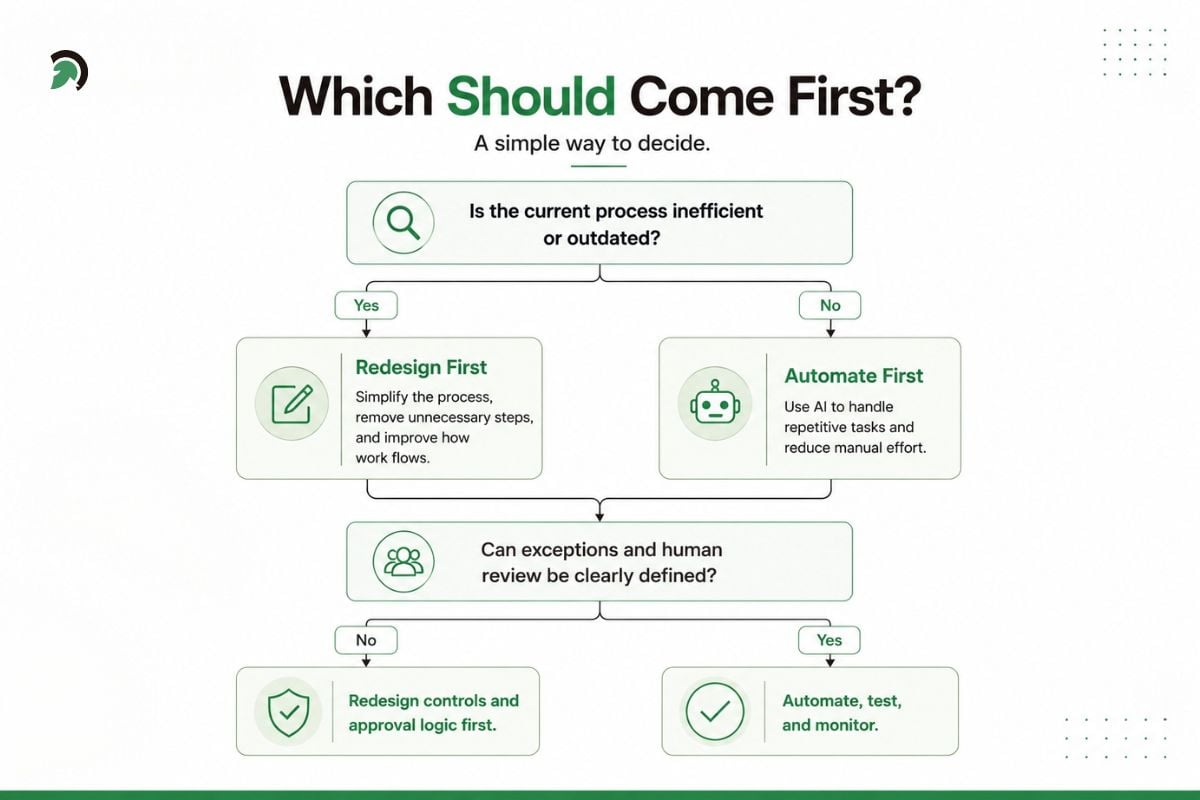
A decision framework for choosing between process redesign and AI workflow automation.
Start with the business outcome rather than the technology. Ask what the process is supposed to accomplish, which steps create value, where work waits, where data is entered more than once, and which approvals manage real risk.
Then look at the quality of the inputs. An AI workflow is easier to automate when data is accessible, responsibilities are clear, and exception paths are known. If those basics are missing, automation may create a complicated system that still depends heavily on employees to repair problems.
Businesses should also plan for failure. What happens when the model is uncertain? Who reviews questionable output? Can an action be reversed? These questions matter even more as intelligent workflow automation begins triggering actions across enterprise systems.
Organizations that need help determining where AI fits into operations may begin with AI consulting services before committing to a large implementation. The purpose should be to identify valuable problems first, not simply search for places to insert AI.
A Better Approach: Redesign, Then Automate
For complex processes, a structured sequence works better than starting with tools.
1. Map the Existing Process
Document what actually happens, not only what the process manual says should happen. Include employees, systems, approvals, inputs, outputs, handoffs, delays, and exceptions.
This provides a realistic view of the process and makes hidden inefficiencies easier to identify.
2. Remove Bottlenecks and Redundancies
Look for duplicated checks, unnecessary approvals, manual transfers, repeated data entry, and work that can be eliminated entirely.
This is where redesign often produces value before a single AI model is introduced.
3. Define the Ideal Workflow
Design the process around the desired outcome. Do not let the limitations of the current system dictate the future process too early.
Ask how the process would work if unnecessary technical or organizational constraints did not exist.
4. Decide Where AI Adds Value
Once the workflow is simplified, identify tasks where AI is genuinely useful. These may involve classification, extraction, summarization, generation, prediction, or contextual decision support.
This is where well-designed AI development solutions can connect models with business applications, APIs, databases, and operational rules.
5. Define Human Oversight and Governance
Not every task should be fully autonomous.
NIST’s AI Risk Management Framework emphasizes incorporating trustworthiness and risk management considerations throughout the design, development, deployment, use, and evaluation of AI systems. NIST also recommends defining roles and responsibilities for human oversight.
For higher-impact workflows, organizations should define approval thresholds, access permissions, escalation routes, audit records, and accountability before deployment.
AI Governance Consulting Services can be relevant when businesses need to structure these controls around operational AI.
Expert View:
Human-in-the-loop should not mean adding an approval after the AI has done its work. Human involvement should be designed around risk, confidence, and consequence, so people intervene where their judgment actually matters.
- Dharmesh Patt, CTO – Operations & Management, EvinceDev
6. Test, Deploy, and Monitor
AI systems are not “set and forget.”
Measure accuracy, exception rates, failures, latency, cost, human intervention, and the business result the workflow was designed to improve.
If exceptions continue to grow, the answer may not be a better model. The process itself may need another redesign.
Example: Automation-First vs Redesign-First
Consider a customer onboarding process for a B2B service.
The existing process asks the customer to submit a form and supporting documents. An employee checks the submission, enters data into the CRM, emails another team for verification, waits for approval, updates the customer, and manually creates downstream records.
An automation-first approach might use AI workflow automation to read the documents, populate CRM fields, draft verification emails, summarize the account, and generate customer updates. That could reduce manual effort significantly.
But a redesign may reveal a better path.
Perhaps the customer form can validate required information before submission. CRM records can be created directly. Verification data can be retrieved through an API instead of email. Low-risk customers may follow a standard route, while unusual cases go to specialists.
The redesigned process may contain fewer steps before any AI is added.
AI can then focus on work that benefits from interpretation: checking documents, detecting inconsistencies, summarizing unusual cases, and assisting employees with exceptions.
That is the difference between automating the process you have and designing the process you actually need.
Where AI Agents Fit Into Process Redesign
AI agents expand the automation discussion because they can coordinate multiple actions rather than perform a single isolated task.
An agent may interpret a request, retrieve information, call an API, update a CRM, generate a document, and trigger the next step. IBM describes newer agent-based approaches as moving beyond fixed workflows toward more adaptive orchestration and autonomous execution.
That flexibility is powerful, but it makes process design more important, not less.
If an agent is given responsibility across a poorly designed workflow, it can move through unnecessary steps more quickly and potentially create new operational risks. Clear boundaries, permissions, escalation rules, and monitoring are therefore essential.
Enterprise AI solutions should be designed around controlled responsibilities rather than unlimited autonomy. The more actions a system can take, the clearer the organization needs to be about what it may do, when it must stop, and when a person needs to intervene.
Common Mistakes Businesses Should Avoid
A common mistake is choosing technology before defining the problem. Another is assuming every manual task should disappear. Some work still requires judgment, accountability, empathy, or context. The goal is the right division of work between people and systems.
Organizations also underestimate exception handling. A workflow can perform well on common cases and still fail operationally if unusual cases have nowhere to go.
Governance is another common gap. AI may touch sensitive customer, employee, financial, or operational data. Access, logging, review, and accountability need to be part of implementation, not an afterthought.
Finally, businesses sometimes measure success only through hours saved. Time matters, but so do quality, customer outcomes, error rates, cost per transaction, employee capacity, and process reliability.
A successful AI transformation changes performance, not merely the number of automated tasks.
Quick Stat:
According to McKinsey, only about one-third of organizations have started scaling AI across the enterprise, even though nearly nine in ten report regular AI use.
How to Measure the Success of AI Workflow Automation
The right metrics depend on the process, but they should connect the technology to an operational or commercial outcome.
Cycle time shows whether work moves faster from start to finish. Error and rework rates reveal whether quality improved. Exception rates show how often employees still need to intervene. Cost per transaction helps determine whether automation remains economical as volume grows.
Organizations can also track customer response time, workflow completion rate, number of handoffs, employee capacity, and the percentage of cases completed without manual intervention.
For AI specifically, accuracy, latency, failure rate, escalation rate, and cost per execution can help diagnose technical performance.
The important point is to measure the whole process. A model can become more accurate while the overall workflow remains slow. AI workflow automation succeeds only when the business process itself performs better.
Also Read: Top AI Use Cases Across Industries: How to Choose and Implement the Right OneAI Workflow Automation or Process Redesign: Which Should Come First?
Choose automation first when the process is already efficient, standardized, and stable, and the biggest constraint is repetitive manual execution.
Choose redesign first when the process contains duplicate work, excessive approvals, disconnected systems, poor data flow, unclear ownership, or legacy steps that no longer create value.
For larger initiatives, a useful sequence is:
Diagnose → Simplify → Redesign → Automate → Govern → Measure → Improve
This sequence also creates a stronger foundation for intelligent workflow automation because the AI is introduced into a process with clearer responsibilities, better inputs, and fewer unnecessary paths.
It also makes enterprise-wide automation easier to scale. Instead of building isolated fixes around every inefficiency, the organization can create reusable systems around processes that have already been simplified.
How EvinceDev Can Help
EvinceDev helps businesses evaluate existing workflows, identify where process redesign is needed, and determine which activities are best suited for AI automation.
Through our AI consulting services, we help organizations assess AI opportunities, define the right workflow strategy, and plan implementation around measurable business outcomes. We also support the development of custom AI workflows, system integrations, intelligent automation, and governance practices needed to scale AI responsibly.
This approach helps businesses avoid automating inefficiencies and instead build workflows that are more streamlined, scalable, and aligned with how the organization actually operates.
Conclusion
AI can automate tasks that were difficult to automate only a few years ago. It can interpret documents, understand language, generate content, support decisions, and coordinate actions across systems. But those capabilities do not remove the need to design good processes.
AI workflow automation is most valuable when businesses first understand how work should flow, which activities create value, where people need to remain involved, and what outcomes the system should improve.
Sometimes the answer will be straightforward automation. In other cases, the bigger opportunity will come from removing steps, changing approvals, connecting systems, or redesigning responsibilities before AI is introduced.
The goal should not be to automate as much work as possible. It should be to create better work, then automate the parts where technology genuinely improves speed, quality, scale, or decision-making.