Key Takeaways
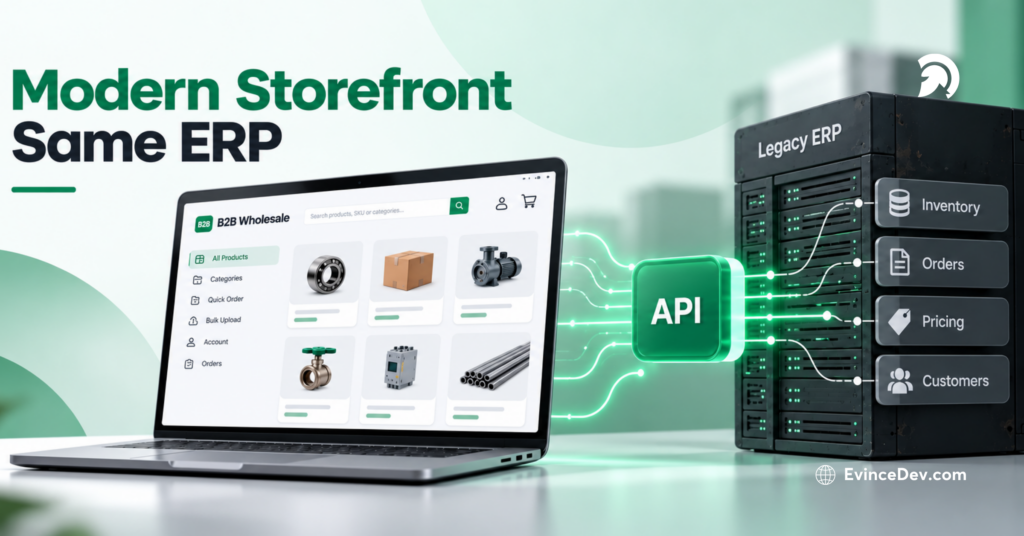
- Separate the Storefront from ERP: Headless commerce lets wholesalers modernize the buyer experience without replacing a working ERP.
- Improve B2B Self-Service: Buyers can access products, pricing, inventory, accounts, and ordering through a faster digital experience.
- Use APIs to Connect Systems: APIs link the storefront with ERP, PIM, CRM, OMS, WMS, payments, tax, and shipping platforms.
- Reduce Frontend Dependency on Legacy Systems: Storefront improvements can move faster without requiring every change to become an ERP project.
- Keep the ERP Focused on Operations: The ERP continues handling core business data while the commerce layer manages the customer-facing experience.
A purchasing manager logs into a wholesaler’s website to reorder products their company buys every month. They expect to see contracted pricing, confirm stock, add several hundred units, submit a purchase order, and move on.
Instead, the page loads slowly, inventory is missing, and account-specific pricing does not appear correctly. The buyer gives up on self-service and emails the sales representative, who then checks the ERP and processes the order manually.
This is a common B2B commerce problem. The ERP may still work well internally, but when it also has to power the customer-facing experience, performance and flexibility can suffer.
That is why wholesalers and distributors are exploring headless commerce for B2B. This blog explains how the model works, why companies are adopting it, how the storefront connects with the ERP, and what to consider before making the shift.
When the ERP Becomes the Bottleneck for B2B Commerce
B2B buyers expect to research products, check availability, manage accounts, and place orders without relying on a sales representative. For wholesalers, problems often arise when the storefront is too tightly connected to a legacy ERP.
Quick Stat:
According to McKinsey, 57% of buyers now rank digital as their primary purchasing channel, up from 33% in 2022. This shows how quickly digital purchasing has become central to distribution
Simple Changes Become Complex
When every storefront update depends on ERP work, improvements such as better search, mobile navigation, or customer dashboards take longer to release.
A headless model separates the frontend from backend systems, making customer-facing changes easier to manage.
The ERP Limits the Experience
ERPs are built for inventory, purchasing, invoicing, fulfillment, and customer records, not necessarily for modern digital experiences.
When they control both operations and the storefront, the customer experience can become limited by back-office architecture.
ERP Performance Affects the Storefront
If product searches, pricing, inventory checks, and account actions require constant ERP calls, slow responses can directly affect buyers.
The goal is to keep the ERP where it is needed while using faster commerce services or cached data for other interactions.
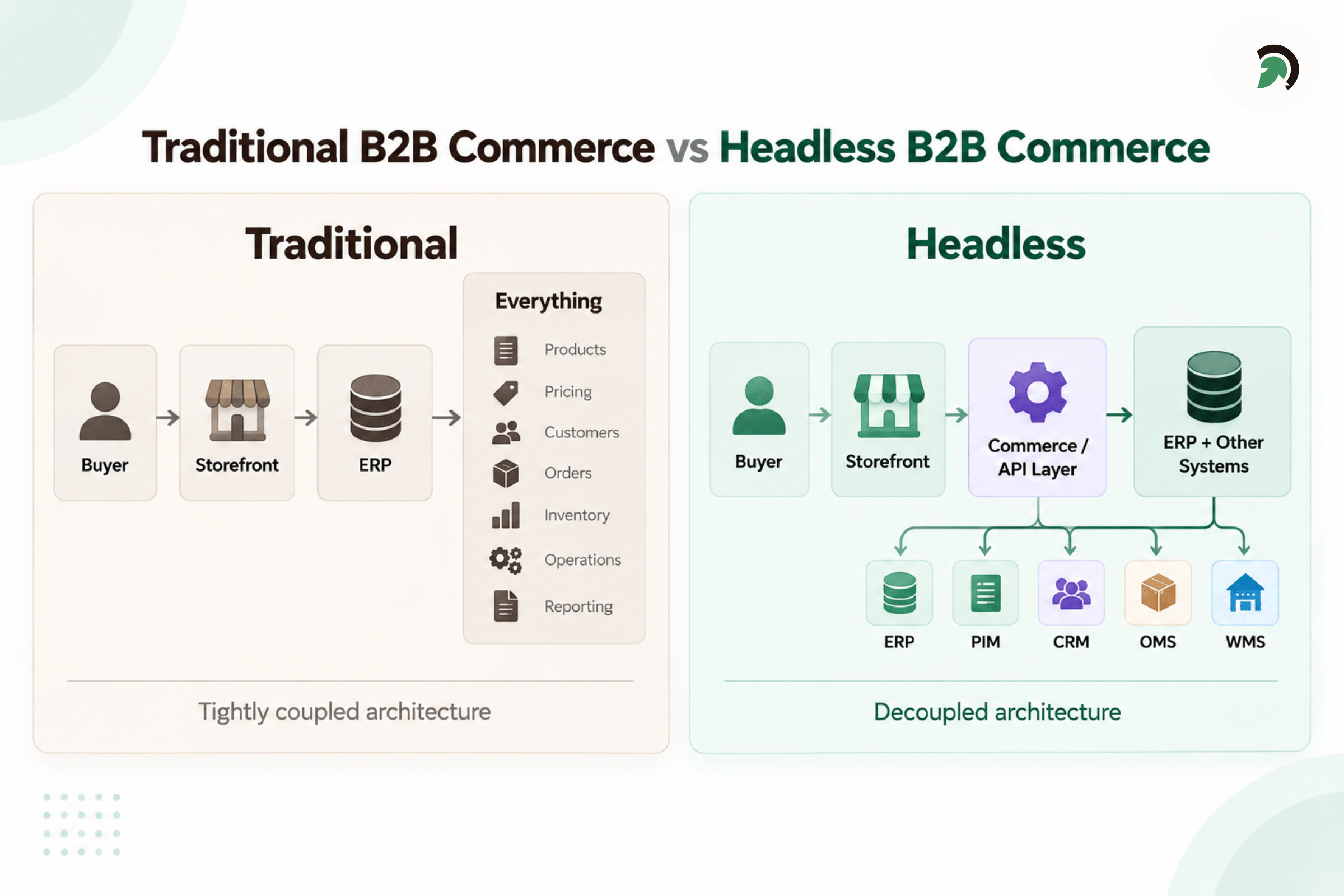
B2B Headless Commerce Integration Architecture
What Is Headless Commerce for B2B?
Headless commerce separates the customer-facing storefront from the systems that manage commerce and back-office operations. The storefront is what buyers interact with, including product pages, search, accounts, carts, checkout, reordering, and order history.
In a headless setup, the storefront connects to backend systems through APIs rather than being tightly built around them.
A simple B2B architecture looks like this:
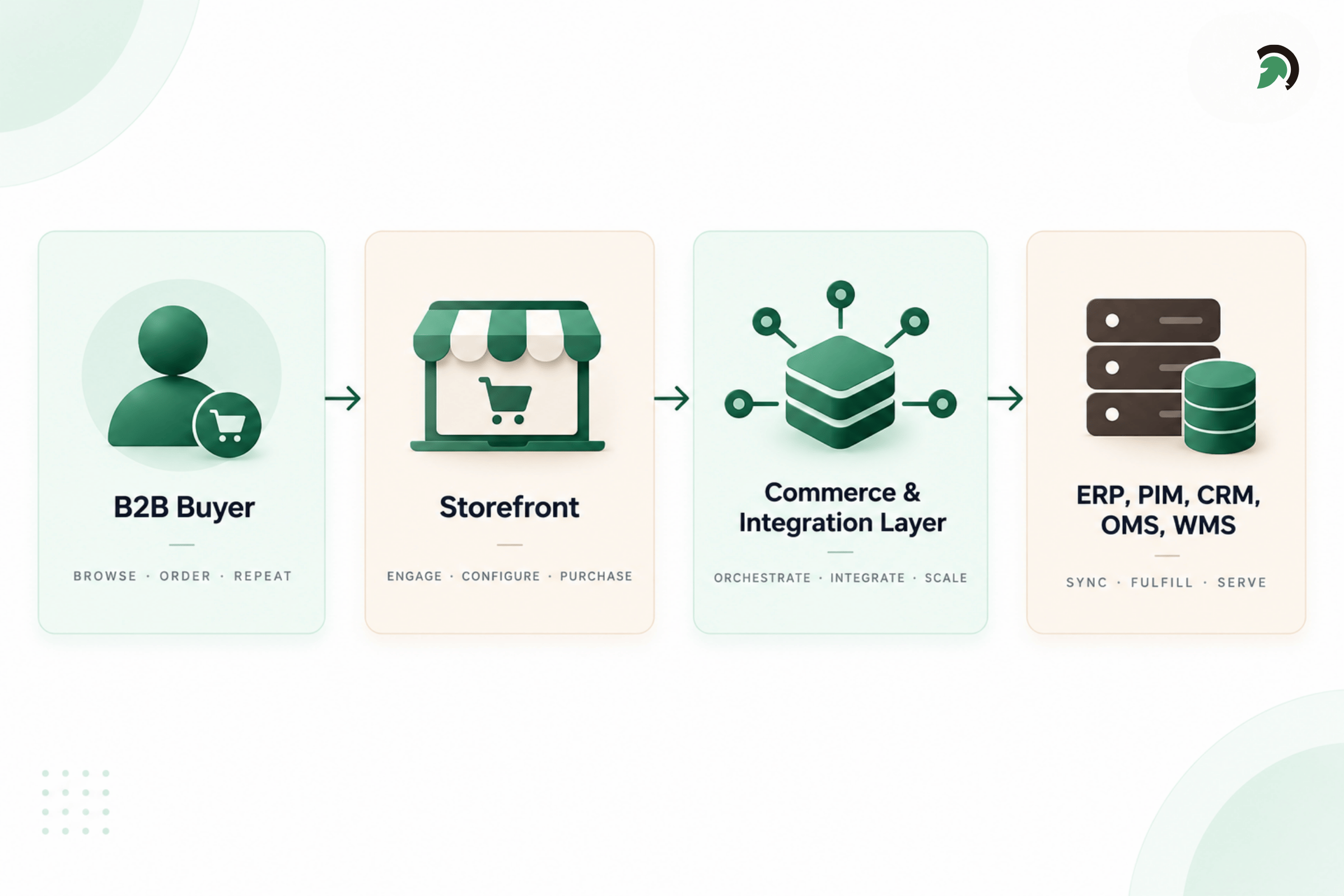
Headless Commerce Architecture for B2B Businesses
The key idea is separation. The ERP can stay in place without controlling the entire digital experience.
The Storefront
The storefront handles the buyer experience. It can be built with frameworks such as React or Next.js and updated without turning every frontend change into an ERP customization.
The Commerce Layer
This layer manages core commerce functions such as catalogs, carts, checkout, promotions, customer accounts, and order creation.
The API & Integration Layer
APIs and middleware connect the storefront and commerce platform with systems such as ERP, PIM, CRM, OMS, WMS, payments, tax, shipping, and other business tools.
The Legacy ERP
The ERP can continue managing customer records, pricing, inventory, credit, invoices, procurement, accounting, and fulfillment data.
The goal is not to replace a working ERP. It is to stop making it responsible for the entire customer experience.
Quick Stat:
According to Gartner, 70% of B2B buyers prefer a completely digital self-service buying experience. For wholesalers, this makes the ability to expose accurate pricing, inventory, account data, and ordering capabilities through the storefront increasingly important.
Decoupling Does Not Mean Moving Everything Out of the ERP
One of the biggest mistakes in headless projects is assuming every capability should immediately move into a new platform. A better approach is to define which system should own each type of information.
| Capability | Likely System |
| Customer-facing pages | Storefront / CMS |
| Product search | Commerce or search platform |
| Product content | PIM / CMS |
| Contract pricing | ERP or pricing engine |
| Inventory | ERP / OMS / WMS |
| Shopping cart | Commerce platform |
| Checkout | Commerce platform |
| Customer records | ERP / CRM |
| Orders | Commerce platform + ERP |
| Fulfillment | ERP / OMS / WMS |
| Financial records | ERP |
The exact architecture will vary.
For one distributor, the ERP may remain the authoritative source for pricing. Another may use a dedicated pricing engine. One business may manage inventory in its ERP, while another may rely on an OMS or WMS.
The important architectural question is:
Which system should be the source of truth for each business capability?
Without that decision, headless commerce can simply replace one tightly coupled system with a collection of poorly coordinated systems.
How a Headless B2B Order Moves Through the Architecture
To understand how headless B2B commerce works in practice, consider the typical journey of an existing wholesale customer placing an order.
1. The Buyer Logs In
The storefront identifies the buyer, their company account, role, permissions, and available purchasing options. It can also determine which catalog, locations, payment terms, and account rules apply to that customer.
2. The Relevant Catalog Is Loaded
The storefront displays the products and content available to the buyer’s organization. Product descriptions, specifications, images, and categories may come from the commerce platform or PIM instead of being requested directly from the ERP whenever a page loads.
3. Customer-Specific Pricing Is Applied
The system applies the pricing rules associated with the customer’s account, such as contract pricing, volume discounts, account-specific price lists, quantity rules, or promotions. Pricing may come directly from the ERP, a dedicated pricing engine, or synchronized commerce data.
4. Inventory Is Checked
The storefront checks whether the requested products and quantities are available. Inventory data may come from the ERP, OMS, WMS, or a synchronized inventory service, depending on how frequently stock levels change and how current the information needs to be.
5. The Buyer Places the Order
The commerce platform manages the checkout process and applies the customer’s available payment options, such as purchase orders, account credit, or card payments. Once the order is confirmed, it is passed to the relevant backend systems for processing.
6. The Order Is Processed and Fulfilled
The ERP, OMS, or WMS handles downstream activities such as order allocation, invoicing, warehouse processing, fulfillment, and shipping. Updated order and shipment information then flows back to the storefront so the buyer can track progress through their account.
What Decoupling Changes for Wholesalers
Decoupling gives wholesalers more flexibility to improve the digital buying experience without immediately replacing the systems that still run core business operations.
Quick Stat:
According to McKinsey’s 2026 Global B2B Pulse, 71% of B2B companies now offer ecommerce, and among those companies, roughly one-third of revenue flows through digital channels.
Modernize Without Replacing the ERP
ERP replacement can affect finance, procurement, inventory, warehousing, and reporting. Headless commerce allows wholesalers to modernize the storefront while keeping the ERP in place and improving backend systems gradually.
Support Complex B2B Buying
B2B buyers may need account-specific catalogs, negotiated pricing, bulk ordering, purchase orders, approval workflows, repeat ordering, and multiple shipping locations. A separate storefront makes these workflows easier to design around customer needs.
Support Multiple Digital Channels
The same commerce capabilities can support websites, dealer portals, mobile apps, sales portals, and marketplace integrations. APIs connect these channels with shared commerce and backend systems.
Reduce Storefront Dependence on the ERP
Product content, search, navigation, and other experiences can be handled outside the ERP, while the ERP continues managing areas such as pricing, inventory, finance, and fulfillment.
Not Every Storefront Request Should Hit the ERP in Real Time
Real-time integration is useful, but not every piece of storefront data needs to come directly from the ERP with each request.
The better question is: How current does this information need to be?
Data such as contract pricing, credit availability, or available-to-promise inventory may require real-time or near-real-time updates because it can directly affect the order.
Other information, such as product descriptions, images, specifications, and marketing content, can usually be managed through a PIM, CMS, commerce platform, or cache.
Separating real-time data from content that can be synchronized or cached reduces unnecessary ERP calls, improves storefront performance, and helps keep the buying experience responsive.
Why a Standard B2B Portal May Not Solve the Architecture Problem
Not every wholesaler requires headless commerce.
An off-the-shelf B2B portal can work extremely well when the business has standardized pricing, limited integrations, straightforward catalogs, one primary storefront, and relatively simple buying workflows.
Complexity changes the equation.
A distributor may have several ERP instances, hundreds of thousands of SKUs, account hierarchies, multiple warehouses, custom quoting, negotiated contracts, PIM and CRM integrations, and several regional storefronts.
In those environments, forcing every requirement into a standard portal can create the same problem the organization was trying to escape.
The objective should therefore not be:
Make everything headless.
It should be:
Choose an architecture that matches the complexity of the business.
Does Your B2B Business Actually Need Headless Commerce?
Headless commerce becomes more compelling when several of the following conditions exist:
- The existing ERP performs core operations well but restricts digital development.
- The organization has complex customer-specific pricing.
- Multiple brands, markets, portals, or channels need to share commerce capabilities.
- The product catalog is large or complex.
- PIM, CRM, OMS, WMS, and ERP systems must work together.
- Digital teams need to release customer-facing changes more frequently.
- The business needs highly customized B2B workflows.
For a company with a small catalog, simple pricing, one storefront, and limited integration requirements, a traditional or hybrid commerce architecture may be easier and less expensive to maintain.
Headless should solve a business and architectural problem, not simply follow a technology trend.
Moving to Headless Without Ripping Out the ERP
A successful headless implementation is usually a staged modernization effort rather than a full replacement project.
Phase 1: Map the Existing Architecture
Document how products, customers, pricing, inventory, orders, fulfillment, and finance move across current systems. This helps uncover dependencies that may not be visible from the storefront alone.
Phase 2: Define System Ownership
Decide which system should own each type of data and business rule. Clarify what stays in the ERP and what belongs in commerce, PIM, CRM, OMS, or other platforms.
Phase 3: Build the Integration Foundation
Set up the APIs, middleware, authentication, monitoring, event flows, error handling, and retry logic needed for reliable communication between the storefront and backend systems.
Phase 4: Build the Storefront
Design the new storefront around how B2B customers actually buy. This may include improved search, account dashboards, bulk ordering, reordering, mobile access, and a simpler checkout experience.
Phase 5: Connect and Test Critical Workflows
Validate the workflows that matter most, including contract pricing, customer accounts, multi-warehouse inventory, purchase orders, payment terms, approvals, tax, shipping, order creation, and fulfillment updates.
Phase 6: Roll Out Gradually
Launch the new experience in stages rather than moving every customer at once. Businesses can begin with one region, brand, customer segment, or product group before expanding further.
What Your Team Needs Before Decoupling the Storefront
Successful implementation requires more than choosing a frontend technology.
The client’s team needs people who understand the existing ERP, particularly how pricing, inventory, customers, orders, credit, and fulfillment currently work.
Teams also need clear API documentation, documented business rules, data ownership decisions, and realistic customer scenarios for testing.
Without that knowledge, a technically modern storefront can still produce incorrect prices, inventory conflicts, failed orders, or broken account workflows.
What You Do Not Necessarily Have to Replace
One of the strongest arguments for this approach is what can remain unchanged.
Depending on the architecture, businesses may continue using existing:
- ERP financial processes
- accounting systems
- procurement processes
- warehouse operations
- fulfillment workflows
- customer master records
- historical order data
- downstream integrations
The fact that a system is old does not automatically mean it should be replaced.
If it still performs its core business function reliably, the better modernization decision may be to expose the capabilities that digital commerce needs while reducing how much the system controls the customer experience.
Decoupling Solves Some Problems and Creates New Responsibilities
Headless commerce is not a shortcut around architecture complexity. It changes where that complexity lives.
APIs must be reliable. Product, customer, pricing, and order data need clearly defined ownership. Failed integrations need monitoring. Teams need to know what happens when an ERP request times out or an order reaches one system but not another.
A headless environment also generally requires stronger frontend, backend, integration, DevOps, testing, and observability capabilities.
That means success should not be measured by how many individual technologies the business adopts.
A good architecture is the simplest architecture capable of supporting the required customer experience, integrations, and future growth.
The Bottom Line
Headless commerce for B2B is not about removing the ERP simply because it is old. It is about letting the ERP continue managing the business functions it performs well while giving the storefront, commerce platform, and digital teams room to evolve independently.
For wholesalers dealing with legacy systems, complex pricing, large catalogs, multiple channels, and interconnected enterprise platforms, that separation can provide a practical path toward modern commerce without forcing an immediate rip-and-replace transformation.
If your existing ERP still runs the business but increasingly limits what customers can do online, EvinceDev can help assess the current commerce architecture, integration dependencies, and modernization options before deciding whether headless commerce is the right next step.