

Key Takeaways
- Friction Drives Abandonment: Too many steps, delays, and repeated data entry can quickly push customers out of the onboarding journey.
- Speed Builds Confidence: Faster onboarding helps maintain customer momentum, trust, and willingness to complete the process.
- Transparency Reduces Uncertainty: Clear progress, timelines, and next steps make even complex verification processes easier to complete.
- Integration Shapes the Experience: Connected systems reduce duplication, technical errors, and unnecessary delays across the onboarding flow.
- Better Onboarding Improves Conversion: Simplifying the journey can reduce drop-off, lower acquisition waste, and help more customers reach activation.
Customers rarely abandon onboarding because they suddenly lose interest in the product. More often, they leave because the process makes it too difficult to continue.
A long registration form, repeated data entry, slow verification, unclear instructions, or a technical error can quickly turn initial interest into frustration. And when customers have faster alternatives available, even small delays can be enough to make them leave.
Quick Stat:
According to Entrust, 1 in 5 users abandoned signing up for a new account in the previous year, with 37% of those users citing a process that took too long and 35% saying it was too confusing.
That is why Digital Onboarding has become a critical part of the customer experience. It is not just a back-office process for collecting information or completing checks. It is the point where a customer decides whether engaging with your business feels simple, trustworthy, and worth their time.
For industries such as banking, FinTech, insurance, healthcare, SaaS, and marketplaces, the challenge is even greater because onboarding often involves identity verification, document uploads, approvals, payments, or compliance checks.
When these steps are slow or poorly designed, businesses can face higher abandonment, lower conversions, increased support costs, and lost revenue.
In this blog, we explore why slow onboarding leads to customer abandonment, where the biggest friction points occur, and how businesses can create a faster, smoother, and more reliable onboarding experience.
What Is Digital Onboarding?
Digital Onboarding is the process of guiding a new user from sign-up to successful activation within a digital product, platform, or service.
It typically covers three core stages:
- Registration and Verification
Account creation, email or phone verification, identity checks, KYC or KYB, and document submission. - Setup and Configuration
Profile completion, payment setup, consent collection, eligibility checks, and product configuration. - Approval and Activation
Final reviews, approvals, onboarding guidance, and access to the product or service.
The goal is simple: help users get started quickly, clearly, and with as little unnecessary effort as possible.
A strong onboarding experience tells users what they need to do, why each step matters, and what happens next. A poor one adds friction through repeated information, unclear instructions, long waits, or unnecessary steps.
Also Read: What Happens When You Delay FinTech Platform Modernization?Why Slow Digital Onboarding Causes Customer Abandonment
Slow onboarding creates a gap between a customer’s intent to get started and their ability to actually do so. The longer that gap becomes, the more likely they are to lose interest, become frustrated, or switch to another provider.
Quick Stat:
According to Signicat’s Battle to Onboard 2022 report, 68% of surveyed consumers had abandoned a financial services application, up from 63% in 2020.
The problem is rarely one single step. It is the combined effect of delays and friction across the journey.
- Too much effort upfront
Long forms, repeated questions, multiple uploads, and unnecessary steps make customers feel that getting started requires more work than expected. - Delays create uncertainty
When OTPs arrive late, documents take too long to verify, or approvals remain pending without a clear timeline, customers do not know what is happening or how long they need to wait. - Technical issues break momentum
Failed uploads, session timeouts, validation errors, or broken integrations can force users to repeat steps. Each interruption increases the chance that they will leave instead of trying again. - Poor visibility reduces confidence
If users cannot see their progress, understand why information is required, or know what happens next, the process feels less predictable and more difficult. - Faster alternatives are easy to find
Customers often compare multiple providers. If one platform takes too long to complete onboarding while another offers a smoother experience, switching requires very little effort.
This is why customer onboarding abandonment is closely tied to friction and waiting time. As Digital Onboarding becomes slower and more complicated, the perceived effort of completing the process increases while the customer’s motivation gradually declines.
Expert View:
Onboarding abandonment is rarely caused by one major issue. It is usually the result of several small points of friction, such as repeated data entry, unclear verification steps, and slow system responses, building up until the customer decides the effort is no longer worth it.
– Dharmesh Patt, CTO – Operations & Management, EvinceDev
Where Customer Drop-Off Happens Most Often
Customer drop-off usually happens when onboarding becomes too long, repetitive, confusing, or unpredictable. These are the most common friction points that cause users to leave before completing the process.
1. Too Many Steps
When onboarding is built around internal business requirements instead of customer needs, the process can quickly feel overwhelming.
Common friction points include:
- Too many steps before activation
- Collecting information that is not immediately required
- Combining compliance, sales, and operational requirements into one journey
Better approach: Separate information into what is required now, required later, and optional. This helps reduce onboarding friction while still meeting business and regulatory needs.
Expert View:
The best onboarding journeys are designed around what the customer is trying to achieve, not around how internal teams are structured. Every step should either move the user closer to activation or satisfy a genuine business or compliance requirement.
– Dharmesh Patt, CTO – Operations & Management, EvinceDev
2. Long and Complicated Forms
Lengthy forms increase effort, especially when customers need to find detailed personal, financial, or business information.
Common friction points include:
- Too many mandatory fields
- Unclear labels or instructions
- Errors appearing only after submission
Better approach: Keep each form focused, ask only for essential information, and explain why sensitive details are required. This is one of the most important digital onboarding best practices.
Quick Stat:
According to Signicat, 21% of surveyed consumers abandoned a financial application because the process took too long, while another 21% left because too much personal information was required.
3. Repetitive Data Entry
Customers expect information entered once to carry through the rest of the onboarding journey.
Common friction points include:
- Re-entering contact or company details
- Providing the same information across verification and payment stages
- Disconnected CRM, billing, and verification systems
Better approach: Integrate systems so customer information can move securely across the workflow. For businesses investing in custom software development services, reducing duplicate data entry should be both a UX and integration priority.
4. Slow Identity and Document Verification
Verification is essential in many industries, but poorly designed verification workflows can quickly delay onboarding.
Common friction points include:
- Unclear document requirements
- Rejected submissions without explanation
- No visibility into verification timelines
Better approach: Make Digital Onboarding verification clear and predictable by explaining what is required, confirming successful submissions, and communicating what happens next.
5. Poor Mobile Experience
Many customers begin onboarding on smartphones, making mobile usability critical to completion.
Common friction points include:
- Small or difficult-to-use form fields
- Complicated document uploads
- Progress being lost when users switch apps or devices
Better approach: Design mobile onboarding as a primary experience with responsive forms, simple uploads, saved progress, and easy recovery after interruptions.
6. No Progress Visibility
Customers are more likely to continue when they understand how much of the onboarding process remains.
Common friction points include:
- No indication of completed steps
- No visibility into what comes next
- No estimate of how much work remains
Better approach: Use progress bars, step counters, completion indicators, and clear next-step messaging to make the journey feel predictable and manageable.
7. Technical Errors and Integration Failures
Technical problems can interrupt momentum and cause even highly interested users to leave.
Common friction points include:
- OTP or verification failures
- Payment, API, or document upload errors
- Session timeouts that erase completed information
Better approach: Provide clear error messages, fallback options, preserved progress, and alternative paths so customers do not have to restart the entire process.
8. Slow Manual Reviews
Some applications require human review, particularly for complex, unusual, or higher-risk cases.
Common friction points include:
- No expected review timeline
- Limited status updates
- No clear indication when additional customer action is required
Better approach: Provide realistic timelines, regular status updates, and clear notifications whenever further action is needed. This helps reduce uncertainty and lowers the risk of customer onboarding abandonment.
The Business Impact of Slow Onboarding
Lower Conversion Rates
Every abandoned journey represents a user who showed meaningful intent but failed to become an active customer.
A business may invest heavily in marketing, SEO, sales, partnerships, and product discovery, but if users cannot complete onboarding easily, much of that investment loses value.
Quick Stat:
According to Alkami’s 2026 Digital Banking Performance Metrics report, conducted with Cornerstone Advisors, an average of 3.36 digital checking applications were abandoned for every one account successfully opened.
Higher Customer Acquisition Costs
When a large percentage of qualified prospects abandon before activation, the effective cost of acquiring each successful customer rises.
Improving onboarding can therefore generate more value from existing traffic without requiring a larger advertising budget.
Delayed Revenue
For many businesses, revenue begins only after onboarding is complete.
A bank may require account approval. A SaaS product may require workspace setup. An insurer may need verification before issuing a policy. A marketplace may need merchant validation before listings become active.
Slow Digital Onboarding delays these outcomes and extends the time between acquisition and revenue.
Increased Support Costs
Confusing onboarding creates support demand.
Customers may ask why a document was rejected, whether an application was submitted, how to complete verification, or why a code has not arrived.
These contacts increase operational costs and slow down customers further. A well-designed journey should prevent common questions before they become support tickets.
Reduced Customer Trust
Onboarding creates an early impression of how the company operates.
If the experience is slow, repetitive, outdated, or unreliable, customers may assume the product itself will be similar. This is especially important when users are providing sensitive financial, health, identity, or business information. Trust depends not only on security, but also on clarity and competence.
Also Read: A Complete Fintech Compliance Blueprint for KYC, AML & DORAWhat Customers Expect From a Modern Onboarding Experience
Customers regularly interact with digital products that offer fast registration, instant confirmation, and smooth mobile experiences. That shapes what they expect elsewhere.
Typical expectations include:
- Short registration flows
- Clear instructions
- Minimal repetition
- Fast verification
- Responsive mobile interfaces
- Real-time validation
- Visible progress
- Secure data handling
- Clear approval timelines
- Immediate confirmation of completed steps
The challenge is to provide speed without sacrificing security, compliance, or data quality. That requires thoughtful design and connected technology.
How to Identify Friction in Your Current Onboarding Journey
Before improving onboarding, businesses need to know exactly where customers are struggling. Overall abandonment shows that a problem exists, but step-level data reveals where it happens.
Look for signals such as:
- Drop-off rates across registration, verification, payment, and activation
- Repeated form or validation errors
- Unusually long completion times
- Mobile vs. desktop performance gaps
- Failed OTPs, document checks, payments, or API calls
- Recurring support questions or customer complaints
Combining these insights helps businesses identify the main causes of customer drop-off during onboarding and focus improvements on the steps creating the most friction.
How Businesses Can Reduce Customer Drop-Off During Onboarding
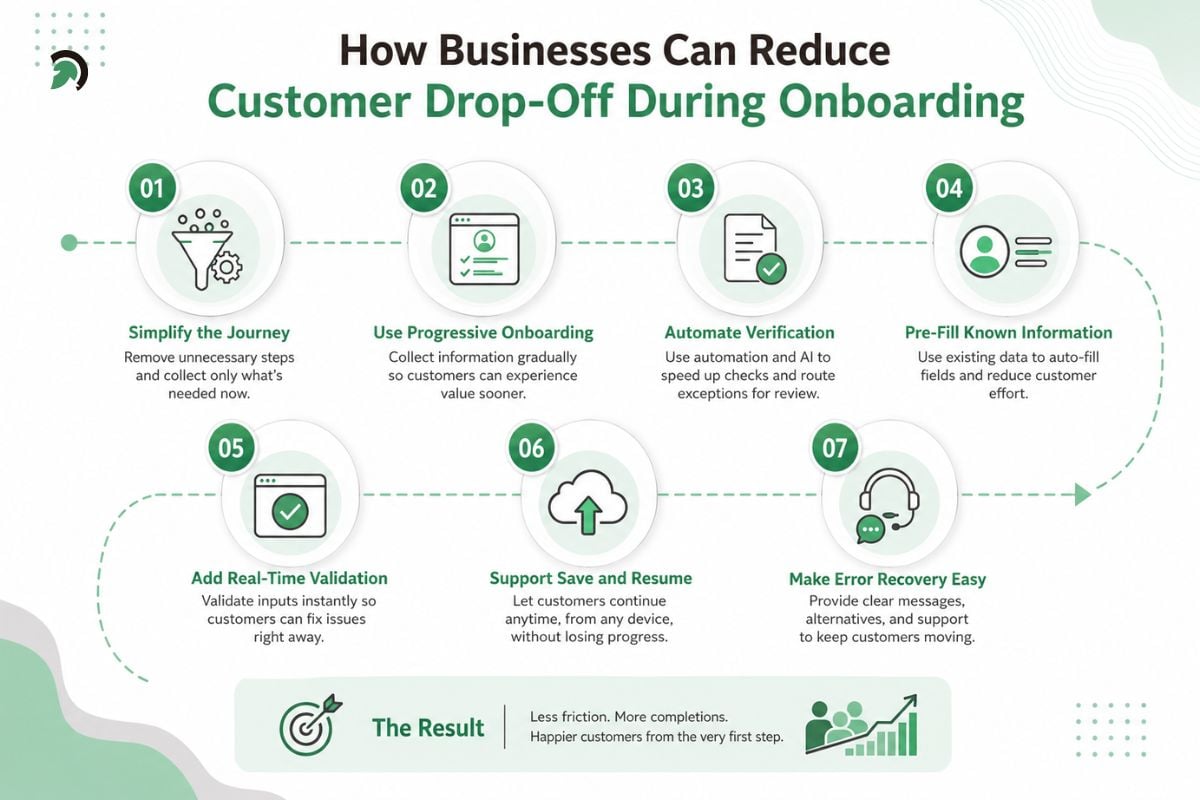
How businesses can reduce customer drop-off during onboarding by simplifying the journey, automating verification, and removing unnecessary friction.
Understanding customer drop-off during onboarding is only useful if businesses can translate those insights into practical improvements.
Simplify the Journey
Map every step from registration to activation. For each one, ask whether the information is required now, whether it could be collected later, and whether an integration could retrieve it automatically.
Removing unnecessary steps shortens the journey and makes the remaining requirements feel more purposeful.
Use Progressive Onboarding
Progressive onboarding collects information gradually instead of demanding everything before the customer can begin.
A SaaS platform, for example, might allow account creation with basic information, then request billing details only when the user upgrades.
This allows customers to experience value sooner and is one of the most practical digital onboarding best practices when regulations do not require all information upfront.
Automate Verification Where Appropriate
Automation can reduce delays in identity checks, document processing, fraud detection, and eligibility verification.
OCR, document classification, data extraction, rules-based validation, and risk scoring can help straightforward cases move quickly while routing exceptions for review.
In financial services, AI in Fintech can also support document processing, anomaly detection, customer assistance, and risk-based workflow routing.
Automation should always include clear escalation paths for cases that require human judgment.
Pre-Fill Known Information
If the business already has customer information, do not ask for it again.
Existing accounts, CRM data, identity providers, partner platforms, and previous interactions can often pre-fill fields, reducing effort and typing errors.
Add Real-Time Validation
Customers should know immediately when something is incorrect.
Email formatting, password requirements, address checks, file size validation, and required fields can often be validated while the customer is still working on the relevant step.
Real-time feedback is much easier to resolve than a list of errors displayed after final submission.
Support Save and Resume
Not every onboarding journey can be completed in one session. A customer may need to locate a document, consult a colleague, check financial information, or continue from another device.
Save-and-resume functionality prevents that interruption from becoming permanent abandonment.
Make Error Recovery Easy
Failures will occur, even in well-designed systems. If a third-party API is unavailable, a document cannot be verified, or a payment fails, the system should preserve the customer’s progress and provide alternatives.
Retry options, alternative verification methods, clear error explanations, support escalation, and saved application states all help reduce onboarding friction.
How Technology Can Make Onboarding Faster
Technology improves onboarding when it removes effort rather than adding another layer of complexity. A modern platform may connect CRM systems, identity providers, payment gateways, document services, risk engines, analytics, communication tools, and internal workflows.
The customer should experience these systems as one connected journey.
For financial businesses with complex regulatory and operational workflows, custom fintech software development services can help connect verification, compliance, workflow automation, integrations, and user experience within one platform.
Architecture also matters as onboarding volume grows. Performance testing, API resilience, monitoring, queue management, and workflow orchestration help prevent slowdowns when application volumes increase.
Balancing Speed With Security and Compliance
Faster onboarding should never mean weaker security.
Regulated businesses may still need identity verification, consent, data protection, fraud controls, KYC, KYB, AML processes, access controls, and audit records.
The better objective is to make these requirements efficient.
Businesses can collect information according to actual risk, automate straightforward checks, route exceptions to manual review, explain why sensitive data is required, and avoid asking for the same compliance information repeatedly.
Secure uploads, appropriate access controls, and clear consent records should operate behind an experience that still feels simple.
Good Digital Onboarding makes security visible without making the customer feel trapped in internal compliance processes.
Metrics That Reveal Onboarding Problems
Businesses cannot improve what they do not measure.
Start with the overall completion rate, then examine the journey in greater detail.
Onboarding Completion Rate
Measure the percentage of people who start and successfully complete onboarding.
Abandonment Rate
Track the percentage who begin but leave before completion.
Step-by-Step Drop-Off
Measure conversion between individual stages to identify whether customers are leaving during registration, verification, document upload, payment, or approval.
Average Completion Time
Long completion times may point to difficult forms, unnecessary steps, or slow external checks.
Verification Failure Rate
Monitor how often identity, address, document, or payment checks fail and why.
Manual Review Rate
A consistently high review rate may indicate weak automation, poor data quality, or validation rules that need refinement.
Onboarding Support Requests
Categorize questions and complaints related to onboarding. Support data often exposes confusing steps that analytics alone cannot explain.
These metrics help businesses understand customer drop-off during onboarding and prioritize the changes most likely to improve completion.
A Practical Framework for Better Onboarding
Improvement does not require a complete redesign. First, identify the highest abandonment points through funnel analytics and review those steps from the customer’s perspective.
Ask whether each step is necessary, understandable, technically reliable, and suitable for mobile use.
Next, examine waiting periods. Determine which delays can be automated and which genuinely require manual review. Where waiting is unavoidable, provide clear timelines and status communication.
Then review integrations. Duplicate entry, inconsistent records, slow APIs, and failed handoffs often indicate that the problem is architectural rather than visual.
Finally, test the updated journey continuously. Combine analytics, usability testing, support data, session behavior, and customer feedback.
A successful Digital Onboarding strategy is not simply about making the journey shorter. It is about making every required step feel justified, understandable, reliable, and easy to complete.
Conclusion
Slow digital onboarding causes customer abandonment because it adds friction at the exact moment users are ready to act. Long forms, repeated data entry, delayed verification, technical issues, and unclear progress can weaken trust and make customers question whether completing the process is worth the effort.
The solution is not simply to make onboarding shorter. Businesses need to make it smarter, with streamlined workflows, connected systems, automated verification, mobile-friendly experiences, clear progress visibility, and secure data handling.
EvinceDev helps businesses design and modernize these journeys through custom software development, FinTech software development, AI-powered automation, system integrations, secure architecture, and workflow optimization. By improving both the customer-facing experience and the technology behind it, businesses can reduce abandonment, accelerate activation, and convert more high-intent users into active customers.