Key Takeaways
- Search by Meaning: Vector databases help retrieve related information even when questions and source content use different wording.
- Embeddings Enable Matching: Embedding models convert content into numerical representations that vector databases store and search.
- Better Context for RAG: Vector retrieval supplies relevant information to help AI models generate informed responses.
- Complementary Search Methods: Vector search works alongside keyword search and relational databases to meet different information needs.
- Quality Beyond the Database: Reliable retrieval depends on accurate content, suitable embeddings, access controls, and regular testing.
The answer may already be in your company’s documents. The problem is finding it when the person asking the question uses different words from the person who wrote it. An employee searches for “manager on leave,” while the relevant procedure sits under “approval delegation.”
Vector databases help bridge this gap. By searching numerical representations of content, they help AI applications find information with a similar meaning, even when the wording differs. This makes them an important part of modern AI search and retrieval.
This blog explains how vector databases work, how they compare with keyword search and relational databases, and where they fit into retrieval-augmented generation (RAG). It also explores practical business uses and what it takes to retrieve useful, reliable information.
Quick Stat:
According to Microsoft’s 2023 Work Trend Index, 62% of survey respondents said they struggled with spending too much time searching for information during their workday.
What Is a Vector Database?
A vector database is a database designed to store, index, and search numerical representations of information called vectors. In AI search, these representations are typically generated by an embedding model.
Alongside each vector, the database can store supporting information, such as a document identifier, source reference, category, or update date.
Its defining capability is similarity search: finding stored vectors that are closest to a query vector according to a chosen mathematical measure. This makes it possible to retrieve related content without requiring identical wording.
If you are asking “what is a vector database?” from a business perspective, think of it as infrastructure for finding related information. It supplies search results that an application can display, recommend, or pass to an AI model.
What Are Vector Embeddings, and Why Do They Matter?
Vector embeddings are lists of numbers that represent useful characteristics of content. An embedding model can create them from text, images, or other supported inputs.
For text, the model learns patterns that allow related passages to have similar representations. “Reducing invoice processing time” and “streamlining accounts payable” may therefore be represented close together, despite using different words.
Imagine placing documents on a map. Documents covering related ideas tend to sit near one another. A question receives its own position, and the search system looks for nearby documents.
The embedding model determines what relationships the vectors capture. The database makes those representations searchable. Choosing a database cannot compensate for embeddings that poorly represent your content.
How Do Vector Databases Find Relevant Information?
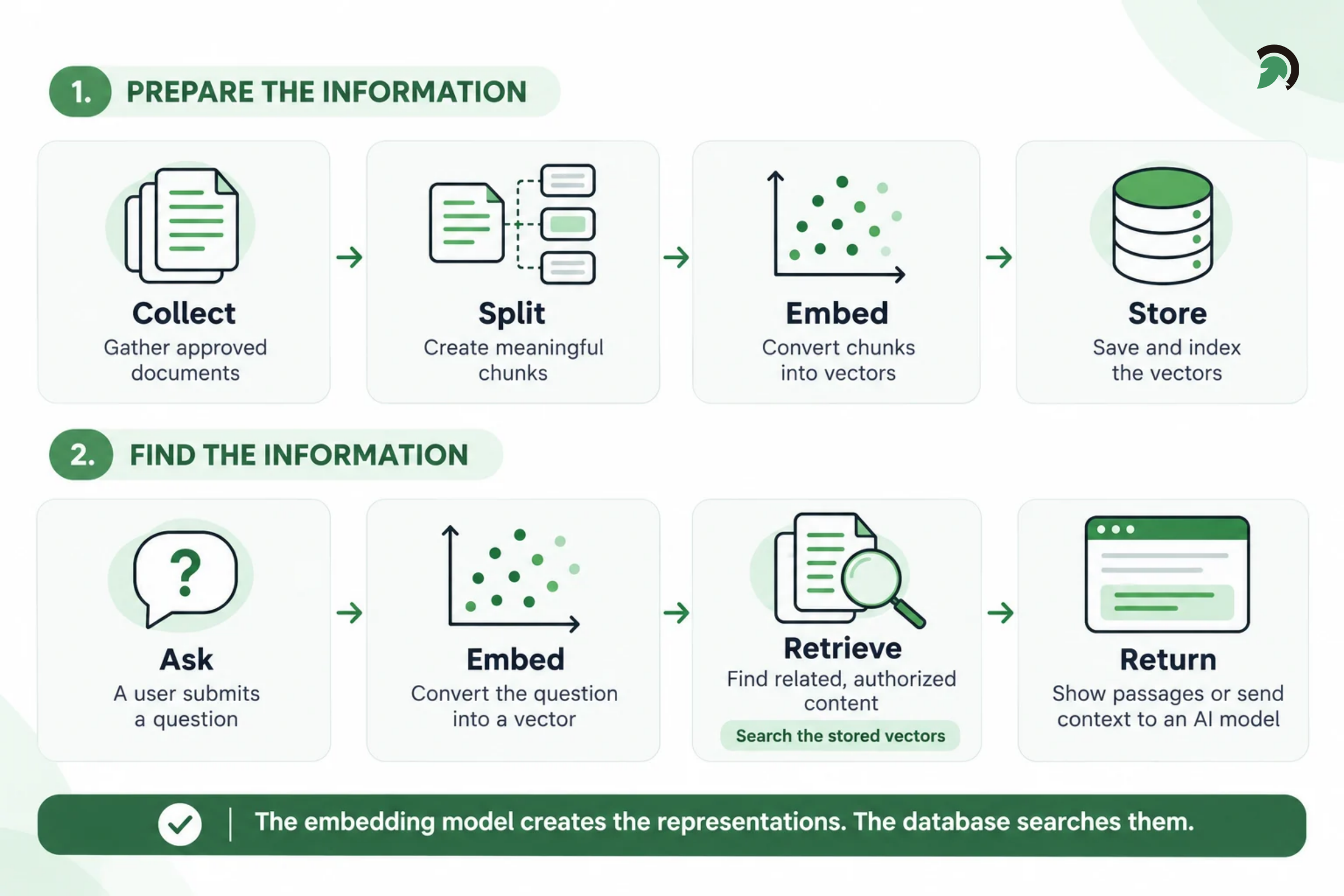
Vector databases find relevant content by comparing its numerical representation with that of a user’s question. The workflow has two stages: preparing content for search and retrieving it when needed.
Understanding Vector Embeddings and Similarity Search
Stage 1: Prepare Content for Search
1. Collect and extract the content
The application gathers information from approved sources, such as product catalogs, manuals, and internal knowledge bases. It extracts readable text, using text recognition for scanned documents when necessary.
2. Divide content into meaningful sections
Long documents are split into smaller sections called chunks. Each chunk should preserve enough context to be useful on its own, such as an instruction and its related conditions.
3. Generate embeddings and attach metadata
An embedding model converts each chunk into a numerical representation. Supporting metadata records details such as the source, department, document version, and access permissions.
4. Store and index vectors
The database stores these representations and builds an index that helps it locate similar vectors efficiently.
Stage 2: Retrieve Relevant Content
1. Convert the question into an embedding
When someone submits a question, the application generates a query embedding using a model compatible with the stored embeddings.
2. Apply the relevant restrictions
The retrieval system limits eligible content using metadata and authorization rules. For example, results may need to belong to a particular organization, product version, or approved document collection.
3. Find the closest matching vectors
The database uses a similarity measure, such as cosine similarity, dot product, or Euclidean distance, to identify related vectors.
For larger collections, approximate nearest neighbor search can retrieve results faster by avoiding exhaustive comparisons. The tradeoff is that it may miss some of the exact closest matches.
4. Return the associated information
The application retrieves the content linked to the matching vectors. It can rerank the results, display relevant passages, or provide them to a language model as context for an answer.
How Does Vector Search Differ from Keyword Search?
The main difference is how they find a match. Keyword search looks for words and phrases, while vector search finds content with a similar meaning. This makes vector search useful for semantic search, where relevant information may use different wording from the question.
For example, someone searching for “slow customer onboarding” may need a document about “reducing account activation delays.” Vector search can connect these related ideas even when the words do not match. Keyword search remains valuable when exact terms matter, such as product codes, error messages, or reference numbers.
Quick Stat:
According to Anthropic’s 2024 experiments, combining contextual embeddings with contextual keyword search reduced retrieval failures by 49% compared with its baseline. The evaluation measured whether relevant information appeared within the top 20 retrieved chunks.
| Search method | Best suited for |
| Keyword search | Finding specific words, phrases, and identifiers |
| Vector search | Finding related information expressed differently |
| Hybrid search | Combining exact matches with meaning-based results |
For a question such as “How do I fix synchronization error ERR-204?”, keyword search can find the exact error code, while vector search can retrieve related troubleshooting guidance. Hybrid search brings both approaches together, helping applications handle precise terms and everyday questions. The right approach depends on the content and the questions users ask.
Vector Database vs Relational Database: What Is the Difference?
The vector database vs relational database comparison concerns their primary strengths. It does not mean businesses must choose one for every workload.
| Aspect | Vector database | Relational database |
| Primary strength | Finding similar numerical representations | Managing structured records and relationships |
| Typical query | “Which passages relate to this question?” | “Which invoices are overdue?” |
| Search approach | Vector similarity, often with metadata filters | SQL conditions, joins, and aggregations |
| Common uses | Semantic retrieval, similar-item discovery, AI context | Transactions, orders, customer records, reporting |
| Typical output | Ranked items related to a query | Records or calculations meeting defined conditions |
| Role in an application | Helps retrieve related information | Maintains structured operational data |
The categories can overlap. PostgreSQL, for example, can support vector similarity search through the pgvector extension alongside existing relational capabilities. An invoice application might keep payment status, amounts, and approvals in relational tables while using vector search over procedure documents.
If a user asks for the total value of unpaid invoices, the application should calculate it from authoritative records. Retrieving similar text is not a substitute for querying current financial data.
What Role Does a Vector Database Play in RAG?
Retrieval-augmented generation, or RAG, is an approach that supplies retrieved information to a language model before it generates a response.
Instead of relying only on the model’s training, the application retrieves relevant material from an external knowledge source. That material becomes context for answering the question.
An application using a vector database for RAG typically follows these steps:
- A user asks a question.
- The application creates a query embedding.
- The retrieval system finds relevant, authorized passages.
- The application supplies those passages and instructions to the language model.
- The model generates a response, with source references when supported.
For example, an employee asks who can approve an invoice while their manager is away. The retrieval system finds the approval-delegation procedure, and the language model explains the steps.
RAG does not automatically eliminate hallucinations. The model may misinterpret a passage, overlook an exception, or answer beyond the available evidence. Applications need evaluation and a clear response when evidence is insufficient. RAG also does not always require a dedicated vector database. Retrieval can use keyword search, database queries, or a combination of methods.
Where Do Businesses Use Vector Databases?
Businesses use vector databases to help employees, customers, and AI applications find relevant information without needing an exact keyword match. Common applications include:
Enterprise Knowledge Search
Employees can find answers across policies, manuals, and project documents using everyday language. For example, searching for “setting up a new supplier” can retrieve a vendor onboarding procedure.
This makes internal knowledge search a practical use case for AI solutions development.
Customer Support Assistants
Vector databases help support tools retrieve troubleshooting guides and approved solutions related to a customer’s question. An assistant can use this information to explain the next steps, while support staff can find guidance faster.
eCommerce Product Discovery
Shoppers can search by describing what they need, such as “a lightweight bag for overnight work trips.” Vector search helps find products with relevant descriptions, while filters narrow results by price, size, and availability.
Document and Research Discovery
Teams can locate reports, research papers, or contract passages that discuss related topics, even when they use different terminology. For example, a search for “ending a supplier agreement” could retrieve a contract’s termination clause.
Product and Content Recommendations
Vector databases can help identify products, articles, or videos similar to those a user is viewing. These matches can support recommendations alongside other factors, such as preferences, availability, and previous interactions.
AI Agents
AI agents can retrieve relevant policies and procedures before responding or performing a task. For example, a service agent could check the applicable return policy before handling a request. Within AI agent development services, this retrieval capability helps connect an agent’s actions with business guidance. Permissions and approval rules determine which actions it can perform.
What Determines the Quality of AI Retrieval?
6 Key Requirements for Reliable AI-Powered Search
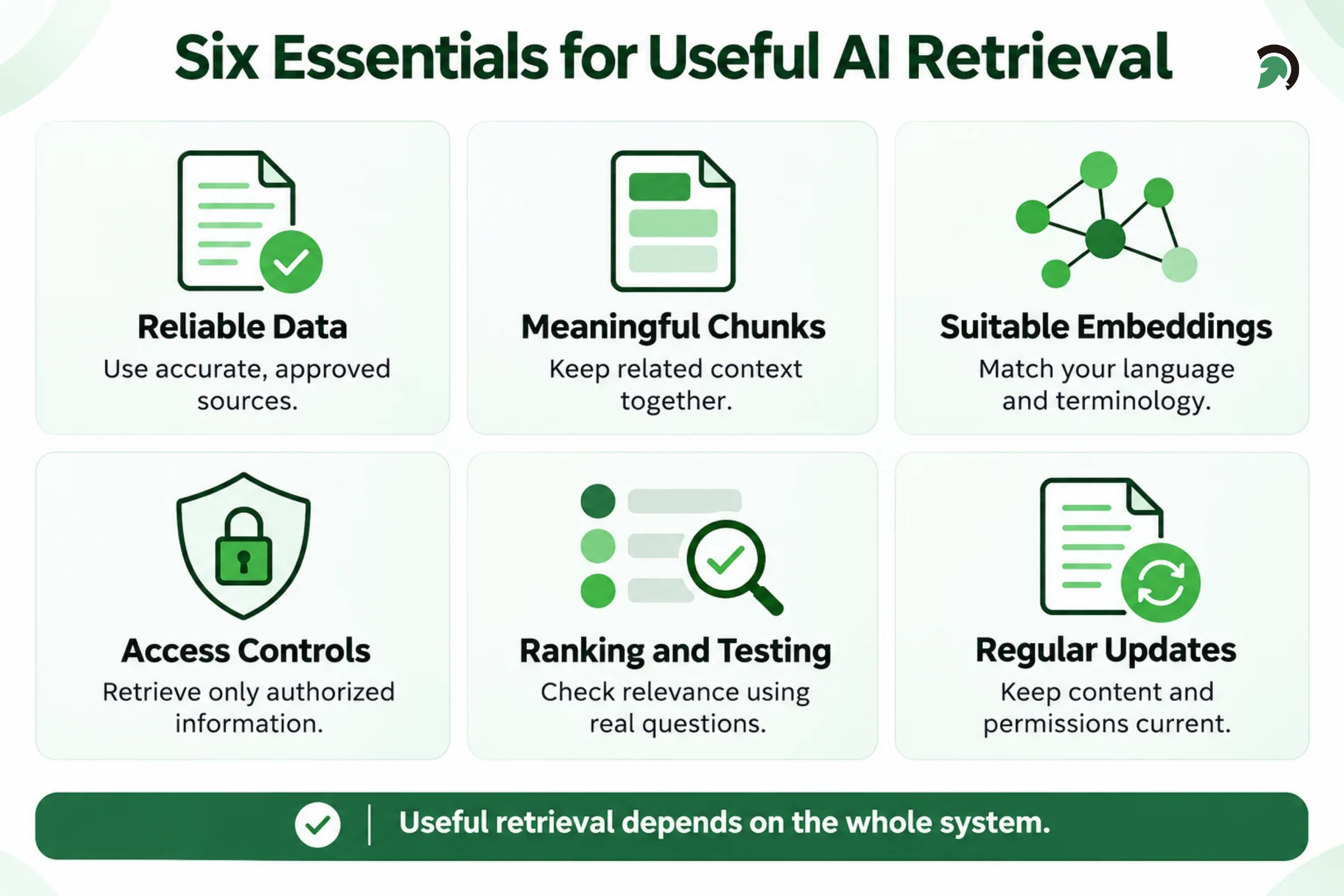
A vector database helps find related content, but useful results depend on how that content is prepared, searched, and maintained.
- Reliable data: Use accurate, approved documents and remove outdated or duplicate content.
- Meaningful chunks: Divide documents into sections that keep instructions, conditions, and exceptions together.
- Suitable embeddings: Choose an embedding model that works well with your terminology, languages, and content.
- Filters and permissions: Narrow results to the relevant information and enforce access rules before sharing content with users or AI models.
- Ranking and testing: Check whether real questions retrieve the right passages and whether generated answers reflect those sources.
- Regular updates: Keep indexed content and permissions aligned with changes in the original systems.
Data analytics and business intelligence services can help monitor search usage, response times, and recurring issues to guide improvements.
Quick Stat:
According to Anthropic’s 2024 experiments, contextual retrieval combined with reranking reduced the top-20-chunk retrieval failure rate by 67% compared with its baseline, from 5.7% to 1.9%.
Does Every AI Application Need a Dedicated Vector Database?
No. An application may not need vector retrieval at all if exact lookups or structured queries already solve its problem.
When vector search is useful, an existing database with vector capabilities may be sufficient. A dedicated vector database or search platform may fit better when workload requirements justify it.
Evaluate options against:
- Expected data volume and query traffic.
- Retrieval quality and acceptable response times.
- Metadata filtering and hybrid search requirements.
- Update frequency and deletion handling.
- Security, deployment, and backup requirements.
- Engineering effort and total operating cost.
Total cost includes embedding generation, storage, indexing, reranking, and model calls where applicable.
For custom software development services, the choice should follow the application’s requirements and the team’s ability to operate it. A familiar platform that meets those requirements may be more practical than adding another system.
How Can Businesses Get Started with AI Search and Retrieval?
Start with a defined problem, such as helping support staff find approved troubleshooting instructions. Identify the source documents, their owners, and the people allowed to access them. Establish how updates will reach the retrieval system. This is where AI integration services help connect search workflows with existing business systems.
Build a pilot using representative content and questions. Include different wording, exact identifiers, ambiguous requests, and questions the documents cannot answer.
Compare keyword, vector, and hybrid retrieval. Measure relevance, response time, and cost before expanding the scope. For an assistant, also check source references and whether it appropriately declines unsupported answers. Expand after the pilot demonstrates value and ownership is clear. Adding more documents should not come before understanding why the current results succeed or fail.
How Can EvinceDev Help Build Useful AI Retrieval?
Vector databases serve as a backbone for many modern AI search applications because they make meaning-based retrieval practical. They help connect a user’s question with relevant information, which can then support search results, recommendations, or generated answers.
Their effectiveness depends on the surrounding system: reliable sources, suitable embeddings, permissions, integration, and evaluation.
EvinceDev can help businesses assess retrieval requirements and build AI applications around their existing information and workflows. The focus should be a measurable outcome, such as finding an approved answer faster or reducing repeated searches across disconnected systems.
Have a business search problem to solve? Discuss your AI search use case with EvinceDev.