Key Takeaways
- Each Account Needs the Right Catalog: Dealers should see the products, prices, and purchasing terms that apply to their agreement.
- Pricing Rules Need Clear Priority: Account terms, quantity breaks, dates, and exceptions must be defined so overlapping rules produce the intended price.
- Connected Systems Keep Terms Aligned: Contract, ERP, and commerce data need clear ownership and reliable updates.
- Check Prices When Orders Are Submitted: Validate the applicable terms again at submission, especially when prices or contracts may have changed.
- Start Small and Measure Accuracy: Pilot with real accounts and orders, then track mismatches, corrections, and failed updates as the rollout expands.
A dealer adds a product to their order, but the price in the portal does not match their renewed contract. The sales rep finds one price in the agreement; the ERP shows another. Before the order can move forward, someone has to work out which price applies and correct the mismatch.
For a single order, that may take a few calls. Across hundreds of dealers, branches, and products, the same problem can keep returning whenever contracts change or systems fall out of sync.
Quick Stat:
In a BigCommerce survey of B2B buyers, 40% named inaccurate pricing and shipping costs as a leading frustration during purchasing. For a dealer, an unexpected price can mean pausing the order to confirm what their agreement actually covers.
Account-based pricing gives each buyer access to the products and prices agreed for their account. But making it work at scale requires clear rules for contract terms, branch access, quantity breaks, and exceptions, as well as a reliable way to carry those rules into the ordering process. This blog explains how contract catalogs work, where pricing mismatches arise, what systems need to connect, and how to introduce the workflow without disrupting existing orders.
What Do Account-Based Pricing and Contract Catalogs Mean?
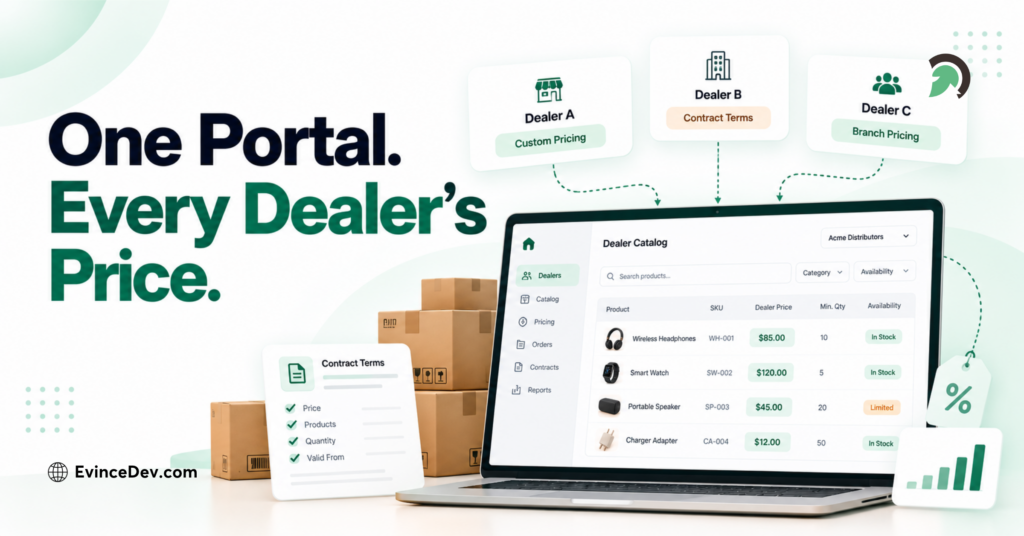
Account-based pricing means that a business buyer’s price depends on the terms assigned to their account. Those terms might specify a fixed product price, a discount from a standard price, or a lower unit price above an agreed order quantity. The same product can therefore have different valid prices for different buyers.
A contract catalog is the set of products and purchasing conditions presented to an account under its agreement. It answers two related questions: Can this account buy the product? If so, under what terms? A signed contract remains the commercial record; the catalog is how applicable terms appear in the ordering process.
Quick Stat:
In Sana Commerce’s 2025 survey of 750 B2B buyers, 64% said accurate, agreed-upon pricing is crucial when ordering online. For a dealer network, that means the price shown in the portal needs to reflect the terms assigned to the account placing the order.
| Buyer | Products Available | Example Pricing Rule |
| Dealer A | Standard replacement parts | Agreed price per item |
| Dealer B | Replacement parts plus regional equipment | Agreed price per case |
| Distributor C | Full authorized product range | Different price after a quantity threshold |
These examples are illustrative. A business might also restrict products by territory or require purchasing approval. Product access, price, and purchasing conditions need to be considered together.
Why Does Managing Dealer Prices Become Difficult as the Network Grows?
The difficulty often starts before anyone opens the portal. A commercial team negotiates a price in a contract, a pricing team updates a spreadsheet, and an operations team maintains the ERP. Someone else uploads a catalog to the commerce platform. If those updates do not follow the same approval and publishing process, each system can be internally correct while the buyer still sees the wrong result.
Time makes the problem harder. A price may begin next month, expire at renewal, or apply only to a particular product unit. A parent distributor may have a general agreement, while one branch has a special arrangement. A product might be discontinued or unavailable in the buyer’s territory. Sales may approve a one-time discount in an email that never becomes a tracked exception in the ordering workflow.
The result is a disputed price or an order needing correction. Sales, customer service, pricing, and finance repeat the same checks while buyers wait. The cost lies in resolving gaps between disconnected records.
Which Rules Determine the Catalog and Price Each Account Sees?
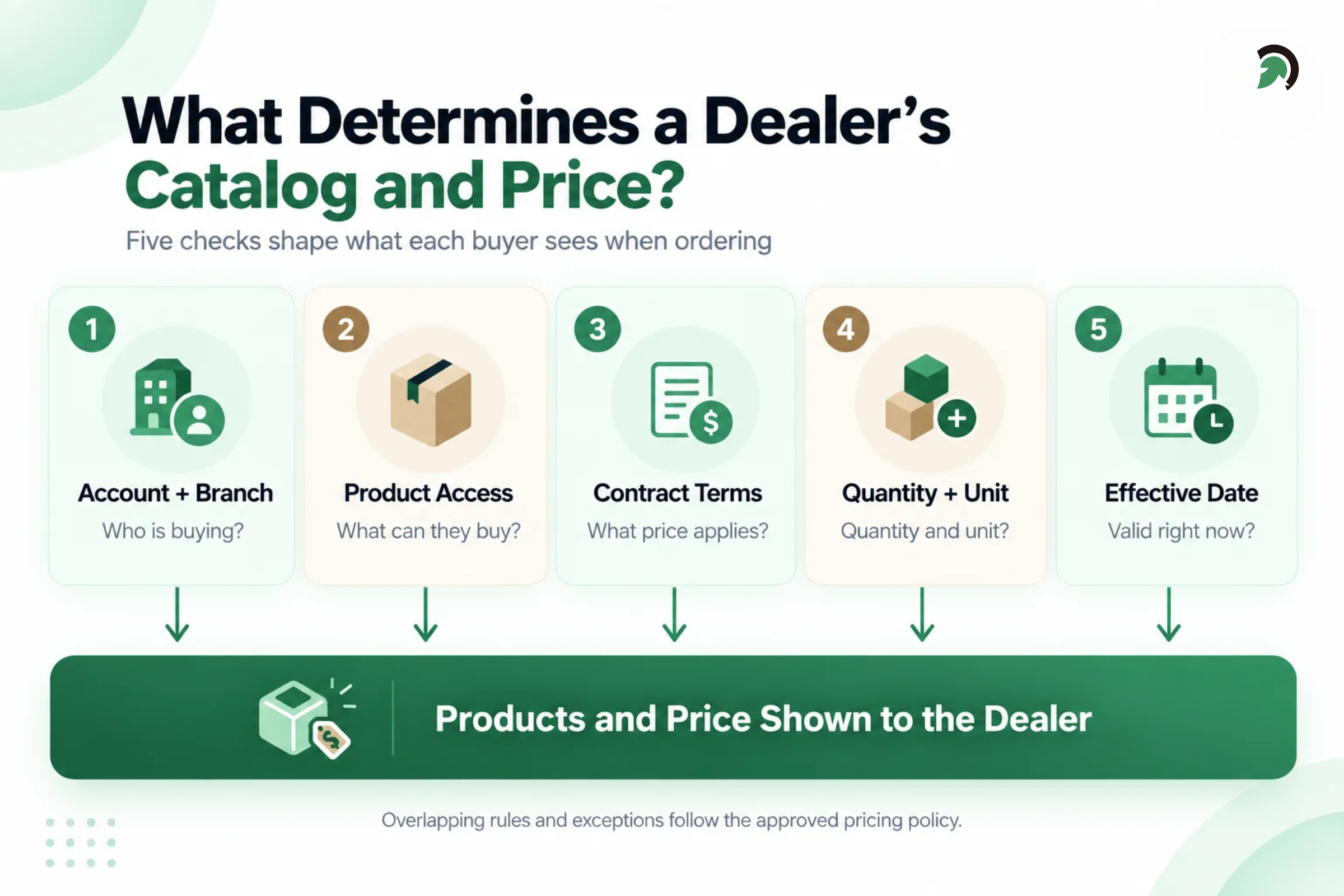
Automation works only when the business can describe its rules clearly. Consider Dealer B in the example above: a branch of a larger distributor that orders parts by the case. To show its correct catalog, the system needs more than a customer name and a discount percentage.
Account and Branch Identity
First, the buyer must be connected to the correct company and ordering location. Does Dealer B inherit the parent distributor’s agreement, or does its branch have separate terms? A buyer with access to several locations may need to select the one placing the order. Establish the account context before applying catalog or price rules.
Product Eligibility
The catalog determines which products the account may view and purchase. Dealer B might be authorized to order parts for its region but not a specialized equipment line sold through another dealer group. A valid ERP price does not make a product available to every buyer. Check eligibility again at order submission.
Contract Prices and Quantity Rules
An agreement can set a fixed price for a product, assign a customer group discount, or provide a lower unit price when the buyer orders enough of the same item. It may also specify a minimum quantity or require orders in case increments. Calculate against the item, account, and order quantity.
Effective Dates, Currency, and Units of Measure
A price of $120 means little without its context. Is it effective today? Is it per case or per item? Does it apply in the currency of the account’s agreement? If Dealer B orders cases but the portal displays the price as though it were for individual items, the apparent mismatch can be substantial even when the underlying number is correct. Include these details in pricing tests.
Pricing Priority and Exceptions
Suppose Dealer B qualifies for a distributor group price, has a branch-specific contract price, and sees a promotion on the same product. Which rule wins? Define when discounts combine, when a specific agreement takes priority, and who can authorize a one-time change. Platforms resolve overlapping prices differently, so test the outcome with real scenarios.
How Do the Contract, ERP, and Commerce Platform Stay Aligned?
A signed agreement records what the business and dealer have negotiated, but its terms must be entered into the systems used to manage prices and take orders. The first step is to decide what each system controls.
| System | Typical Role |
| Contract or pricing system | Records approved terms, effective dates, and exceptions |
| ERP | Holds customer and product records, units of measure, and often approved sales prices |
| Commerce platform | Identifies the buyer and presents the applicable catalog and price |
The exact ownership will vary by business. What matters is that each rule has one approved place to be maintained. If a salesperson changes a discount in the portal while the ERP still holds the previous price, the team needs to know which value applies and who can approve the change. The systems also need matching account and product identifiers so an update reaches the correct dealer, branch, and item. Some changes may need to appear soon after approval; others can follow a scheduled update. In either case, the team should be able to see when a change was published and whether it failed. A missing or expired price should follow a defined review process rather than silently becoming an unintended offer. Finally, the result should be traceable. If a dealer questions an order line, staff should be able to find the account, agreement, pricing rule, effective date, and any approved override that produced the price.
How Does a Contract Change Become the Price on an Order?
Follow Dealer B through a contract renewal. The company has agreed on a new case price beginning next month:
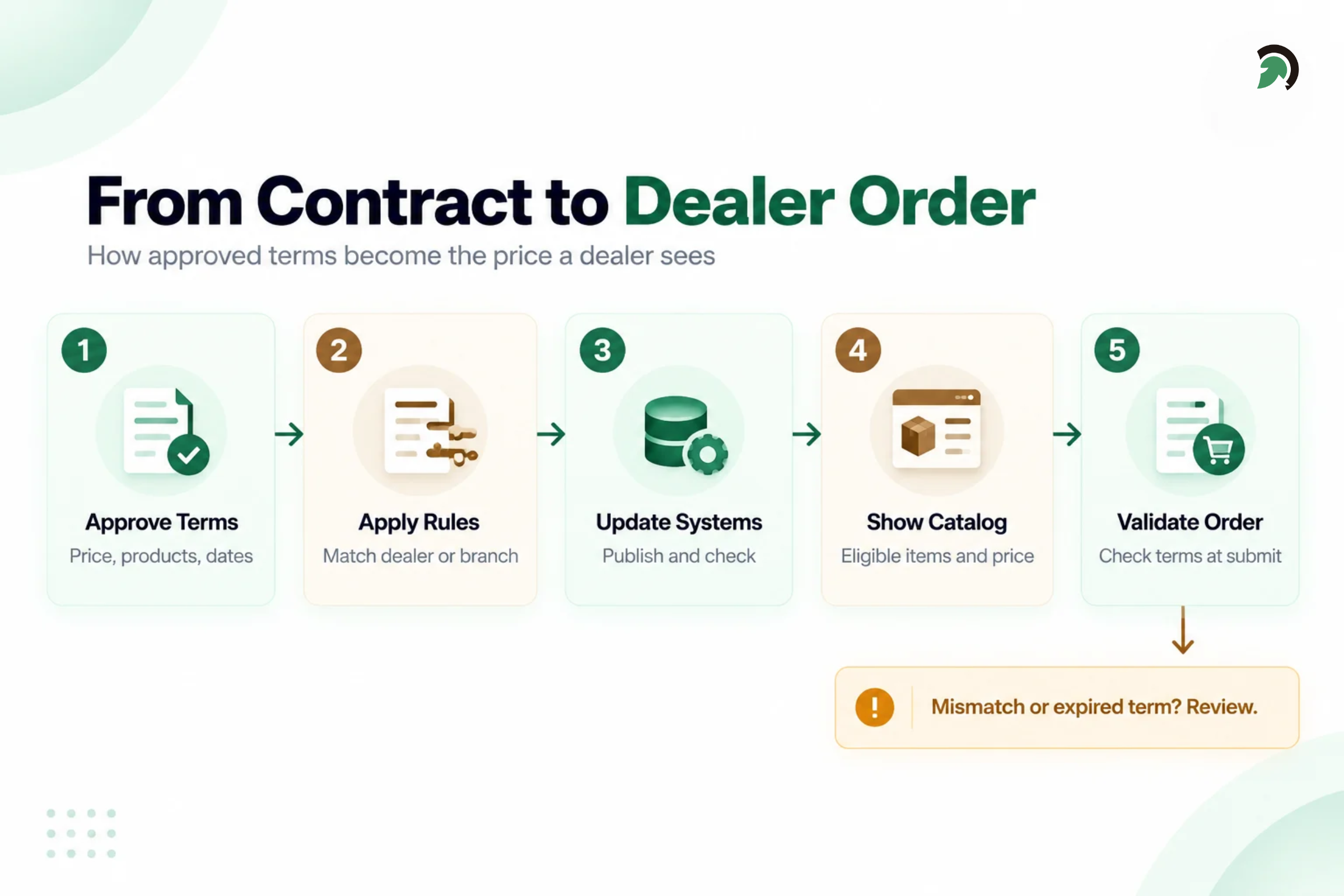
- Approve the change. The commercial owner confirms the new price, covered products, branch, unit, and effective dates.
- Update the designated record. The pricing team enters the approved terms in the system chosen to own them, using product and account identifiers shared with downstream systems.
- Publish and verify. An integration sends the change to the portal. Validation checks that the right account and product were matched and reports any rejected update.
- Show the applicable catalog. When Dealer B signs in for its branch, the portal presents eligible products and the price effective for the selected quantity.
- Validate the submitted order. The applicable terms are checked again when the order is placed, so the final order reflects the agreed rules at that point in the buying process.
- Handle exceptions. If the agreement has expired, the product is restricted, or a price cannot be resolved, the order follows a defined review path.
A buyer may leave a cart open while contract terms change. Decide which price is honored and when, communicate changes, and record the price accepted on the order. Shipping and taxes can affect the total, but are separate from the contracted product price.
When Are Built-In B2B Pricing Features Enough?
Many commerce platforms already provide B2B pricing features. Shopify lets businesses assign catalogs to B2B markets and, on Shopify Plus, directly to companies or company locations. These catalogs can control product availability and include quantity rules and price breaks. Adobe Commerce offers shared catalogs with company-specific product access and custom prices. These features may be enough if they support the business’s contract terms and can stay aligned with its other systems.
ERP-owned prices, branch overrides, and external approvals may require integration or additional rules. They do not automatically require a new storefront or pricing engine. List the rules and test how the platform applies them, especially where catalogs or prices overlap. If standard behavior does not match the contract, define the missing process or integration.
Quick Stat:
In McKinsey’s 2026 Global B2B Pulse Survey, 71% of respondents said their organizations offer e-commerce. For businesses selling through dealer portals, the question is whether their existing platform can apply the right products and prices to each account.
What Does Implementation Look Like Without Disrupting Existing Orders?
A phased rollout lets the team test contract pricing against real orders while the current ordering process continues to operate.
- Review the contracts and current workflow. Gather representative agreements, price files, account and product records, and examples of disputed orders. Include a straightforward dealer, a distributor with branches, an expiring contract, and an approved exception. This shows where terms are stored and where staff currently make manual decisions.
- Define the rules and their owners. Decide which system maintains each record, how branch accounts inherit terms, which price takes priority, and what happens when a price is missing. Sales and pricing teams should approve these business rules before technical teams configure the platform or build integrations.
- Pilot with a small group of accounts. Compare the products and prices those buyers see with their agreements and submitted orders. Test quantity breaks, units of measure, branch-specific terms, restricted products, overlapping discounts, expired terms, and failed updates. Keep a clear route for staff to review exceptions during the pilot.
- Expand after the results are reliable. Add more accounts once the team can reproduce and explain the pilot’s pricing outcomes. Monitor mismatches and failed updates as the rollout grows, while retaining a way to handle orders that need manual review.
The client’s team will need to provide contracts, account and product data, system access, and people authorized to resolve conflicting terms. The existing ERP and commerce platform can often remain in place if they support the required rules and integrations. A realistic timeline depends on data quality, contract variations, system access, and the amount of order testing needed.
How Do You Check That Account-Based Pricing Is Working?
Measure whether the new process reduces the work it was built to address. Track price mismatches found before and after order submission, manual overrides, orders needing correction, and the time between an approved contract change and its appearance in the portal. Review failed updates and dealer support requests about prices as well.
Establish a baseline before rollout and compare it with the pilot and later account groups. Staff should also be able to trace disputed prices to their underlying rules.
Bottom Line
Account-based pricing becomes difficult when a dealer’s agreement, the ERP, and the ordering portal each hold a different version of the terms. Automating contract catalogs starts with defining which products an account can buy, which price applies, when that price is valid, and how exceptions are handled. The next step is connecting those rules to the systems dealers use to place orders. Testing real contracts and orders with a small group of accounts helps uncover mismatches before the workflow expands across the network. Dealers can then order with greater confidence, while sales and operations can trace how each price was applied.
If your team manages these terms across spreadsheets and disconnected systems, EvinceDev can help with unified commerce solutions, eCommerce ERP integration, and API integration services. We can review your current pricing workflow and identify what needs to be configured or connected to keep dealer catalogs aligned with their agreements.