
Key Takeaways:
- More Than Convenience: What feels easier at the beginning may not always be the better fit for your website in the long run.
- Growth Reveals the Difference: Some platform strengths become much clearer once you think beyond the initial website launch.
- Features Aren’t the Full Story: The better choice often depends on how well those features support your goals and workflow.
- Control Can Shape the Choice: The level of customization and ownership you need can make a real difference over time.
- It Depends on What You’re Building: A platform that works well for one type of website may not be the right fit for another.
If you’re planning to build a website, chances are you’ve come across the debate around Wix vs WordPress. Both platforms are among the most popular website creation tools in the world, yet they serve slightly different audiences.
Wix is known for its simplicity and all-in-one approach. It allows users to build websites visually using drag-and-drop tools without worrying about hosting, security, or coding.
WordPress, on the other hand, is a powerful open-source content management system (CMS) that gives you far more flexibility and control over your website.
Because of these differences, many people often ask questions like:
- What is the difference between Wix and WordPress?
- Which platform is easier to use?
- Which one is better for SEO or ecommerce?
- And ultimately, which is better, Wix or WordPress?
In this guide, we take a detailed look at Wix vs WordPress, comparing their ease of use, design flexibility, SEO capabilities, pricing, scalability, and overall value to help you choose the platform that best fits your website goals.
Quick Stat:
According to ThemeIsle’s CMS market share report, around 70% of websites with meaningful content use a content management system, showing how platforms like WordPress and Wix have become essential for modern website development.
What Is Wix and How Does It Work?
Wix is a cloud-based website builder designed for beginners and small businesses. Instead of installing software or configuring hosting, users can create websites directly within the Wix platform.
Its biggest strength is simplicity. Wix offers a visual editor where you can drag elements like text, images, and buttons onto a page and design your site exactly as you want.
Key features of Wix include:
- Drag-and-drop website editor
- Hundreds of professionally designed templates
- Built-in hosting and security
- App marketplace for additional features
- Integrated marketing tools
Another advantage of Wix is that it manages technical tasks such as updates, security patches, and performance optimization.
Because everything is handled within the same ecosystem, Wix is often preferred by:
- freelancers
- small business owners
- bloggers starting their first site
- portfolio websites
However, the simplicity that makes Wix appealing can also limit customization in the long run.
Quick Stat:
According to W3Techs, Wix powers over 4% of websites globally, making it one of the most widely adopted website builders today.
What Is WordPress and Why Is It So Popular?
WordPress is the world’s most widely used website platform, powering more than 40 percent of websites globally.
When people compare Wix vs WordPress, they usually mean WordPress.org, which is the self-hosted version of WordPress.
Unlike Wix, WordPress is open-source software. This means anyone can modify it, extend it, or build custom functionality using plugins and themes.
To create a WordPress website, you typically need:
- a hosting provider
- a domain name
- WordPress installation
Once installed, WordPress provides a powerful dashboard where you can manage pages, blog posts, media files, and plugins.
Major benefits of WordPress include:
- thousands of themes and design options
- over 60,000 plugins
- full ownership of website data
- complete control over customization
Because of its flexibility, WordPress is widely used by:
- blogs and media websites
- ecommerce stores
- corporate websites
- startups and SaaS companies
This level of control is one of the main reasons the Wix vs WordPress comparison often favors WordPress for long-term scalability.
Quick Stat:
According to W3Techs, WordPress holds around 59.9% of the CMS market share among websites that use a content management system, highlighting its dominance in the website platform ecosystem.
Who Should Use Wix vs WordPress?
Choosing between Wix vs WordPress often depends on your technical skills and website goals.
Wix is ideal for people who:
- want to launch a website quickly
- have no coding knowledge
- prefer an all-in-one solution
- Need a simple website or portfolio
WordPress is ideal for users who:
- want complete design flexibility
- plan to scale their website in the future
- want advanced SEO capabilities
- need custom functionality
This distinction explains why the WordPress vs Wix comparison is common among both beginners and experienced developers.
How Easy Is It to Use Wix vs WordPress?
Ease of use is one of the biggest deciding factors in the Wix vs WordPress comparison.
Wix Ease of Use
Wix is designed specifically for beginners. The platform guides you through the entire setup process.
You simply:
- Choose a template
- Customize the layout
- Publish the website
The visual editor makes it easy to move elements around the page and instantly see how your site will look.
WordPress Ease of Use
WordPress requires a bit more learning at the beginning.
Users need to:
- Install themes
- Configure plugins
- Manage hosting settings
While modern page builders like Elementor have simplified the process, WordPress still requires more setup than Wix.
Overall, when comparing Wix vs WordPress, Wix is easier for beginners, while WordPress offers more control once you learn the system.
How Do Design and Customization Compare?
Design flexibility is another important factor when evaluating Wix vs WordPress.
Wix Design Options
Wix offers hundreds of ready-made templates designed for various industries such as restaurants, portfolios, and online stores.
Advantages include:
- visually appealing templates
- easy customization
- no coding required
However, Wix templates have structural limitations, and switching templates after launching a website can be difficult.
WordPress Design Options
WordPress provides significantly more design flexibility.
Users can choose from:
- thousands of free themes
- premium theme marketplaces
- custom design frameworks
Developers can also modify themes directly with code, which is why many agencies prefer WordPress for complex projects.
What Is the Difference Between Wix Apps and WordPress Plugins?
A major part of the Wix vs WordPress ecosystem comparison involves extensions.
Wix App Market
Wix offers an app marketplace that allows users to add extra functionality to their websites.
Examples include:
- live chat tools
- booking systems
- email marketing integrations
- analytics tools
The marketplace is curated, which means apps are generally well integrated with the Wix platform.
WordPress Plugins
WordPress plugins extend website functionality in almost unlimited ways.
Popular plugin categories include:
- SEO optimization
- ecommerce tools
- membership platforms
- security enhancements
With more than 60,000 plugins available, WordPress offers far more flexibility than Wix.
Which Platform Is Better for Blogging?
Blogging is an area where the Wix vs WordPress comparison becomes particularly interesting.
Blogging with Wix
Wix includes built-in blogging tools that allow users to:
- create blog posts
- categorize content
- manage comments
For casual blogging, Wix works well and is easy to manage.
Blogging with WordPress
WordPress was originally built as a blogging platform, and it still excels in this area.
Advantages include:
- advanced content management
- custom categories and tags
- powerful editorial workflows
- extensive SEO optimization
For content-heavy websites, WordPress usually provides a more robust blogging experience.
How Do Wix and WordPress Compare for SEO?
Search engine optimization is a critical consideration in the Wix vs WordPress debate.
Wix SEO Features
Wix has improved significantly in recent years and now includes tools such as:
- SEO setup wizard
- customizable meta tags
- mobile optimization
- automatic sitemap generation
WordPress SEO Features
WordPress offers deeper SEO control through plugins like:
- Yoast SEO
- Rank Math
- All-in-One SEO
These plugins allow users to control:
- schema markup
- technical SEO settings
- advanced metadata
Because of this flexibility, many marketers believe WordPress provides stronger SEO capabilities in the Wix vs WordPress comparison.
How Do Ecommerce Features Compare?
Both platforms support online stores, but the Wix vs WordPress ecommerce capabilities differ.
Wix Ecommerce
Wix provides built-in ecommerce features such as:
- product catalogs
- payment integrations
- inventory management
- shipping options
These tools work well for small to medium online stores.
WordPress Ecommerce
WordPress ecommerce is typically powered by WooCommerce, a powerful plugin that transforms WordPress into a full ecommerce platform.
WooCommerce allows businesses to:
- customize checkout flows
- integrate advanced payment gateways
- scale large product catalogs
For growing ecommerce businesses, WordPress often offers greater flexibility.
How Do Marketing Tools Compare?
Marketing tools also influence the Wix vs WordPress decision.
Wix Marketing Features
Wix includes built-in tools like:
- email marketing campaigns
- CRM functionality
- marketing automation
- analytics dashboards
These integrated tools make it easier for beginners to manage marketing without installing extra software.
WordPress Marketing Features
WordPress relies on plugins for most marketing features, but this also allows for more advanced integrations with tools such as:
- HubSpot
- Mailchimp
- marketing automation platforms
How Do Performance, Security, and Maintenance Compare?
Technical maintenance is another key difference in the Wix vs WordPress discussion.
Wix Infrastructure
With Wix, everything is managed automatically.
This includes:
- security updates
- performance optimization
- hosting infrastructure
Users don’t need to worry about technical maintenance.
WordPress Infrastructure
WordPress requires more hands-on management.
Users must:
- Update plugins and themes
- configure security tools
- manage hosting performance
However, this flexibility also allows for more control over website optimization.
How Much Does Wix vs WordPress Cost?
Pricing is often a deciding factor when comparing Wix vs WordPress.
Wix Pricing
Wix operates on a subscription model with plans that include:
- hosting
- security
- customer support
Pricing is predictable because everything is bundled into one plan.
WordPress Costs
WordPress itself is free, but users typically pay for:
- hosting services
- premium themes
- premium plugins
The total cost varies depending on website complexity.
Who Owns Your Website Data?
Data ownership is an important but often overlooked factor in the Wix vs WordPress comparison. It determines how much control you have over your website content and how easily you can move your site to another platform in the future.
Wix Data Ownership
Wix is a hosted platform, which means your website operates within the Wix ecosystem. While you own the content you create, exporting your full website or migrating it to another platform can be limited and may require manual work.
WordPress Data Ownership
WordPress provides full ownership of your website data, including content, media, and databases. Since it is an open-source platform, you can easily migrate your website between hosting providers and maintain greater control over your site in the long run.
Which Platform Scales Better as Your Website Grows?
Scalability is an important factor to consider in the Wix vs WordPress comparison, especially if you plan to expand your website over time. As your site grows, you may need more advanced features, better performance, and the ability to handle increased traffic and content.
Wix Scalability
Wix works well for small to medium-sized websites such as portfolios, small business sites, or simple online stores. Because it is a fully managed platform, Wix takes care of hosting, updates, and performance optimization, which makes scaling easier from a technical standpoint. However, as websites become more complex, users may encounter limitations in customization, integrations, and advanced functionality. This can make it challenging for businesses that require highly tailored features or large-scale digital experiences.
WordPress Scalability
WordPress is widely known for its ability to scale with your website’s growth. From small blogs to large enterprise platforms, WordPress can support a wide range of website sizes and complexities. Since it is open-source and highly customizable, users can expand functionality through plugins, custom wordpress development, and scalable hosting solutions. Businesses can also optimize performance with caching tools, content delivery networks, and advanced server configurations.
Because of this flexibility, WordPress is often the preferred choice for organizations planning long-term growth. Whether you want to add new features, handle higher traffic, or build a more complex digital platform, WordPress provides the infrastructure and customization options needed to scale effectively.
Wix vs WordPress for Different Use Cases
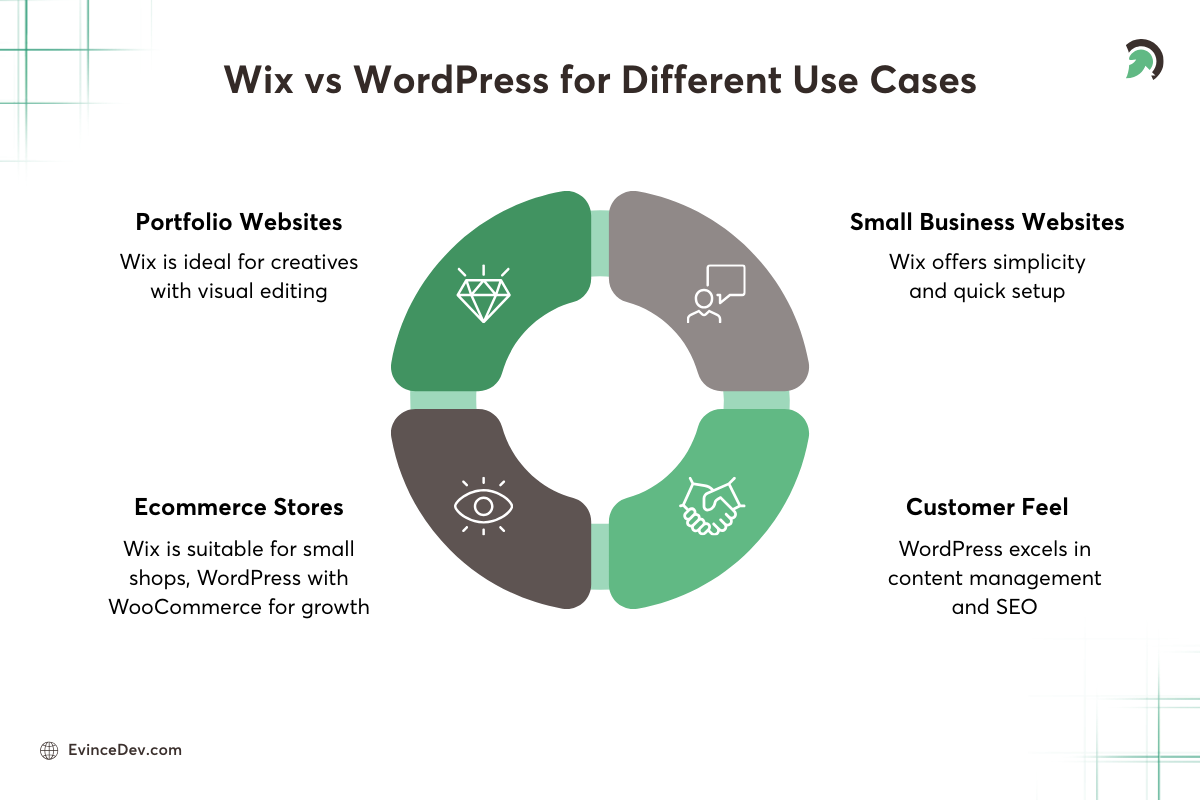
When comparing Wix vs WordPress, the right platform often depends on the type of website you want to build.

Small Business Websites
Wix is a good option for small business websites that need a simple and quick online presence. Its ready-made templates and built-in tools make it easy to launch and manage a basic website without technical expertise.
Blogging Platforms
WordPress is generally the better choice for blogging. It offers stronger content management features, better organization of posts and categories, and more advanced SEO capabilities.
Ecommerce Stores
Wix supports ecommerce through built-in store features that work well for smaller shops. However, WordPress combined with WooCommerce provides more flexibility and scalability for businesses planning to grow their online store.
Portfolio Websites
Wix works particularly well for portfolio websites. Its visual editor and design-focused templates allow creatives to quickly build attractive portfolios without needing coding knowledge.
Wix vs WordPress: What Are the Key Differences at a Glance?
Let’s have a quick overview of the difference between Wix and WordPress.

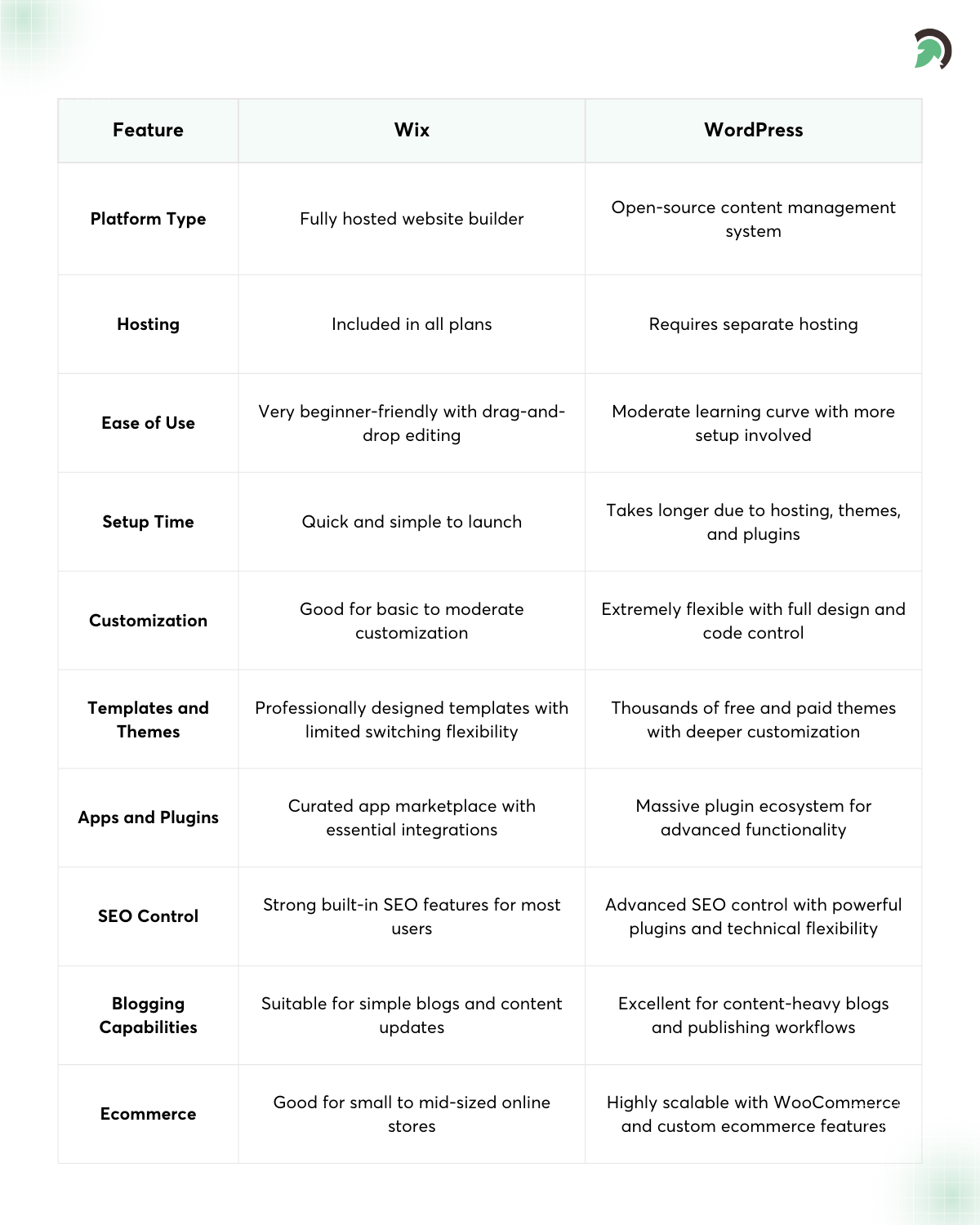
At a high level, the Wix vs WordPress debate comes down to simplicity versus flexibility.
Wix provides an all-in-one environment where everything is managed for you. WordPress offers greater customization but requires more involvement in setup and maintenance.
What Are the Pros and Cons of Wix vs WordPress?
Understanding the pros and cons of Wix vs WordPress can make it easier to decide which platform aligns better with your needs. While both platforms are powerful in their own ways, they differ significantly in terms of flexibility, ease of use, and long-term control.
Wix Pros
- Beginner-friendly interface: Wix offers an intuitive drag-and-drop builder that makes website creation simple, even for users with no technical background.
- All-in-one platform: Hosting, security, templates, and essential tools are included, so you don’t have to manage multiple services.
- Quick website setup: With ready-made templates and guided setup options, users can launch a website in a relatively short time.
Wix Cons
- Limited customization: While Wix offers design flexibility, it can be restrictive compared to platforms that allow deeper customization.
- Platform lock-in: Because Wix operates within its own ecosystem, migrating your website to another platform can be challenging.
- Fewer advanced features: For complex websites or highly customized functionality, Wix may not offer as many advanced options.
WordPress Pros
- Highly customizable: WordPress allows extensive customization through themes, plugins, and direct code modifications.
- Large plugin ecosystem: With thousands of plugins available, users can add almost any feature, from SEO tools to ecommerce capabilities.
- Strong SEO capabilities: WordPress provides advanced SEO control through powerful plugins and flexible site structure options.
WordPress Cons
- Learning curve: Beginners may need time to understand the dashboard, themes, plugins, and website management.
- Requires maintenance: Users are responsible for updating plugins, themes, and core software to keep the site secure and optimized.
- Hosting management required: Unlike Wix, WordPress requires choosing and managing a hosting provider separately.


Bottom Line
When evaluating which is better Wix or WordPress, the right choice usually comes down to your website needs and how much control you want over customization and scalability.
If you’re looking for a simple, all-in-one platform that lets you launch a website quickly with minimal technical effort, Wix can be a convenient choice. It handles hosting, security, and maintenance for you, making it ideal for beginners or small websites.
On the other hand, if you want greater flexibility, deeper customization, and the ability to scale your website as your business grows, WordPress often proves to be the stronger long-term option. Its open ecosystem, powerful plugins, and advanced SEO capabilities make it suitable for businesses that need more control and functionality.
Both platforms have their strengths, and the right choice in the WordPress vs Wix decision depends on your technical comfort level, project requirements, and long-term vision. If you’re still unsure which platform aligns best with your goals, consulting experienced developers can make the decision easier. At EvinceDev, our team helps businesses evaluate the right technology stack and build high-performing websites, whether it’s a custom WordPress solution or a scalable digital platform tailored to your needs.