
Key Takeaways:
- Core Sync Flows: Focus first on orders, inventory, and pricing syncs; add other integrations only after stability.
- Use Middleware: At scale, use middleware for queues, retries, monitoring, alerts, and reusable rules across systems.
- Hybrid Syncing: Use real-time for orders and inventory spikes; batch pricing and catalog updates to save API calls.
- Canonical Model: Adopt a canonical model so NetSuite, SAP, or Odoo changes do not break Shopify workflows later.
- Edge Case Ready: Design for refunds, exchanges, partial fulfillment, cancellations, and multi-location inventory.
- Monitor & Audit: Add alerts plus reconciliation checks to catch missing orders, stock drift, and pricing gaps fast.
For growing Shopify businesses, Shopify ERP integration becomes the difference between scale and operational chaos.
In the early stages, Shopify works beautifully as a standalone platform. Orders are manageable, inventory is limited, pricing is relatively static, and teams can survive with manual processes. But as order volume increases, catalogs expand, and sales channels multiply, cracks start to appear.
Orders need to be pushed into accounting systems. Inventory needs to stay accurate across warehouses. Pricing needs to be controlled centrally to avoid margin leakage. When these processes are handled manually or through loosely connected tools, errors become inevitable.
ERP Shopify integration is no longer about convenience. It is about operational survival. Without a well-designed integration, teams spend more time fixing data issues than growing the business.
This blog lays out a practical, battle-tested ERP Shopify integration blueprint for integrating Shopify with ERPs like NetSuite, SAP, and Odoo, focusing on the three most critical data flows: orders, inventory, and pricing.
Quick Stat:
According to the IBM (2025) report, 43% of COOs cite data quality issues as their most significant data priority, and disconnected commerce and ERP systems are one of the fastest ways to create data that teams cannot trust.
What Is ERP + Shopify Integration, in Simple Terms?
ERP + Shopify integration is the process of connecting Shopify, where customers place orders, with an ERP system, where the business runs its operations. The goal is to ensure that orders, inventory, and pricing stay consistent across systems without manual intervention.
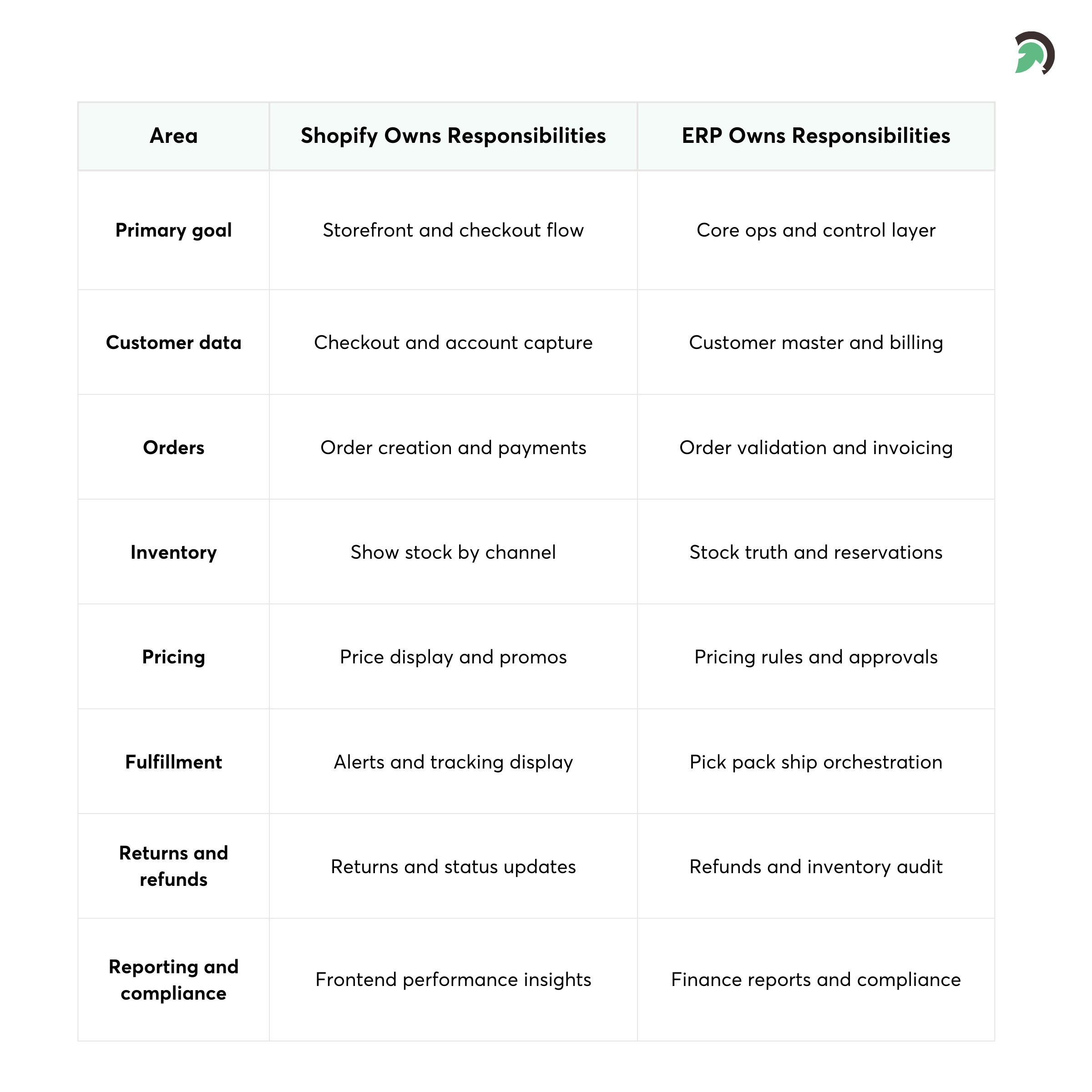
In a well-designed setup, Shopify handles the customer experience, checkout, and payments, while the ERP controls inventory, fulfillment, pricing rules, and financial records. Integration acts as the bridge between the two, automatically moving data in the right direction at the right time.
Without this integration, teams are left to export manually, use spreadsheets, or other isolated tools. At scale, this creates issues with fulfillment, inventory, pricing, and reporting. This blueprint is concerned with how to get this bridge right, with proper ownership, proper data flow, and proper resilience from the outset.
Who Is This ERP + Shopify Integration Blueprint For?
This blueprint targets organizations that have moved past basic ecommerce maturity and now operate at scale.
It is especially relevant for:
- Ecommerce leaders responsible for revenue growth and customer experience
- Operations teams managing inventory, fulfillment, and logistics
- Finance teams that need clean, auditable order and pricing data
- IT and engineering teams responsible for system integrations and reliability
The scope of this blueprint includes:
- Order synchronization between Shopify and ERP
- Inventory synchronization across warehouses and locations
- Pricing synchronization for B2C and B2B models
What this blueprint intentionally does not cover in depth:
- Full ERP migration projects
- Replacing or redesigning WMS or POS systems
- CRM or marketing automation integrations
The goal is clarity and depth where it matters most, not architectural sprawl.
What Assumptions and Definitions Should Be Clear Before You Start?
Most integration projects struggle not because of technical limitations, but because teams never align on fundamental assumptions.
Before designing a single API call, these questions must be answered clearly.
What Does “Source of Truth” Mean in a Real Integration?
A source of truth is the system that owns and governs a specific type of data.
For example:
- Inventory quantities should be mastered in the ERP
- Pricing rules and approvals should live in the ERP
- Cart creation and checkout logic should belong to Shopify
Problems arise when two systems believe they are authoritative over the same data. Without strict source-of-truth rules, data conflicts become unavoidable and difficult to debug.
How Should Core Commerce Entities Be Defined?
Teams must also agree on shared definitions, such as:
- What constitutes a SKU versus a product variant
- How warehouses differ from Shopify locations
- How reserved stock is treated versus available stock
- How promotions differ from base pricing
Even small inconsistencies in these definitions can cascade into large operational failures at scale.
What Is an ERP + Shopify Integration Blueprint?
An ERP + Shopify integration blueprint is a documented architectural plan that defines how data flows between systems, how decisions are enforced, and how failures are handled within scalable ecommerce development environments. It is not simply a list of APIs or a connector.
A proper blueprint includes:
- Clear ownership of each data domain
- Direction and frequency of data movement
- Field-level data mappings
- Error handling and retry strategies
- Monitoring and reconciliation processes
Without a blueprint, integrations tend to grow organically through quick fixes and exceptions. Over time, this leads to brittle systems that are expensive to maintain and risky to change.
A blueprint creates discipline and predictability.
Why Does ERP–Shopify Integration Matter from a Business Perspective?
The business impact of poor integration is often underestimated until it shows up in revenue and customer experience metrics.
Manual order processing increases fulfillment delays and human error. Inventory inaccuracies lead directly to overselling, stockouts, and customer dissatisfaction. Pricing inconsistencies erode trust and complicate financial reporting.
From a strategic standpoint, strong integration enables:
- Faster order fulfillment and reduced handling costs
- Higher inventory accuracy across channels
- Cleaner financial close cycles
- Easier expansion into new regions, currencies, and channels
In other words, integration is not just an IT concern. It is a foundational enabler of scale.
Quick stat:
IBM (2025) reports that 43% of COOs cite data quality issues as their most significant data priority, which is exactly what weak ERP–Shopify integrations create at scale: inconsistent, unreliable operational data.
What Role Do Shopify and ERP Systems Play in a Modern Commerce Stack?
Shopify and ERP systems are designed for very different purposes.
Shopify excels at:
- Customer experience and storefront performance
- Checkout, payments, and promotions
- Rapid experimentation and merchandising
ERP systems excel at:
- Inventory control and supply chain planning
- Order fulfillment and invoicing
- Pricing governance and margin protection
- Financial accounting and compliance
Problems occur when teams try to force one system to behave like the other. Integration allows each system to remain focused on its strengths while staying synchronized.

What Are the Core Data Flows in an ERP + Shopify Integration?
At the heart of the blueprint are three data flows that must work flawlessly.
How Should Order Synchronization Work?
Shopify order sync with ERP typically flows from Shopify to the ERP.
When an order is placed in Shopify, the ERP needs:
- Customer details
- Line items and quantities
- Taxes, discounts, and shipping charges
- Payment status and method
Once received, the ERP takes ownership of:
- Order validation
- Fulfillment orchestration
- Invoicing and accounting entries
In many setups, bidirectional Shopify ERP sync allows order status updates to flow back to Shopify to keep customers informed. This closed loop ensures transparency without duplicating logic.
How Should Inventory Synchronization Be Designed?
In Shopify inventory sync with ERP, inventory is almost always mastered in the ERP.
The ERP manages:
- Stock across multiple warehouses
- Reserved and committed inventory
- Procurement and replenishment logic
Shopify consumes inventory data to:
- Display accurate availability
- Allocate orders to locations
- Prevent overselling during peak demand
Inventory syncs must be reliable and timely, especially during promotions or flash sales.
Quick Stat:
An ECR Retail Loss study working with 7 European retailers found that about 60% of inventory records were wrong, and that correcting inventory record inaccuracies increased sales by roughly 4% to 8%.
How Should Pricing Synchronization Be Handled?
Shopify pricing sync with ERP is one of the most sensitive aspects of integration.
ERPs typically manage:
- Base pricing
- Customer-specific price lists
- Volume discounts and contract pricing
- Currency conversions
Shopify reflects these prices at the storefront level but should not override ERP-approved pricing without governance. This is especially critical for B2B and multi-region setups.
What Integration Architecture Options Are Available?
There is no universal architecture that fits every business. The blueprint should evaluate options based on complexity, scale, and future growth.
When Do Direct API Integrations Make Sense?
Direct API integrations connect Shopify directly to ERP APIs.
They can work well for:
- Simple catalogs
- Low order volumes
- Single-store environments
However, as business rules grow, direct integrations become harder to maintain and debug.
When Should Middleware or iPaaS Be Used?
Middleware introduces a dedicated integration layer between systems.
This approach offers:
- Centralized error handling
- Better scalability
- Reusable logic across systems
- Improved monitoring and observability
For NetSuite, SAP, and complex Odoo environments, middleware is often the most sustainable choice.
Should Syncs Be Real-Time or Batch-Based?
Real-time ERP sync for Shopify is ideal for:
- Orders
- Inventory changes during high-volume periods
Batch syncs work well for:
- Pricing updates
- Catalog changes
Most mature architectures use a hybrid approach.
How Should Data Mapping and a Canonical Model Be Designed?
Data mapping is where integration projects either succeed or fail.
A canonical model acts as a neutral data structure that all systems map to. This abstraction allows the same logic to support NetSuite, SAP, and Odoo with minimal ERP-specific changes.
Key mappings include:
- Order headers, line items, taxes, discounts, and shipping
- Inventory quantities by SKU and location
- Pricing by customer segment, currency, and tier
Investing time in a clean canonical model dramatically reduces long-term maintenance costs.
How Do You Define a Reliable Sync Strategy?
A sync strategy answers operational questions before they become incidents.
For each data flow, the blueprint must define:
- What triggers the sync
- Which system initiates it
- How the system prevents duplicates
- How the system resolves conflicts
Examples include:
- Orders triggered via Shopify webhooks with idempotency keys
- Inventory updates triggered by ERP events or scheduled jobs
- Pricing updates handled through controlled batch processes
Explicit rules prevent ambiguity and simplify troubleshooting.
What Makes a Technical Implementation Truly Robust?
Robust implementations are designed with failure in mind, and the right Shopify development services ensure the integration is resilient in production.
A strong implementation includes:
- Event-driven workflows
- Queue-based processing
- Retry and backoff mechanisms
- Dead-letter queues for failed messages
- Reconciliation jobs that compare systems regularly
Instead of assuming systems will always be available, resilient architectures assume failure and recover gracefully.
What Should a Free Implementation Checklist or Architecture Template Include?
A gated asset should provide immediate, tangible value. It should help the reader quickly validate whether they are architecting the integration correctly, and give them a practical starting point they can hand to IT or an integration partner.
An effective checklist or template should cover:
- Source-of-truth validation across orders, inventory, pricing, and product data
- Required API scopes and permissions for Shopify and the ERP to avoid access gaps later
- Data mapping requirements for the three core flows (orders, inventory, pricing), including key edge fields like taxes, discounts, locations, and price lists
- Error handling scenarios such as retries, deduplication, failed sync queues, and reconciliation rules
- Testing and validation steps that include real-world cases like refunds, cancellations, partial fulfillments, and multi-location inventory
- Go-live readiness criteria, including monitoring, alerting, rollback planning, and post-launch verification
This positions your organization as a strategic partner rather than just a vendor, because it shows you understand both the technical and operational realities of ERP–Shopify integration.
What Are the Most Common ERP–Shopify Integration Pitfalls?
Even experienced teams run into predictable challenges when integrating Shopify with an ERP. Most issues are not caused by the APIs themselves, but by gaps in data definitions, edge-case handling, and operational visibility.
Common pitfalls include:
- SKU mismatches across systems: product identifiers, variant logic, or naming conventions differ between Shopify and the ERP, which leads to failed order imports or incorrect inventory updates.
- Ignoring refunds, exchanges, and partial fulfillments: the integration works for “happy path” orders but breaks when real-world scenarios appear, causing finance and customer support issues.
- Treating inventory as a single global number: not accounting for multi-location stock, reserved inventory, safety stock, or warehouse allocation leads to overselling and inaccurate availability.
- Underestimating API rate limits and performance constraints: high-volume periods expose limits on API calls, batching needs, and processing speed, resulting in sync delays and backlogs.
- Lack of monitoring and alerting: failures go unnoticed until customers complain or operations discover missing orders, because there is no visibility into sync health, error rates, or reconciliation gaps.
A strong blueprint helps teams anticipate these risks early by defining clear source-of-truth rules, mapping details, edge-case workflows, and reliability practices before the integration reaches production.


What Does a Real-World ERP + Shopify Integration Look Like?
In a live environment, Shopify captures the customer order, and the ERP runs operations by validating the order, reserving inventory, and recording financials. Integration then syncs updates reliably between both systems, so every team works from the same data without manual effort.
In a live environment, successful integration means that there are tangible benefits. These include:
- Teams process orders faster because Shopify posts them to the ERP automatically, so they can automate Shopify fulfillment with ERP without manual import or re-entry
- Teams improve inventory accuracy by syncing stock by location and updating it consistently, which reduces overselling and stockouts.
- Teams reduce manual effort by handling common exceptions through defined workflows, retries, and reconciliation jobs.
- Financial close cycles are faster because finance gets clean order, tax, discount, and refund information in the ERP system with fewer corrections
Why Is a Checklist Summary Critical Before You Scale?
Before scaling further, teams should confirm:
- Source-of-truth rules are enforced
- Monitoring is live
- Error recovery has been tested
- Edge cases are handled
- Documentation exists
A checklist summary reinforces discipline and readiness.
What Should You Know About NetSuite, SAP, and Odoo Specifically?
Each ERP introduces unique considerations.
What Makes Shopify NetSuite integration Unique?
- Strong financial workflows
- API limits requiring batching
- Native connectors that still need customization
What Makes Shopify SAP integration More Complex?
- Multiple SAP variants
- Heavy middleware dependency
- Strong governance and compliance requirements
Why Is Shopify Odoo integration More Flexible?
- Open-source extensibility
- Modular architecture
- Greater customization responsibility
A good blueprint accounts for these differences without fragmenting the architecture.
Bottom Line
Shopify ERP integration succeeds when ownership, mapping, and reliability are defined from day one. If you take only one thing from this blueprint, let it be this: define your source of truth, design the three core sync flows deliberately, and plan for real-world exceptions before you go live.
When planning a new integration or fixing an existing one, start with a structured assessment and use disciplined Shopify development services to move faster. Validate workflows, document mappings, cover edge cases (refunds, partial fulfillments, multi-location inventory, B2B pricing), and align on an architecture that can scale without constant firefighting.
If you want a second set of eyes on your setup, EvinceDev helps Shopify brands integrate with ERPs like NetSuite, SAP, and Odoo through reliable, scalable ecommerce development solutions. Our team supports the full lifecycle, from integration blueprinting and data mapping to implementation, monitoring, and ongoing optimization, so your orders, inventory, and pricing stay accurate as you grow.
Whether you need a quick audit, a full integration build, or improvements to an existing connector, the right next step is simple: turn this blueprint into an actionable plan and execute it with discipline.