

Key Takeaways:
- Behavioral Note Templates: Built-in session and progress note templates that match real behavioral documentation workflows.
- Compliance by Design: HIPAA-aligned security with encryption, RBAC, and audit trails for sensitive mental health data.
- Telehealth That Works: Reliable video, secure messaging, and a smooth session-to-documentation workflow for remote care.
- Billing Connected to Notes: Coding support and claims tools that link clinical documentation to CPT/ICD and reduce rework.
- Patient Portal for Engagement: Self-service scheduling, secure communication, and tools that support engagement and measurement.
- Interoperability & Integrations: API, FHIR/HL7, and system integrations that prevent data silos and cut manual entry.
- Scalability for Growth: Custom workflows, multi-location support, and scalable infrastructure as your practice expands.
- AI With Clinician Control: Advanced automation that saves time while keeping clinicians in review for accuracy and quality.
If you’re shopping for Behavioral Health EHR software, you’re probably not just looking for “a place to save notes.” You’re trying to protect clinical quality, meet compliance expectations, and keep your day-to-day workflows from turning into an administrative maze. That’s why choosing the right Behavioral Health EHR software features matters so much. Modern behavioral healthcare software development plays a key role in building scalable, compliant, and efficient EHR systems tailored for mental health workflows.
Behavioral healthcare teams often have needs that general medical EHRs don’t fully cover, think therapy documentation styles, outcome tracking, structured/unstructured clinical notes, and the operational rhythms of sessions rather than quick primary-care visits. The right system can improve patient care, reduce risk, and help your organization run more smoothly.
In this guide, we’ll walk through the core features to evaluate so you can compare platforms with confidence and pick the one that actually fits your clinicians, workflows, and growth plans.
What is Behavioral Health EHR Software?
An Electronic Health Record (EHR) is the digital system used to document and manage patient health information. In behavioral health, that includes clinical notes, treatment plans, progress updates, scheduling, billing, and the compliance/security controls required to handle sensitive data.
Behavioral health EHR software is built to support mental health workflows, especially those used by therapists, psychologists, and psychiatrists, in which clinical documentation, longitudinal progress, and care coordination often differ from those in general healthcare.
Key users
- Therapists and psychologists who document sessions, maintain progress notes, and track treatment goals over time.
- Psychiatrists who manage medication workflows, psychiatric evaluations, and follow-up documentation.
- Clinics and hospitals that need multi-user coordination, reporting, billing operations, and audit-ready records.
At its best, behavioral health EHR software doesn’t just “store data.” It supports the full clinical and administrative lifecycle from the moment a session is scheduled to the point where care outcomes and billing align.
Why Feature Selection Matters in Behavioral Health EHR
It’s tempting to compare EHRs on cost or brand recognition. But for behavioral health practices, features determine your real-world experience, what clinicians can document quickly, what operations can automate reliably, and how well you can stay compliant as you scale. A strong foundation in behavioral healthcare software development helps ensure that your EHR adapts to evolving clinical, operational, and compliance requirements.
What you gain when features fit
- Better patient outcomes: Documentation and treatment-planning workflows influence the consistency and continuity of care.
- Compliance confidence: Security controls, audit trails, and proper workflows reduce risk.
- More efficient days: Scheduling, documentation shortcuts, and automation reduce admin load.
- Scalability: Practices grow—new clinicians, locations, service lines—and the EHR must keep up.
- Integration with the broader ecosystem: Interoperability prevents your team from duplicating work across tools.
Core Features to Look for in Behavioral Health EHR Software
1. Comprehensive Patient Records Management
- Centralized patient profiles: Start with how the system organizes patient information. You want a single, intuitive profile that’s easy to navigate during sessions, not a maze of tabs and partial records.
- Therapy notes and session history: Behavioral healthcare depends on longitudinal context. Look for a way to capture therapy sessions clearly and retrieve relevant history quickly.
- Treatment plans and progress tracking: Effective EHRs make it easier to create, update, and review treatment goals over time. This is where outcome tracking becomes practical, not theoretical.
- Support for structured and unstructured data: Clinicians use both formats: structured fields for consistency and unstructured narrative for nuance. Ideally, the platform supports both, so your documentation can be complete without becoming rigid.
2. Behavioral Health-Specific Clinical Documentation
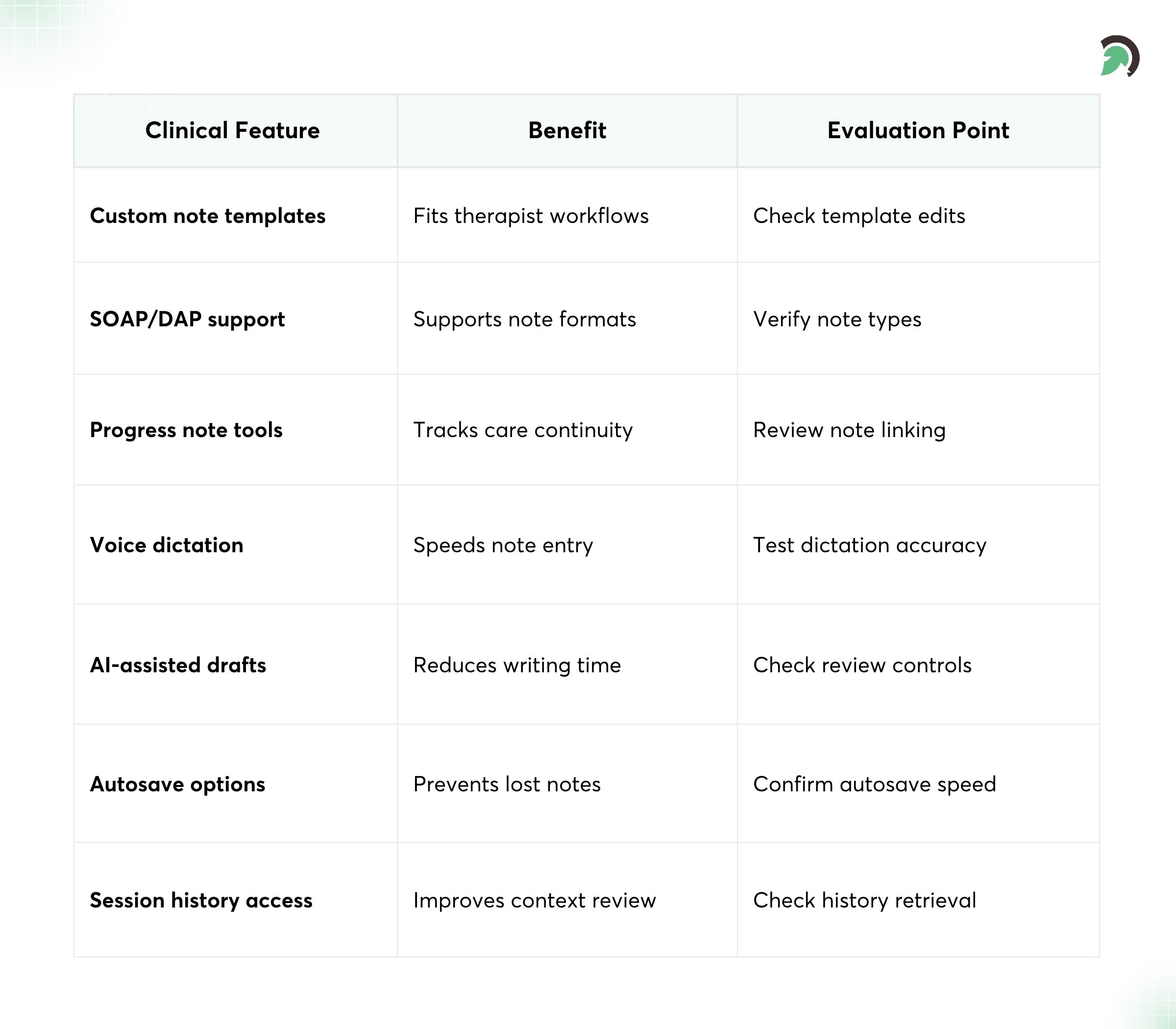
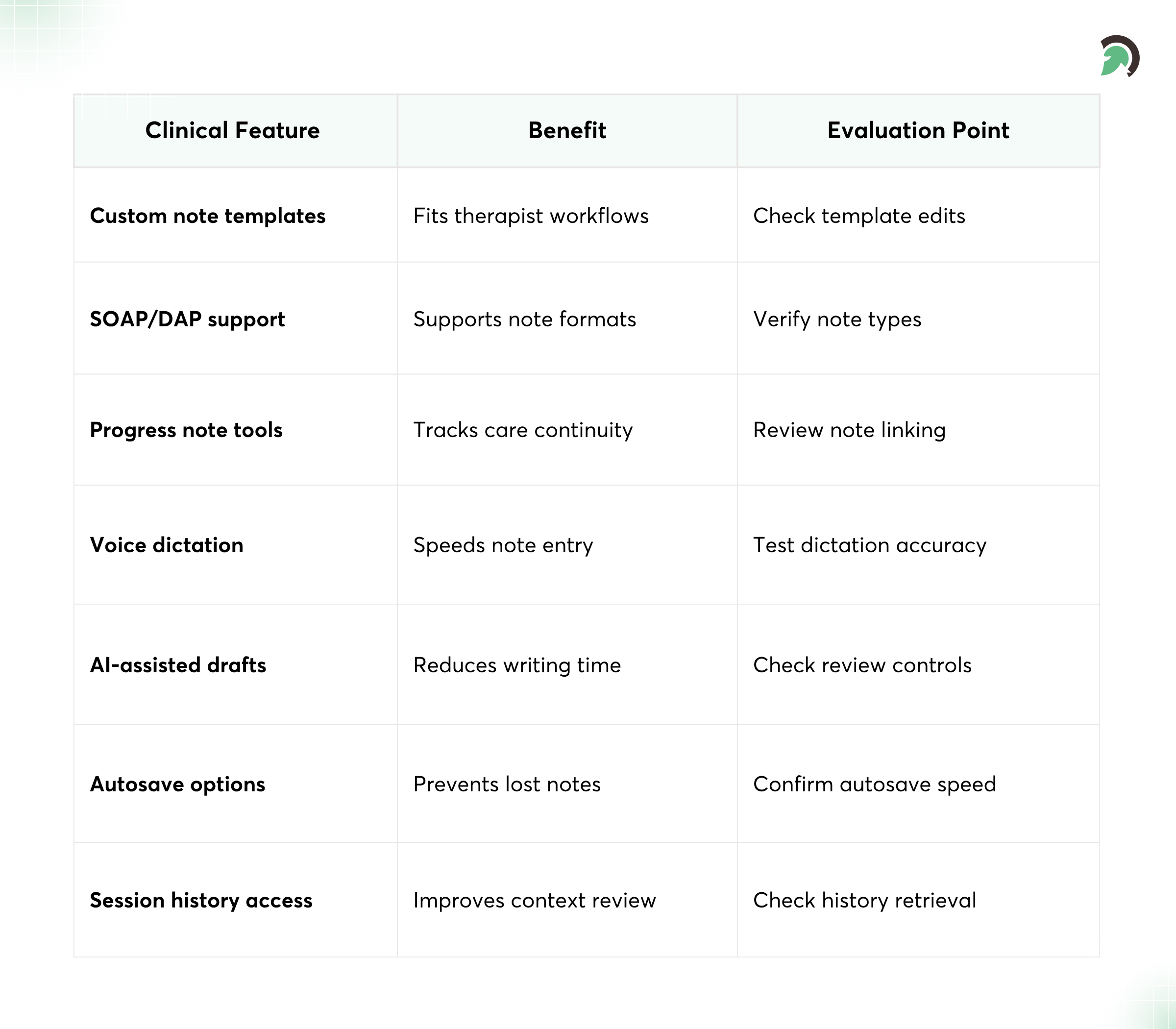
Customizable templates for therapy sessions
Generic templates often fail behavioral health teams. You want configurable templates that mirror how clinicians actually document therapy.
SOAP notes, DAP notes, and progress notes
Different providers use different note styles. Look for flexibility so you can support:
- SOAP documentation where needed
- DAP documentation workflows
- Progress notes aligned to treatment goals and continuity
Easy documentation workflows for clinicians
Speed matters. If documentation takes too long, clinicians either rush quality or document later under pressure. A good system reduces friction with smart defaults, autosave, quick actions, and minimal clicks.
Voice-to-text or AI-assisted documentation
Many behavioral health teams benefit from voice dictation or AI-assisted drafting. The key is to evaluate accuracy, review controls, and how the tool fits into your clinical workflow, not just whether it “sounds good.”
Well-designed documentation workflows are often the result of thoughtful behavioral healthcare software development, focused on reducing clinician burden and improving accuracy.
3. Appointment Scheduling and Calendar Management
-
Automated scheduling system
Scheduling should be more than a calendar grid. The EHR should support how sessions actually work, availability rules, clinician assignment, intake timing, and session types.
-
Recurring session management
Recurring appointments are common in therapy. The best platforms handle recurring sessions cleanly, including adjustments without creating chaos in the schedule.
-
Calendar integration
Check how calendars sync with existing tools. If your team uses Google Workspace, Outlook, or a dedicated practice scheduling workflow, integration reduces manual overhead.
-
Appointment reminders and notifications
No-shows are expensive and disruptive. Look for automated reminders via email/SMS/portal notifications and the ability to configure timing and content.

4. Telehealth Integration
-
Video and audio consultation capabilities
Telehealth isn’t optional anymore for many practices. Your EHR should support secure video/audio sessions or integrate seamlessly with telehealth platforms.
-
Secure messaging between patients and providers
Messaging is a major part of patient engagement in behavioral health, especially for follow-ups and questions between sessions. Ensure the messaging is secure and aligned with policy workflows.
-
Remote therapy session support
For remote care, documentation, session timing, and patient records must stay synchronized. You don’t want clinicians guessing where the record “lives” after the session ends.
-
Integration with tele-behavioral health platforms
Ask whether telehealth integration is native or bolted on, and how it handles session notes, consent, and audit trails.
Modern behavioral healthcare software increasingly includes telehealth capabilities to support remote therapy and continuous patient engagement.
5. Billing and Insurance Management
Automated billing and invoicing
Billing should be connected to clinical documentation. When scheduling and session billing match, you reduce errors and shorten the time from care delivery to reimbursement.
Insurance claim processing
Look for claim workflow support that helps your billing team submit properly and track status. Even if you outsource billing, the EHR should provide the right data.
Coding support (CPT, ICD codes)
Coding is a critical compliance and revenue function. Evaluate:
- Code search and selection ease
- Documentation-to-coding alignment
- Support for updates and multiple coding needs
Payment tracking and reconciliation
Billing isn’t just submitting claims—it’s collecting payments, reconciling, and managing denials. You want clear dashboards and audit-friendly history.
6. Compliance and Security Features
-
HIPAA-compliant data handling
If you handle PHI (and most behavioral health providers do), you need HIPAA-aligned security and operational policies. Ask vendors what their compliance approach looks like in practice.
-
Data encryption (at rest and in transit)
Encryption is foundational. You should also confirm secure access pathways and data movement protection mechanisms.
-
Role-based access control (RBAC)
RBAC helps ensure that clinicians, billing staff, and administrators only see what they need. This protects patients and reduces the chance of accidental data exposure.
-
Audit trails and activity logs
Audit trails matter, especially when documentation is scrutinized. Look for activity logs that track access, changes, and user actions in a way you can defend when needed.
7. Patient Portal and Engagement Tools
-
Patient access to records and treatment plans
A patient portal can reduce confusion and increase adherence. When patients can review relevant information (with appropriate permissions), it supports continuity between sessions.
-
Secure messaging and communication
Communication features should be secure, structured, and easy for patients to use. For behavioral health, messaging can reduce delays in care and improve follow-up consistency.
-
Appointment booking and management
Self-scheduling can be a huge operational win if your practice can manage the workflow (intake eligibility, provider selection, session type). Make sure the EHR supports patient-friendly booking.
-
Self-assessment tools and feedback
Many practices use questionnaires or self-assessments for baseline and ongoing progress. Even lightweight tools can support structured check-ins that complement therapist documentation.
8. Reporting and Analytics
-
Clinical and operational reporting
Reporting is where your EHR becomes smarter than a filing cabinet. You should be able to generate reports for clinical oversight and operational leadership.
-
Patient outcome tracking
Outcome tracking helps you evaluate care effectiveness, monitor trends, and support quality improvement. When possible, look for metrics that tie back to treatment plans.
-
Financial and billing reports
Practice owners and operations teams need visibility into revenue cycle performance—denials, claim status, outstanding balances, and payment turnaround.
-
Data-driven insights for decision-making
The best EHRs make it easier to spot patterns: appointment utilization, clinician productivity trends, patient engagement metrics, and documentation consistency.
9. Interoperability and Integrations
-
Integration with other healthcare systems (EHR/EMR)
Interoperability prevents “data lock-in” and reduces manual transfer. You want the ability to exchange information with other providers and systems when care needs collaboration.
-
API support for third-party tools
APIs are your growth lever. If you plan to add specialty tools, outcome platforms, care coordination solutions, or workflow automations, API support matters.
-
Integration with labs, pharmacies, and insurance providers
While behavioral health doesn’t always depend on the same lab flows as primary care, medication management and care coordination often require integrations.
10. Customization and Scalability
-
Custom workflows and templates
Every practice runs differently. Customization should help you match real workflows, intake steps, documentation flow, forms, and clinical workflows to your clinical model.
-
Configurable user roles and permissions
As your organization grows, roles evolve. Confirm the system supports configurable permissions without forcing you into rigid structures.
-
Support for multi-location practices
If you have more than one location or plan to expand, check that patient records, scheduling, and reporting behave correctly across locations.
-
Scalable infrastructure for growth
Scalability isn’t just about “handling more users.” It includes performance, reliability, and a roadmap for future feature additions.
Flexible behavioral healthcare software allows organizations to customize workflows and scale operations without disrupting care delivery.
11. Mobile Accessibility
-
Mobile-friendly interfaces or apps
Clinicians are often on the move, between sessions, meetings, and admin tasks. Mobile access can improve responsiveness and reduce documentation delays.
-
Access to patient data on-the-go
Mobile should be secure and usable, not a risky workaround. Evaluate authentication, device management, and role permissions.
-
Remote documentation capabilities
Documentation doesn’t always happen right after every session. Mobile tools can reduce backlogs if the experience is efficient and reliable.
12. AI and Automation Features (Advanced)
-
AI-assisted clinical documentation
AI can accelerate note creation by summarizing structured inputs or assisting with draft generation. Still, you should prioritize clinician review, transparency, and accuracy controls.
-
Predictive analytics for patient outcomes
Some systems offer analytics that may help identify risk factors or engagement gaps. The value depends on whether the analytics are explainable and grounded in your clinical context.
-
Automated reminders and alerts
Look for automation that supports care continuity: reminder schedules, task triggers (like follow-ups), and alerts for workflow-critical events.
-
Intelligent workflow automation
The best automation reduces manual steps while remaining flexible enough to support clinical judgment. Ask how automations are configured and how your team can adjust them over time.
Benefits of Choosing the Right EHR Features
When you choose behavioral health EHR software with the right feature set, you’ll feel it in day-to-day practice—not just during implementation.
Common wins providers’ notice
- Improved patient care and treatment outcomes through consistent documentation and care planning.
- Increased efficiency by reducing repetitive administrative steps.
- Better compliance with security controls, audit trails, and standardized workflows.
- Enhanced patient engagement via portals, messaging, and self-assessments.
- Scalable practice management that supports growth without constant workflow retraining.
Common Mistakes to Avoid
Most EHR regrets don’t stem from a single big mistake. They come from a handful of predictable oversights. Here are the ones I’d watch for:
Choosing the wrong kind of EHR
- Choosing a generic EHR instead of a behavioral-specific one forces clinicians into awkward documentation habits.
- Overlooking integration capabilities and then spending months moving data manually.
Ignoring governance and workflow realities
- Ignoring compliance requirements (security, audit trails, access controls) until it’s too late.
- Selecting overly complex systems that slow clinicians down instead of supporting them.
- Not considering future scalability—new clinicians, new locations, new care programs.
If you want a smoother rollout, your feature evaluation should include workflow fit, not just “does it have a feature.”
How to Evaluate Behavioral Health EHR Software
Use a structured approach to compare vendors fairly and avoid being sold on promises.
1) Identify practice requirements and workflows
Start with your real workflow, not an ideal one. Map your processes: intake, assessment, therapy sessions, documentation, billing, scheduling, telehealth, and follow-up.
2) Create a feature checklist
Use the categories in this guide to build your checklist. Weight the features based on your needs—your priorities should reflect how you deliver care.
3) Compare vendors and solutions
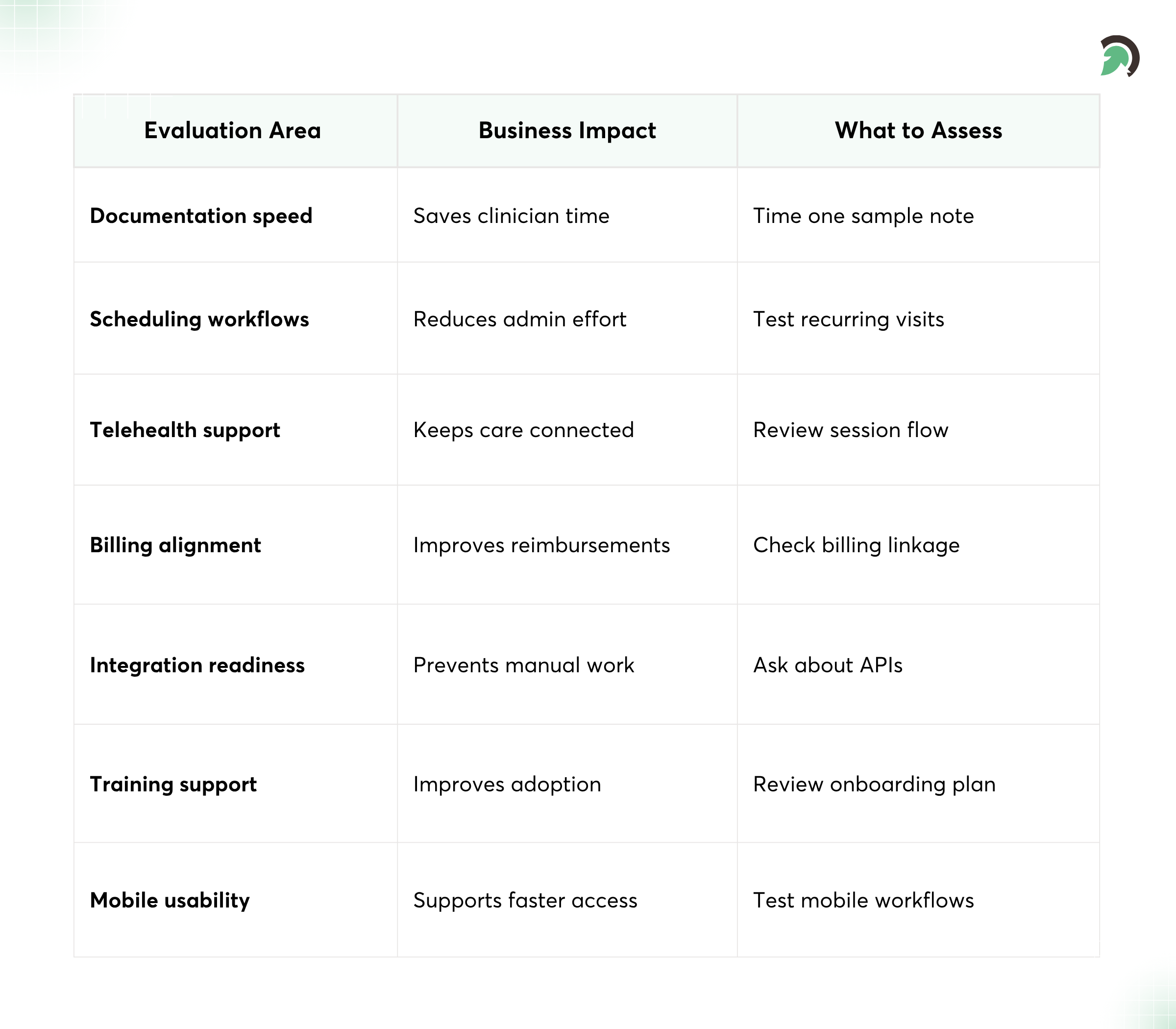
Shortlist vendors that match behavioral health workflows. Ask targeted questions around documentation speed, template flexibility, and integration readiness.
4) Request demos and trials
During demos, watch for:
- How fast a clinician can document common note types
- How scheduling handles recurring appointments
- How telehealth sessions connect to documentation
- How billing links to clinical data
5) Assess support and training options
Great software can still fail with weak onboarding. Confirm what training looks like, how implementation support works, and how ongoing support is delivered.
Future Trends in Behavioral Health EHR Systems
Behavioral health EHR software is evolving quickly. Here are trends to keep on your radar as you evaluate future-proof options.
- AI-driven clinical insights: More systems are using AI to assist with documentation, identify risk, and improve care coordination, always with the expectation that clinicians review and validate outputs.
- Integration with wearable devices: Wearables may support more continuous monitoring for some patient populations. Integration capabilities will determine whether this is possible in your workflows.
- Expansion of telehealth capabilities: Telehealth workflows will likely become more integrated and seamless, with better documentation flows and improved patient communication.
- Cloud-based EHR adoption: Cloud deployments can support remote access, easier updates, and multi-location operations, assuming security and performance meet your needs.
- Enhanced interoperability across systems: As standards improve, practices that prioritize interoperability will spend less time on data export and import and more time delivering care.
Conclusion
The best behavioral health EHR software isn’t the one with the biggest feature list; it’s the one that supports the way therapy is delivered, documented, billed, and followed up. When you prioritize behavioral health-specific documentation, strong security, telehealth integration, and interoperability, you reduce friction for clinicians and improve consistency for patients. Those choices also make compliance easier to manage and reporting more meaningful as your practice grows.
If you want a smoother selection process, explore solutions with your workflow checklist in hand, then validate the experience in real demos and trials. Teams that approach this strategically often end up happier with both care delivery and operational outcomes, whether you’re evaluating a new system or refining what you already use. Working with an experienced behavioral healthcare software development company like EvinceDev can help turn your requirements into scalable, compliant, and user-friendly solutions built for long-term success.